Storage Issue
Answered


-

Hi Jordan IUNCKER,
Please check THIS support article that covers the notification you see.
0 -
Hi Norman
But is not a solution.. I don't really understand what is the problem...
Lot of my customers have this error notification.......0 -
Logfile : https://we.tl/t-d7Sxgrte8F
 0
0 -
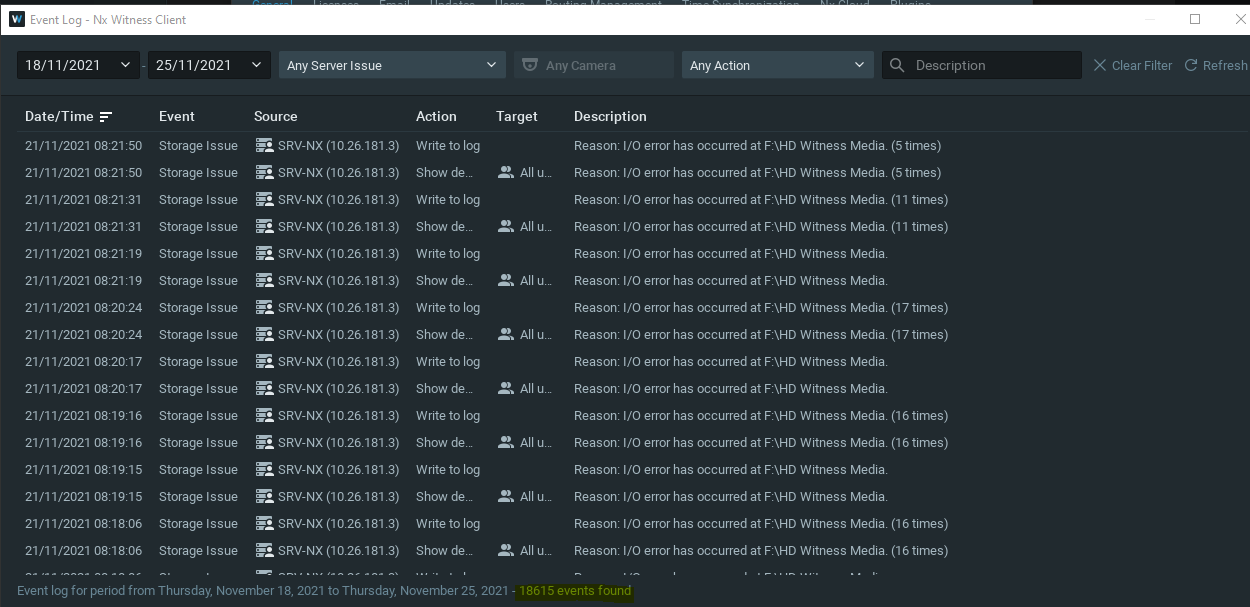
One others customers, same issues :
 0
0 -
Hi Jordan IUNCKER,
You're right, it isn't a solution, the support article explains what most likely happens, so you know what to investigate. From the VMS side, it is just a notification, not an error on the VMS side.
I haven't got sufficient information to point you in a better direction.
Since you show drive F:\ I assume multiple drives are available for storage (D:\, E:\ and F:\) it just might be that the F:\ drive is A) defect, B) has bad blocks, C) has insufficient specs to handle the load.
0 -
Hi Norman
I think we have this problem everywhere I use NAS RAID5.
When you do RAID, you allocate all available space for the storage group.
Then I make an ISCSI target to show the drive on the server.
So the storage group appears full on the NAS, but the space is totally available inside.
I think NX is getting the wrong information probably.
There is also an abnormal usage I think via the internal monitoring of the VMS. Sometimes in the internal monitoring, the disk usage goes from 5/10% to 100% all of a sudden and I think that's when NX sends a notification.I don't really understand the problem, did you examine the log file?
0 -
Hi Jordan IUNCKER,
I haven't checked the log files, but now you provided more information about using RAID it makes sense.
There won't be different information than it shows in the screenshots, which very generic since the issue exists in the storage and not in the Nx Witness software. The logs mainly contains entries related to our Mediaserver Application.Please check THIS support article to learn how Nx Witness manages storage. As you can see, Nx Witness automatically divides the load for each disk. When you create a RAID, you create multiple disks to be recognized as one disk, as a result the load can't be divided anymore and, due to the nature of RAID, it writes all data to a single disk and most likely this single disk isn't capable of handling the incoming data fast enough and the notifications appear as you shared.
So, you should create more capacity by offering more disks to write to at the same moment.
Also, since RAID is commonly used for redundancy of data, you also could consider stop using RAID, and start using our back-up function in the server settings. Of course a combination of RAID and our back-up feature is possible as well, as long as the RAID configuration has sufficient resources to manage the incoming load.
Please keep THIS support article in mind. The more information you provide, the better we can understand your situation and point you in the right direction.
0 -
Hi Norman
Thanks for your feedback.
What the better solution so ?
RAID5 ? RAID10 ? Others ?0 -
There is no such thing as better in this case.
The thing to consider in the design is the capacity of the RAID, since Nx was designed to divide the load over all disks, which cannot be done with a single RAID with multiple disks.
To be honest, for redundancy, I would use the Nx Witness real-time backup feature and if you really want to have maximum redundancy you can set up a backup to another storage location, with or without RAID configuration.
0 -
Hi Norman
Can you ask any developer to come check system please ?
I have lot of error.
I don't know what happen with my system.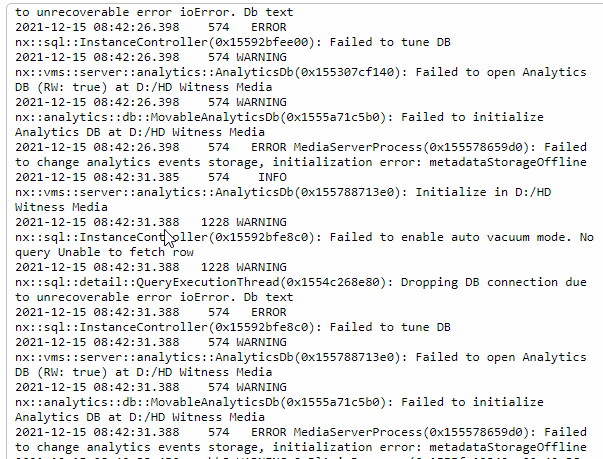
Please we need help quickly from Nx Support.
It's a big city and one of biggest customers.0 -
Hi Jordan IUNCKER,
I'm more than happy to look into your system, but in general, this should be resolved from the storage side. The only thing Nx Witness does, it notifying you. It is rarely an error on the Nx side.
So, please let me know if it is possible to provide a remote connection via TeamViewer, so we can check the client, server, and storage. If that is possible, I'll convert this topic into a support ticket, so you can share the login credentials confidently.
0 -
Hi Norman
I'm so happy to hear anything from you.
We need really help.Yes you can, I can send you Teamviewer/Anydesk credentials right now.
Regards
0 -

- Authorized Reseller
Hi Jordan,
This article might explain some of your issues...
https://support.nfs.co.nz/menu/nxwitness/raid-in-video-surveillanceHope it helps understand possible RAID issue.
0 -
Your url is unavailable.. please check it and send me it again
Regards
0 -
It's available here.
0
Please sign in to leave a comment.
Comments
15 comments