Resources Tree - Need more levels/branches
Completed
Resources tree needs more levels to drill down to. A single level is very restrictive for very large sites. I have a 1700 camera project coming up . The project has 3 building, about 17 floors and each floor has sections and the customer wants easier navigation for camera selection
-

Hi Norman, Aleksandr
The reasons are as follows:
1. The customers does not want the operators / users to know which server records which cameras due to security reasons (sabotage). We have had customers' operators switching a server off (by unplugging the power) to enable their friends to start stealing in casino's. Failover recording took over the recording of the cameras, however the damage caused to the server hard drives were costly. Now if this person knows where the cameras failed over, they can simply unplug the power to that system as well.
2. The servers in the tree makes it hard to find cameras. The camera is more important than where the camera records. In vast mining applications (Radius up to 20km), there may be various locations connected to distributed server rooms with associated cameras. Considering a mining application, there are not always easy ways to pull in fiber optic cables all over due to active mining. Consider this: North shaft is 15 km from South Shaft. There is a wireless link between sites and constant streaming the camera across this link is not reliable enough for recording, but when viewing a camera, missing packets is not a huge problem. Previously the customer could name their cameras to find them easily in a sequential camera tree without confusing servers in the way. Say entrance at North shaft is camera 1, and entrance at South Shaft is camera 2. These are then sequentially numbered and the customer can easily find these 2 related cameras, even when their location and server is far apart. With the servers in the tree, the customer now has to expand the tree for the server at North shaft, select his camera, and then search for the server at south shaft, expand the tree and select the camera he needs. This is a bit too much to find cameras.
3. In our market, professional IP/VMS system users believe strongly in "MAX NO OF MOUSE CLICKS". The max number of mouse clicks to find what you are looking for when operating the client software should not exceed 3 mouse clicks. With the servers visible in the tree, the max number of clicks are increased which closes our sales capability against major VMS providers in Africa. Before this update, we managed to meet this requirement. With the update to version 4.1, we are no longer able to meet that requirement which closes about 60% of our sales pipe.
0 -

Riaan, thank you for the detailed reply.
Second and third issues will be addressed in the nearest releases.
- Collapsed / expanded state if the nodes in the resource tree will be saved locally, so if users once have expanded the servers or folders – they will be kept expanded, and won't require extra clicks to open.
- It will be possible to switch between 2 views of the resource tree – with servers and without.
However, the first issue still remains. It should be easy to restrict non-admin users to the view without the servers, as it was before 4.1, and the existence of folders should solve lack of grouping / hierarchy problem, which caused us to enable displaying of servers for regular users at the first place.
I will discuss it internally and get back to you as soon as I have any answers.
0 -

Hey Riaan -
Which would you prefer - fixed behavior (e.g. Servers shown, not shown based on role) or the ability to create custom Resource views for individual users?
0 -
Sorry - I know the question wasn't directed at me but can I add a +1 for custom resource views?
I completely agree with Riaan and even from the interactive demos something to highlight here is that it's key to be able to group cameras that are spread across multiple servers. As per Riaan's example - if I have numerous cameras from the same area spread across multiple servers, I need to be able to group them so users aren't required to browse multiple servers for this.
From the interactive demo Aleksandr posted I noticed that this was still only providing the ability to create folders within a server rather than across the system (previously didn't notice this). Only administrators and technicians need to see the servers so using these as the basis for operator views/folders just makes the system more complicated to operate.
I don't think it would be necessary to create custom resource views for each operator individually but rather create one custom resource view with folders/sub-folders for all of the cameras (regardless of server) and then assign permissions to folders/cameras for each user role.
1 -
Hi Tony, Aleksandr
Thanks for everything. I feel I know Tony since I am always on your Youtube channel ;-)
Cameras should ideally be grouped in any order regardless of which server it is actually recording on. For instance, in a casino, you have slots, tables, back of house, count-rooms, cash desks, restaurants, bars, arenas, parking, entrances, hotel and these cameras can amount to hundreds of cameras and can be on different servers. For ease of use one should be able to group these areas into camera groups regardless of which server the camera is recorded on. In failover, these groups should be maintained. If admin logs in, he/she can move cameras from one server to another, but the operators/users should not even know that these cameras are now recording on another Server. The above also assists in storage management and calculations since the gambling law depicts how long each camera must record for. Allocating space to a server is then simplified because one can slot a low activity camera on a server with space, without worrying about the camera sequence and grouping.
I agree with Joel that each operator does not need its own custom tree but restrictions to certain cameras should remain as at times, even the control room operators can be under investigation either covertly or not.
I believe the same would apply to smart city surveillance. We are working on a smart city proposal which covers several cities and we are working with Briefcam on this as integrated partners. The city of Ekurhuleni's intention is to install approx. 2000 cameras in the greater Benoni and Kempton Park areas in South Africa. Camera Grouping will be key since they are looking at deploying this solution completely de-centralized meaning there will be 100's of servers per area. If we consider a medium size suburb, we might have 10 servers and we will need to group cameras according to the customer spec: ANPR cameras, Intersection cameras, by street, by suburb.....
Hope this makes sense??? Keep up the good work.
1 -
One final note:
I do not think it would be necessary to have 1 camera in 2 groups (a camera associated with 2 groups of cameras???), unless others may think that is a requirement.
0 -

Hi Riaan Kruger and @...,
Thank you for your feedback. This is highly appreciated.
There are some reasons to add 1 camera in multiple groups, for instance a camera could be in a group that holds all cameras in a certain room or area, but also in the group of cameras that covers all emergency exits.
0 -

Hi Riaan Kruger
After internal discussion we decided to add a system-wide setting that will restrict non-admin users to the view without the servers. We’ll do our best to release it together with grouping feature in 4.3.
2 -
Hi Veronika
Thank you for the info above.
I regret to inform you that yet another customer (British American Tabaco East Africa) has now complained about the server visibility and lack of camera Chronical order which also resulted in downgrading to the previous version. Total 3 customers now.We look forward to receiving 4.3 in order to evaluate if our customers would accept that.
Kind regards
Riaan
0 -
Do we have any updates on this topic?
0 -
Hello @...
We already have this functionality implemented, so it will be available in an upcoming release.
0 -
Hi All
Our customers are asking again regarding this topic.
From the above we can see it is already implemented but not yet released. When can we expect the release to come out ?
Your kind update would be appreciated.
Regards
Riaan
0 -
Hi Riaan Kruger,
Estimate for the release of the next version, 5.0, is Q2-2022, but based on experience delays might occur.
0 -

- Authorized Reseller
Hi Norman,
We are now testing 5.0 beta and we don't see any improvement in this case. Please let us know, what is the progress ?
0 -
Hi Tomasz Polus
I haven't seen it myself yet in the final beta, since I'm on a holiday at the moment, but in the release notes the following is mentioned:
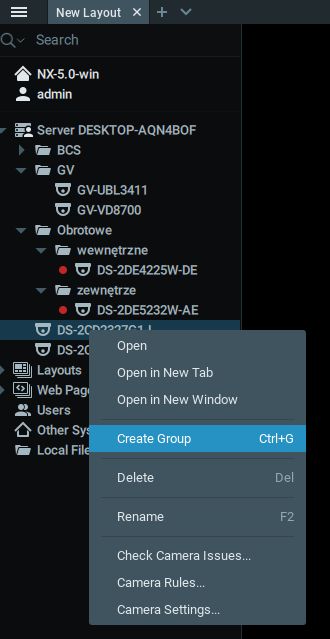
"Users can now organize cameras and other resources into custom groups in the Resource Tree. To create a group, select two or more resources, right-click the selection, and click Create Group."
0 -

- Authorized Reseller
I found this feature in version 5.0.0.34342. The CTRL + G shortcut also works when resources are selected in the tree. Seems to be working fine
 0
0 -
Chetan Sathaye, Riaan Kruger, @..., @..., Fredrik Ahlsen, paul chandler, Malcolm Goon Chew, @..., and Fabian Penasse,
I just wanted to inform you, finally, this request has been added in the 5.0 Beta release which is available right now and confirmed by Tomasz Polus and Piotr Wnęk that it works as expected for them.Feel free to test this 5.0 Beta version in your demo systems or test labs to have an understanding of how it works and provide any feedback to the Beta Feedback section of this community.
0 -
Thanks for the post.
Let me upgrade our system here and see .
0
Please sign in to leave a comment.
Comments
48 comments