
The Media Server automatically detects, analyzes, and manages your system storage to optimize video recording performance and stability.
Storage drive detection and requirements
During setup, the Media Server automatically scans the host computer for available storage. You can use local internal hard drives, Direct-Attached Storage (DAS), or Network-Attached Storage (NAS).
To ensure system stability and correct write-ratio calculations, Nx Witness applies the following storage rules:
- Minimum drive size: The VMS disables recording on any drive that is less than 10% of the size of the largest drive in the server. For example, if you register a 100 TB NAS, the VMS disables any drive for storage smaller than 10 TB
- System drive protection: Nx Witness prevents recording to the main operating system drive if another attached drive meets the minimum requirements and is at least five times larger than the system drive.
- Reserved space: The server maintains a minimum reserved space of ~10% on every drive with a minimum of ~10 GB to prevent performance degradation. To modify these limits, see THIS article to learn how to adjust the reserved disk space.
- Archive integrity: By default, you cannot manually add, modify, or delete files within the archive using the VMS software.
How Nx Witness writes data to storage
Nx Witness continuously captures IP video streams and processes them in RAM before writing them to disk.
Writing behavior and buffers
To optimize how video data is saved to your physical hard drives, the VMS uses an internal memory buffer. Instead of constantly writing tiny fragments of data to the disk, which would be inefficient and wearing on hardware, the system collects data in this temporary buffer until it reaches a specific size (by default, ~4 MB, controlled by the ioBlockSize settings). As soon as this buffer is completely full, the server instantly flushes (writes) the entire block of data to the storage drive.
Concurrent writing and recycling
-
Equalized writing: Nx Witness writes data concurrently to all enabled drives using a calculated size ratio. By filling all drives at the same percentage rate, the system ensures even disk utilization and uniform wear while simultaneously distributing I/O traffic to prevent performance bottlenecks on any single drive.
Crucially, this design goes beyond hardware efficiency; its core objective is to distribute data as evenly as possible time-wise. Filling the drives at the same chronological rate ensures that:
- Maximum Storage Capacity: Ensures all available disk space across the entire system is utilized fully and efficiently.
- Gap-Free Timelines: Guarantees there are no missing chunks or gaps in your recorded video archive at any given point in time.
- Efficient Archive Recycling: When the storage fills up and older data needs to be overwritten, the system recycles data uniformly. This prevents "unbalanced" deletion scenarios where a single day's video gap on one drive forces the system to prematurely wipe massive amounts of data from another.
- Automatic recycling: When a drive becomes full, Nx Witness automatically deletes the oldest recorded video across all drives to free up space for new data. This process ensures a continuous, uninterrupted timeline.
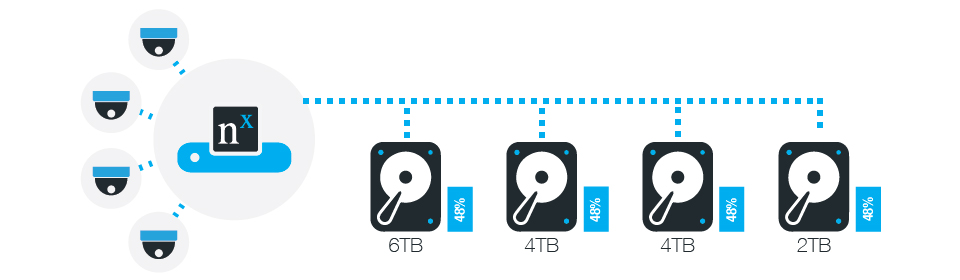
Adding storage to an existing system
When you add new drives to a server that already contains full drives, the system continues to distribute data across all storage locations to maintain a balanced write load.
Because the server writes data at an equal percentage rate to all drives, the following behaviors occur:
- Data recycling continues: The server does not route new data exclusively to the new drives. Because the older drives are already full, the system continues to recycle the oldest data on those drives to make room for its assigned share of the current stream.
- Gradual retention increase: The new drives fill up while the older drives recycle data at a slower pace than before. The total archive retention period increases gradually until all drives reach an equal percentage of capacity.
- Retention estimates: The server provides storage space estimates and predicted archive retention times. These predictions become accurate once all drives hold an equal percentage of data. For example, if the predicted retention time is three months, all drives will stabilize to hold three months of archived video roughly three months after you add the new storage.
Managing hard disk failures
If a single drive fails in a multi-drive system, the VMS automatically manages the failure through the following actions:
- The system continues writing data to all remaining healthy drives.
- The system displays a notification in the notifications panel to alert you of the drive failure.
- The Media Server rebuilds the archive index automatically when you restart the service.
- In case of failure to the last remaining storage drives occurs, devices are transferred to the first available failover-enabled Server, and the Client is automatically reconnected.
Comments
0 comments
Article is closed for comments.