Android App Problems
Answered
Just updated the android app to v21.1.34070 on Motorola G7 Power phone, Android 10. Previous version worked perfectly. New version freezes when any attempt made to replay. Completely useless for anything other than Live View.
-

Hi @...,
Thank you for letting us know.
We have discovered the potential cause, and we are working on a solution.
In the meantime, if you want to revert to the previous version, you can uninstall the current version and download the applicable APK file below and sideload it as described in THIS support article:
- Android / ARM32 - Client installer nxwitness-client-20.4.32276-android_arm32.apk
- Android / ARM64 - Client installer nxwitness-client-20.4.32276-android_arm64.apk
JIRA-MOBILE-1349
0 -
Thanks, back to normal. But please, better quality control next time.
0 -
just to confirm , same problem.
V 21.1.34070
Mobile:
Armor 9E Ulefone
Android 10 ( Googleplay systemupdate 2021-11-01Q )
Kernel 4.9.190+
Going to download the 20.4.32276 version
edit:
20.4.32276 works ok. ( only no dewarping in recorded fiseye content , but maybe this was already fixed in newer versions )
0 -
Hi @...,
Regarding:
20.4.32276 works ok. ( only no dewarping in recorded fiseye content , but maybe this was already fixed in newer versions )
Just checked it, but works just fine here. I can dewarp live, during playback, etc.
Could you open another topic about this and describe the issue a bit more, - Expected behavior vs Actual behavior -, preferably including screenshots or even better a screen recording?0 -
Just checked it, but works just fine here. I can dewarp live, during playback, etc.
sorry, my mistake. when the "smart search?" button is active this is the case. else dewarping is ok.
remove my comment about that if you want.
0 -
Hi @...,
It is expected behavior that the dewarping defaults when selecting the Smart Search option, since it enables you to see the motion on the entire field of view.
When you select an area, you can dewarp the image again to have a better focus on the area you're interested in.
0 -
Hi ChipMunk
I've got the same problems on a Samsung Galaxy A52 with Karnel: 4.14.190 Android version 11
And on a Huawei P With Karnel: 4.9.148 Android version 9.1.0.397
Kind regards, Vincent
0 -
Hi Norman
I just noticed the availability of v21.2.34193 which is supposed to have fixed the "freeze" bug. It's definitely an improvement on v21.1.34070 i.e. I can now play from archive - but only at normal speed. Pressing the "fast forward arrow" causes merely a jump to the next clip which then continues to play at normal speed.
Being able to scan rapidly through recordings is a critical function for me, and it still doesn't work!
Chip
0 -
Hi @...,
With the Nx Mobile APP you cannot play fast-forward or backwards.
With the arrows in the left (1) or right (2) direction you jump one hour back in time or one hour forward in time (or till the end). If the function meant you can play FFW or FBW, the | would miss from the arrow icon.
What I would recommend is to use the smart search feature (3). Which you tap this icon, the timeline will reveal all motion events, and you can jump back and forth with the arrows (1 & 2) through the motion events.Also, you can tap and hold the image to select an area and the timeline will fill with the events in the selected area.
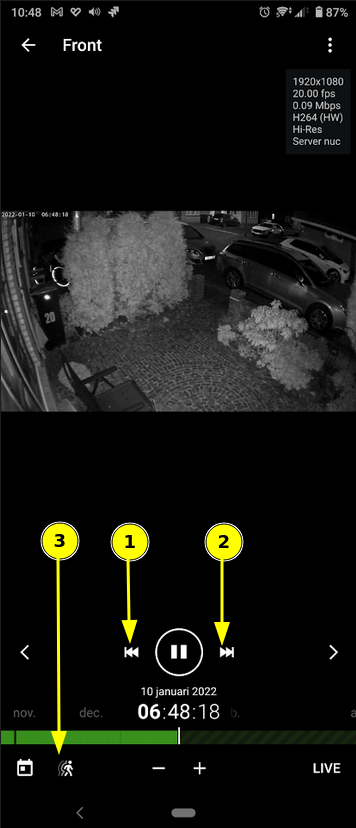 0
0 -
Thanks Norman, that's very helpful. I'm new to all this but I really thought that in the earlier app I could do the fast forward just like the windows viewer.
I need to find more time to play around with this to take advantage of all the features.
Many thanks
0 -
Hello @...,
Besides playing around, I noticed we do not have clear documentation about the Nx Mobile application, so I create a task for our technical writers to create a manual for the Nx Mobile application that can be used as a reference.
JIRA-DOC-5000 -
That would be very useful. I almost mentioned above that I hadn't come across anything which explained the capabilities and limitations of the Android app, but thought perhaps I hadn't looked in the right places.
0 -
Hi @...,
It's us to blame in this case, not yourself.
To be honest, I do not expect a manual on a short notice, so feel free to ask anything in this thread, and we'll answer it as soon as possible
0 -
Thanks Norman - I'll do my best to keep you on your toes :-)
One last question for now. Is the option to connect to NX Cloud blocked on the trial license? The NX Witness Client (Windows) \ System Administration \ NX Cloud tab shows "create cloud account" and "learn about cloud" but not any dialogue to connect to it.
Cheers
0 -
Hi @...,
See THIS support article and the video in the article.
0 -
Thank you once again Norman
- I had slipped into the habit of logging in as a user "administrator" rather than the admin - "owner".
I just assumed they were equivalent
All sorted
Cheers
0
Please sign in to leave a comment.
Comments
16 comments