Função PTZ
Answered
-

- Authorized Reseller
Olá Hallan Souza,
Acho que neste fórum tem de ter as mensagens em inglês, mas vou responder em Português e em Inglês para tentar ajudar.
Quando adiciona a câmara por RTSP, não é possível ter comando PTZ, já que essa função não é detectada. Por RTSP apenas é possível obter o stream de vídeo e audio a partir da câmara.
Quanto à questão de ficar desconectado, pode enviar um snapshot do problema para ajudar a equipa da NxWitness a ajudar?
Se puder enviar informação sobre o cenário tal como o fabricante e modelo da câmara, versão do NxWitness que está a usar será útil para tentar perceber qual é o problema.
------ English Translation ------
Hello @Hallan Souza,
I think this forum must have the messages in English, but I will respond in Portuguese and in English to try to help.
When adding the camera by RTSP, it is not possible to have PTZ command, as this function is not detected. By using RTSP it is only possible to get the video and audio stream from the camera.
As for the issue of the camera getting disconnected, can you submit a snapshot of the issue to help the NxWitness team help?
If you can provide information about the scenario such as the make and model of the camera, the version of NxWitness you are using would be helpful in trying to figure out what the problem is.
0 -

Hi Hallan Souza,
Besides providing the snapshot of the issue, please also provide the camera model name, and follow the below instructions:
1. Check the firmware version
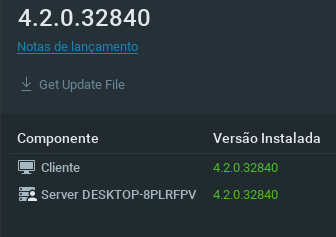
The latest Nx Witness version is 4.2.0, if your Nx Witness is not running the latest version, you could first try to update the Nx Witness to the latest release.
Check: https://my.networkoptix.com/#/downloadPlease make sure your camera is running on the latest firmware as well.
2. Perform the basic ONVIF camera troubleshooting
Please follow the instruction of this support ARTICLE to perform the basic ONVIF troubleshooting.Thank you.
Also, thank Miguel Câmara for providing a prompt reply and translation.
0 -
Hi Miguel, thanks for helping me with English. Here are the requests that Anderson Chang asked: 1- version of NXwitness currently used.
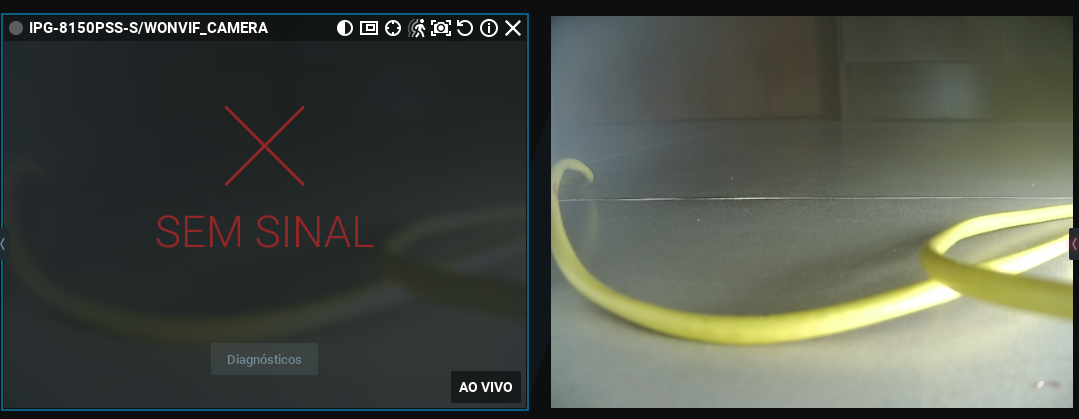
2 - snapshot of the reported problem: where there is no signal and the camera that was automatically added by NXwitness and the camera on the side is the same camera that was manually added by me.
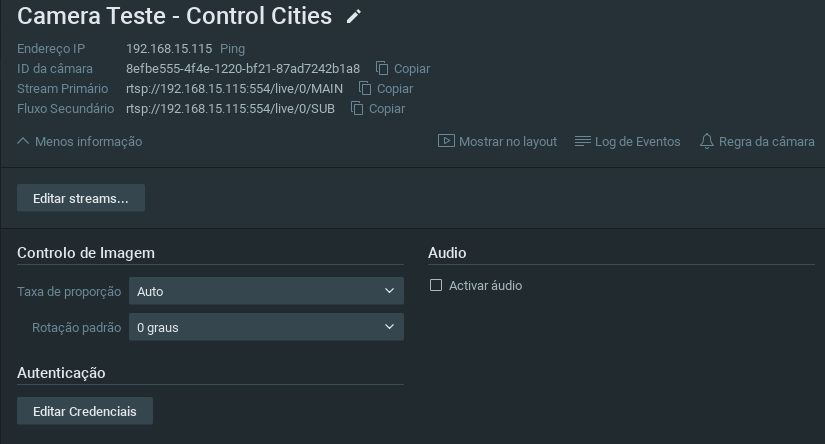
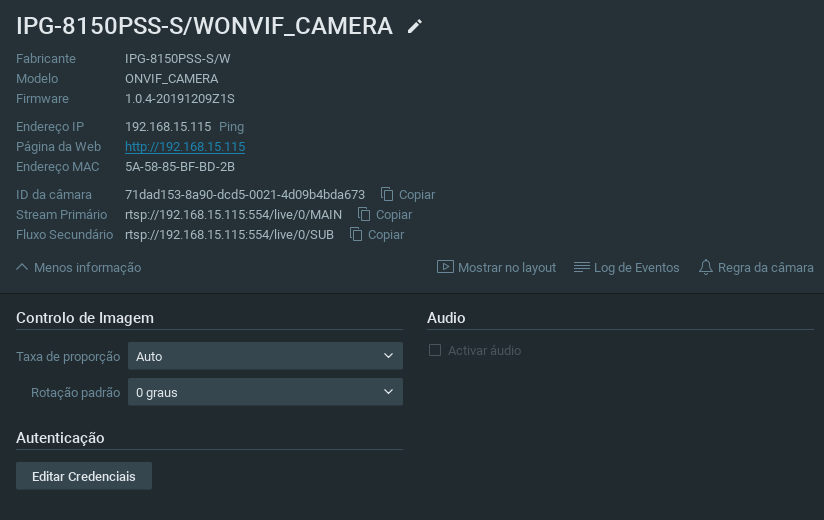
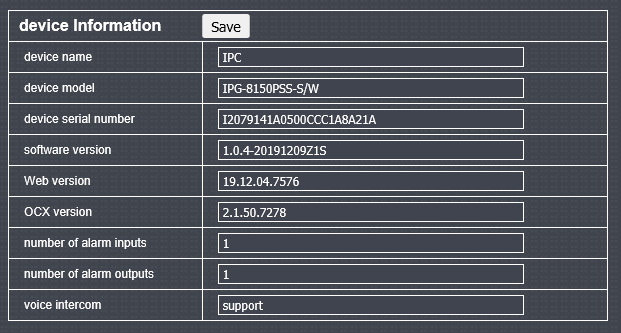
3 - follow the camera data:manufacturer's website: http://yucvision.com/
 0
0 -
Hi Hallan Souza,
Please follow the below instructions for basic troubleshooting:
1. Check the firmware upgrade of the camera
According to the screenshot, the camera is running on the firmware which seems to be released at end of 2019. Please check whether the manufacture releases any newer firmware.2. Provide the result of the diagnostic
Please click the diagnostics button on the layout, and provide the result to us by screenshot or post the content.3. Perform the basic ONVIF camera troubleshooting
Please follow the instruction of this support ARTICLE to perform the basic ONVIF troubleshooting.Thank you.
0 -
Hi,
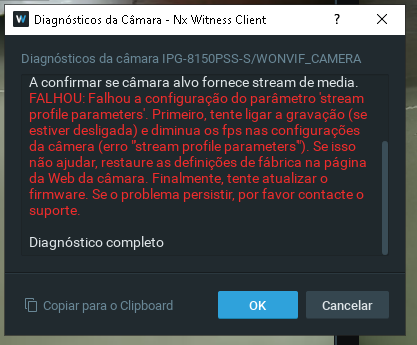
1. Check camera firmware update According to the screenshot, the camera is working with firmware that appears to have been released in late 2019. Check if the manufacturer releases any newer firmware. Answer: It's already in the latest version, it doesn't have any more updates.2. Provide the diagnosis result Click the diagnostics button on the layout and provide the result to us via a screenshot or post the content. Follow:
3. Run basic ONVIF camera troubleshooting Follow the instructions in this support ARTICLE to perform basic ONVIF troubleshooting. Answer: already done, without success!
help, I need help. Thanks.
0 -
Hi Hallan Souza,
According to the screenshot you provide, it seems the camera could not correctly respond to the stream profile provisioned by the Nx Server. Please try to disable the optimization of the camera and see whether you can get the camera back to work.
There are two options to disable the optimization:
Overall: Open Main Menu and go to System Administration > General tab, uncheck the Allow System to optimize device settings.
Single device: Open Camera Settings and go to Expert tab, check the Keep camera stream and profile settings.
You may refer to this ARTICLE for further information.About the ONVIF camera troubleshooting, did you try to connect the camera by ODM (ONVIF Device Manager)? Could you play the camera stream and control the PTZ on the ODM? This information will be useful for the investigating.
Thank you.
0 -

Hi Hallan Souza,
Regarding:
3. Run basic ONVIF camera troubleshooting Follow the instructions in this support ARTICLE to perform basic ONVIF troubleshooting. Answer: already done, without success!
If the camera can't be controlled through the Onvif Device Manager, it also cannot be controlled in Nx Witness.
If this is the case, the issue should be addressed by the camera manufacturer and there is nothing we can do.
0 -
Hi Hallan Souza,
We have not heard back from you in a while, so we are going to assume your question has been answered and set this topic to 'Answered'.
0
Please sign in to leave a comment.
Comments
8 comments