Request for change behavior client in speed search archive

Hello,
Our customer complains about the NX Wintess client behavior when he change the speed proofreading. After update our customer realized a change.
Before : When we view at x16 speed and pause, the last replay starts in x1 speed (normal speed).
After : When we view at x16 speed and pause, the last replay starts again at x16 speed and not at normal speed.
Our customer would like to have the previous behavior.
I don't found any seeting change about this need. I talked with the support and said me that this behavior can't be change in seetings. Is it possible to add this seeting in futher release ?
Many thanks in advance.
-

I understand the ability to resume playback in the speed you were on is useful to some customers in some circumstances but then there should be a separate resume icon. The ‘Play’ icon that currently exists should function as ‘Play’ and go forward x1 speed.
1 -

I completely agree with Christal.
The new 6.1 fast forward/rewind/pause/play controls are incredibly hard/painful to use. I had a real life situation with persons causing trouble outside a property being monitored and was on the phone with police and trying to get them a license plate, and it was so hard, because I'd been rewinding at several times speed and spot the plate, press pause, then needed to play forward slowly to queue it up to be able to note the plate number and give it to the Police, but you can't, the only option is to press "play" which doesn't play, it just continues rewinding at the same speed, taking one further from the plate, with one having to then press buttons several times to stop it going backwards fast and get it going forwards, but you've got the Police on the line and troublemakers outside, so you have to fast forward it, you can't wait for it to play at normal speed, and you have to try to stop it again as soon as you see the plate come into view, but this is on a moving car so you don't get much warning, and you overshoot and have to repeat going backwards. It's a nightmare. Note: I've been using NX Witness for 10 years and the previous video controls we so easy to use and normal (like any video player normally).
I thought maybe it was just me being very used to the usual way any video player controls normally work. Then I had a lot of practice with the new controls, because after the incident I had to queue up video from different cameras to get photos and video to export for Police. But it was really hard, didn't get easier and took 3 - 4 times as long as it normally would to do the same work.
Two other users I work with have tried this so far and have had the same complaint re the video controls.
Please make that at least optional, or revert back to the previous video controls where pressing play after pause just causes it to play at normal 1x speed, not to resume rewind/fast forward at the same speed.
0 -

Just wondering; why not using the Object Search or Event Search to find a license plate?
0 -
Hi Norman, that's a fair question. To be honest, it didn't occur to me, because I didn't think the Object Search worked properly yet, because when I had tested it, it did not seem useful/reliable and also a bit cumbersome to pull out and use in a rushed situation (there might be shortcuts I'm not familiar with). And ordinarily, if a car had just come past within the last few minutes late at night when there were no other cars, a simple rewind seemed efficient.
Re object search, I thought I should give specifics rather than a generality so I checked it again newly on its functionality at that site. I found using it I can pick up license plates on my two license plate recognition cameras (not on other cameras). I cannot search any license plates (using plates in the video clips it provided) - it comes up with nothing.
It can pick up persons, but no other defining characteristic works (gender, clothing color, glasses, mask, etc) - as soon as a characteristic is chosen, it has no results. It cannot pick up faces in the last 30 days, except randomly one camera showed 4 faces from a couple of weeks ago. This is despite a Hanwha PTZ there will show “face” tagged next to a face in live view in NX.
It can show trucks and cars.
0 -

I also agree with the other posts in this forum. The updates to the speed up/slow down/play and rewind controls in 6.1 are horrible. I have a customer that has three locations and requested that I do not update the other two locations to 6.1 after they used the updated controls in 6.1.
When a user is reviewing recorded video footage at a faster rate (4x, 8x or 16x) and they pause the video, they're most likely pausing because they saw something they want to see in more detail. It makes more sense when they press play again, for the playback to resume at normal speed, not the faster playback rate.
Since it appears this new update is not well liked, In my opinion, the developers should add an option to the client so the user can configure which option they like better. In my opinion, the default settings should be to resume normal playback (1x) after a video is paused.
0 -
Hi yann, Christal, Edward Dickey, Jonathan, Zack Sauve, chris gill, and viktor denysenko,
I’ve been working with our development team to provide a quick solution regarding the recent changes to the playback behavior. Currently, the system defaults to resuming your last selected playback speed after a pause. We understand that some of you prefer the previous behavior, so we are introducing a quick fix to toggle this behavior for this in our upcoming release.
If you’d like to change this behavior immediately, we have a private patch available for you to test.
Private Patch Details & Installation
- Version: 6.1.2.42646
- Method: Creating a manual configuration flag.
Instructions
- Install the patch version listed above.
-
Create a configuration file named exactly
savePlaybackSpeed.- Note: Ensure there is no file extension (like .txt) at the end.
-
Edit the file and enter one of the following values:
-
true: Keeps the current behavior (resumes speed after pause). -
false: Reverts to the previous behavior (resets speed after pause).
-
- Place the file in the following directory based on your OS:
For Windows:
C:\Users\<username>\AppData\Local\Network Optix\Network Optix HD Witness Client\settings\localLinux
~/.local/share/Network Optix/Network Optix HD Witness Client/settings/localDecisions regarding a permanent change to the default behavior are handled by our Product Team. They evaluate these adjustments based on user feedback, so I encourage you to keep sharing your thoughts with us.
0 -
Thank you for reaching out to the development team regarding this issue. I appreciate it! I'm happy they're going to include a toggle option for the next release. I'll probably wait for the official release to update the systems.
0 -
Hi Jonathan,
No worries. Once the next release is out, you can follow the instructions I mentioned above.
0 -

Hi Norman. Thanks for the link to this. I will give it a try
0 -
Forgive my newbish question but how do i create a configuration file as outlined above?
0 -
Hi chris gill,
No worries. I had to check it myself as well for Windows.
Open your desired text editor, for example the default Notepad application;
- Enter the desired value,
falsein the screenshot below. - Select File > Save As > and navigate to the applicable path:
C:\Users\<username>\AppData\Local\Network Optix\Network Optix HD Witness Client\settings\local - Enter the filename between quotes:
“savePlaybackSpeed” - Save as type: All files
- Select Save
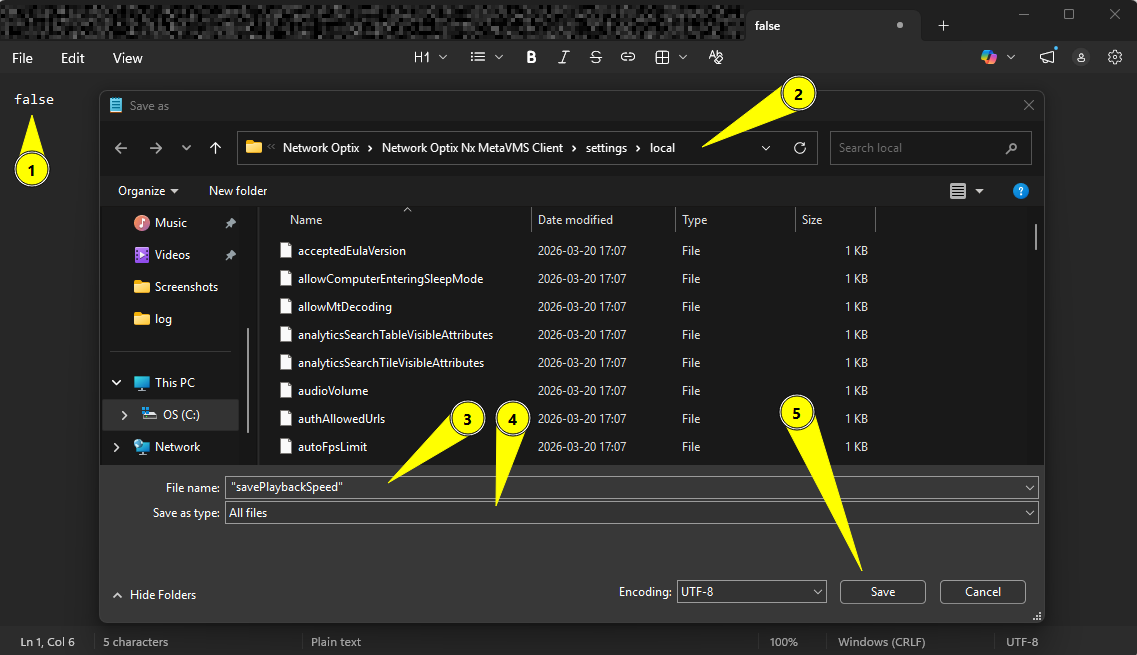
For macOS and Linux, it is much simpler:
You can do it via the GUI, but its easier via the terminal, so open the terminal (Ctrl+Alt+T):
Navigate to the path:
Linux:
~/.local/share/Network Optix/Network Optix HD Witness Client/settings/localmacOS:
~/Library/Application Support/Network Optix/Network Optix HD Witness Client/settingsEnter the following command:
echo "false" > savePlaybackSpeedIn theory, this command could be used in Windows as well, but by default it creates an UTF-16 LE file, which won't work. It should be UTF-8.
The proper command would be for the default PowerShell terminal:[System.IO.File]::WriteAllLines("$pwd\savePlaybackSpeed", "false")And to complicate it, for newer versions of PowerShell terminal:
"false" | Out-File -FilePath savePlaybackSpeed -Encoding utf8NoBOM0 - Enter the desired value,
-
Thank you
0 -

Hello. This didn't work for me. I have server 6.1.2.42573 and client 6.1.2.42648 (2 higher than the version of 42646 you specified above). We're on Linux.
I created a file savePlaybackSpeed and put the single word false in it. I then restarted the client (and the server, just to be sure). The new playback speed behaviour is still there, it didn't revert to the old behaviour.
Any clues?
0 -
Hi Craig McGill,
I have personally tested this feature using version 6.1.2.42648 on an Ubuntu 22.04 LTS environment, and I can confirm that the option is functioning exactly as expected.
If you are still encountering issues, please double-check the following requirements for the configuration file:
- File Path: Verify that the file is located in the specific directory required by the application.
-
File Extension: Ensure the file has no extension (e.g., make sure it isn't saved as
.txtor.conf). - Case Sensitivity: Confirm that the naming follows the exact capitalization required, as Linux systems are case-sensitive.
- Restart: To apply the change, the Desktop Client has to be restarted after any change to any of the files.
Best regards.
0 -
Hi Norman.
My sincere apologies. This fix does work. The error was mine. In order to edit files I typed the sudo command which changed usernames from my personal account to root. I was therefore adding savePlaybackSpeed in root's directory, not mine. Once I realised that, I edited the file in my directory and it worked.
Sorry to have wasted your time. It's working fine now! :-)
0 -
Good to hear Craig McGill!
No worries about wasting my time. I'm glad it works for you.0 -

Hi Norman, Will the published patch work with DW Spectrum or will that require a different file? Myself and the other dispatchers will be thrilled once I get the system patched as the new behavior has been really frustrating all of us.
0 -
Hi Zack Sauve,
For DW, you can use this link:
6.1.2.42796
Just a quick heads-up: with the official release of version 6.1.2, we’re reverting to the original behavior, so manual adjustments won’t be necessary. However, the patch option will remain available for anyone who prefers to customize that setting.
0 -
Norman,
6.1.2 was released on the NX Side, is it available for DW so I can upgrade our site so we have the original behavior back?
0 -
Hi Zack,
The DW version is not available at this moment.
Until it is available, you can use the build provided earlier and make the manual change.With kind regards,
0
Please sign in to leave a comment.
Comments
20 comments