Recorded Footage automatically saved onto an External HDD
Answered
Hi,
I had a client where they plugged an external usb 3.0 HDD into the actual NVR Server, and the NVR server started recording footage to it. Rather than plug it into their own desktop with the Desktop client installed. (this was about 6 months ago)
I am writing up an SoE/SoP and wanted to find out where to turn this setting off, but i cannot find anything. All i can find is how to ENABLE the feature (https://support.networkoptix.com/hc/en-us/articles/360046064633-How-to-enable-external-USB-storage-) thing is, we never enabled the feature.
Did this use to be a feature automatically enabled in the past, which is now disabled by default? if so that's fine.
Summary:
When we build our Servers/NVR's i want to ensure this setting is not enabled in case someone accidentally plugs temp storage into it.
Thanks!
-

Hi Michael,
Please follow the steps in the article but set the value of allowRemovableStorages attribute as 0. The setting will take effect after restarting the Nx service. Then the external storage will not be enabled for recording after Nx detect and display it in the Storage Management.
Thank you.
0 -
Hi Wendy,
Yep i realize we can do that, but if the article exists on how to enable this feature, is the default now 0/off?
I just checked a new server i configured, and the regedit doesn't exist (it has to be made, like the article suggests).
But is it default to off somewhere else? or would you recommend that i create the regedit anyways to ensure it will not record to storage media?
What i'm trying to say is..if we have to make a regedit to ENABLE the feature, surely the feature is already disabled? but maybe 6 months ago it wasn't (that's when the incident occurred).
Thanks.
0 -
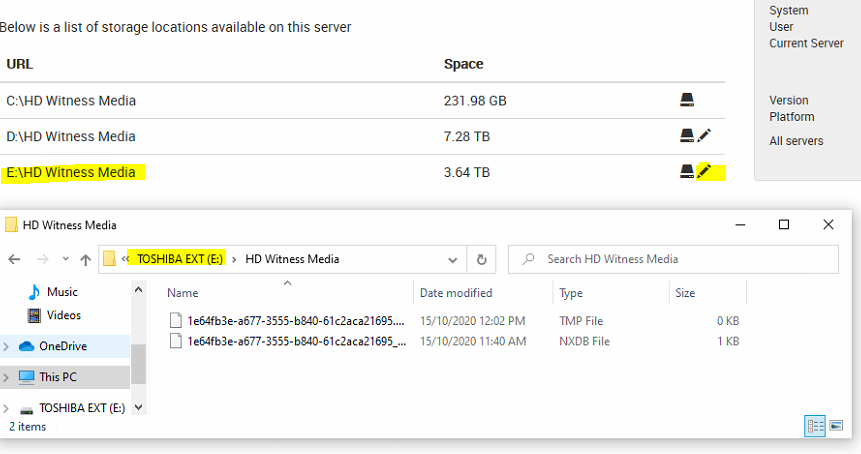
Ok so i just tested and plugged in an EXTERNAL usb drive and it has automatically picked it up for writing, the server webadmin also picks it up as an internal drive..which is why maybe it starts writing to it?
Is this a bug? if so, i am going to have to definitely create the regedit with "0" and test. If this works, it will become part of our SoE/SoP.
See Screenshot:
 0
0 -
Ok, did some more testing.
- Applied the registry edit anyways and set it to "0".
- Restarted Server, made sure the external location was removed also.
- Restarted again.
- Plugged in external HDD, and restarted again for good measure.
NX Witness Server is still detecting the external as a device it can write to because it deems it as an internal drive, when it is 100 percent a USB External HDD.
How can we prevent this from happening besides disabling the USB ports on the device its self?
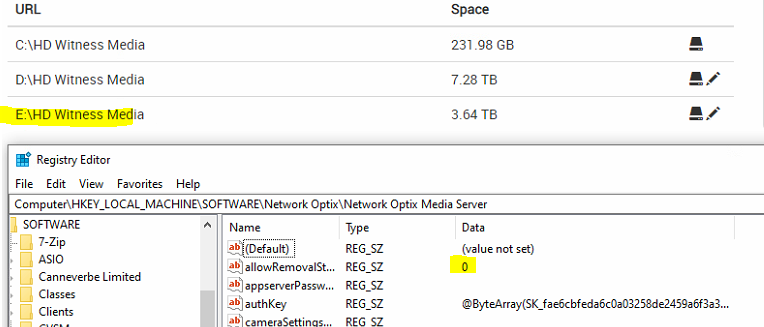
**EDIT**
Ok, i plugged a 60GB USB flash drive in, and it still detects it as internal - which i guess has nothing to do with it. because the regedit was set to 0 here, it did not utilise it 60GB flash drive as "Used For Writing" automatically.
I changed regedit to 1 and restarted and it still doesn't use the 60GB for writing.
So what does the regedit actually do, because its not working as intended in either scenario to me :(
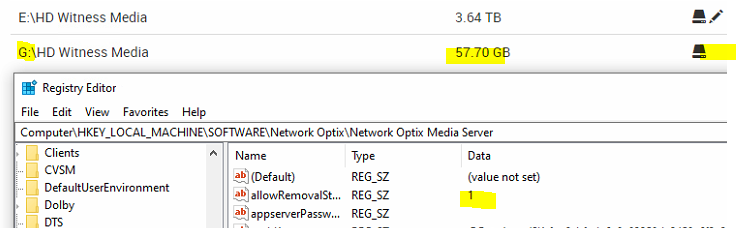
Ultimately, i want to ensure NX Witness server will not automatically write to any devices plugged in, it looks like it triggers to automatically write based on the size of the device?
I also noticed that server settings in the client software detects the 4TB External as "local" and the 60GB Flash drive as "USB"
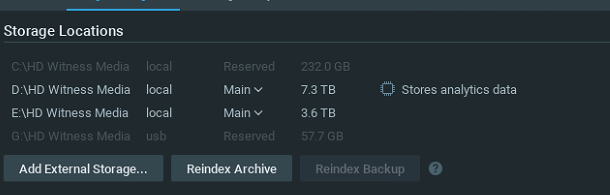 0
0 -
Hi Michael,
Thanks for your feedback and testing.
The allowRemovableStorages is turned off by default. Nx still detects this external storage but the status should be disabled on the storage management page. And please check the note 1 in the article:
Note 1: Nx Witness will not allow recording to drives that are less than 10% the size of the largest drive in the system. This is done to ensure a correct write-ratio calculation and to improve overall system stability. For more information, please check this support article.
When you plug into a 60GB USB storage, it is less than 10% of the latest drive in the system and Nx set it as "Reserved".
For your reference, I attached the testing result on my server with the 4.1.0.31767 version. Everything is default and just plug in the external storage. I didn't add any value via the registry.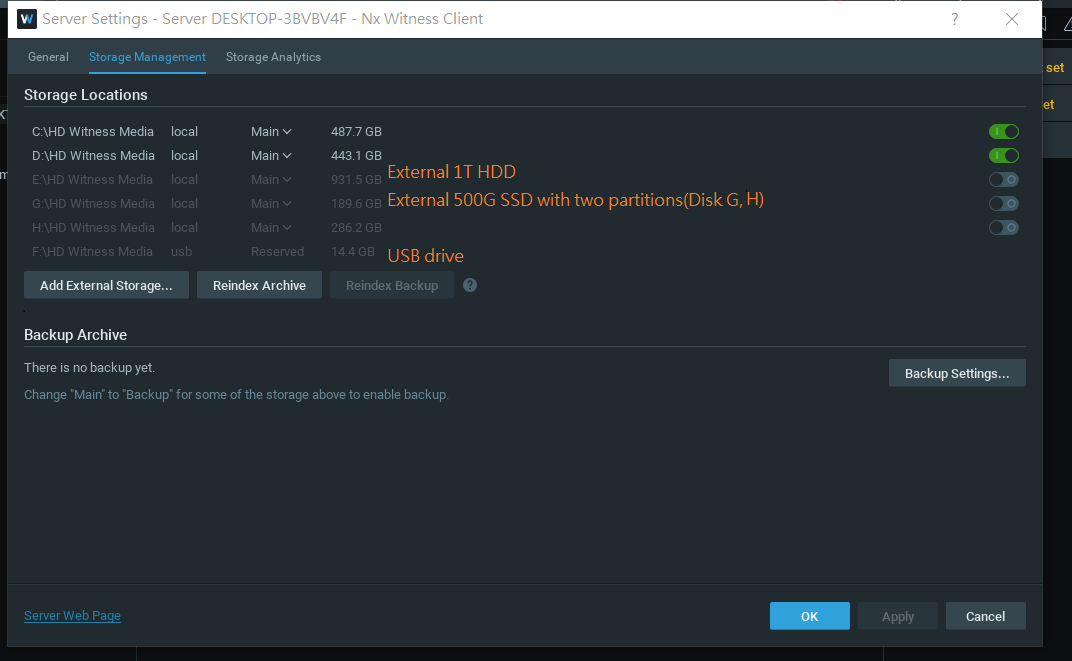 0
0 -
Hey Wendy,
i have a fresh setup with all the defaults and i plugged in a 4TB External USB drive restarted the server, and it started using it for writing.Which is our issue, and the purpose of this post.
But i understand why the 60 gb flash drive wasn't being used even with it set to allow in my test thanks to you pointing out the note 1. Thanks.
In my tests It still definitely started writing to a 4TB USB External, and enabled the drive on a fresh setup without any reg edits, and then it still did it even when i created the regedit and set it to "0".
I have just used a registry edit to disable external usb storage altogether for now. which is the only way i can think of to ensure it wont start writing to it.
0 -
Hi Michael,
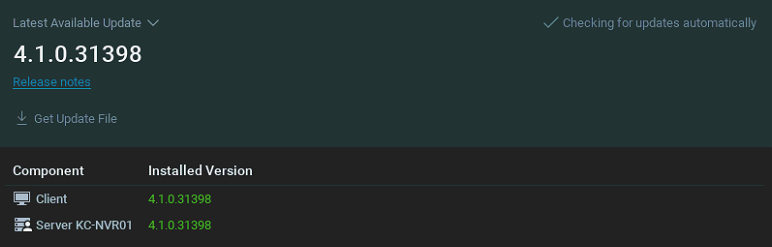
May I know which Nx version are you testing now?
Thank you.
0 -
Hey Wendy,
Looks like 4.1.0.31398
 0
0 -
Hi @...,
If it's possible, could you help us to verify the case as below:
1. Test with the latest patch
In-Client Upgrade
Build Number: 31946
Password: 1roj7j2. Do the clean uninstall by referring to the article here first then retry.
- Check the behavior with the 0 value of allowRemovableStorages
- Check the behavior with no allowRemovableStorages specified.Remember that the storage should be unplugged and delete from the Storage Management page before each test.
Looking forward to your test result. Thank you.0 -
HI Wendy,
Did exactly as you asked, when patched, and no registry entry created, it works. Which is great.
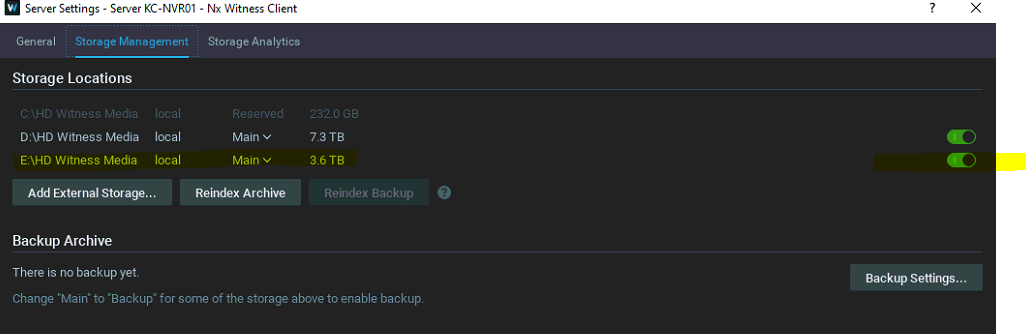
However setting to 0 - it ends up using the drive for storage, which is fine really if the default now works
See screenshots.
allowRemovableStorages set to 0: - Doesn't Fix.
allowRemovableStorages string completely removed of registry (Removed drive from storage management + Restarted) - Fixed:
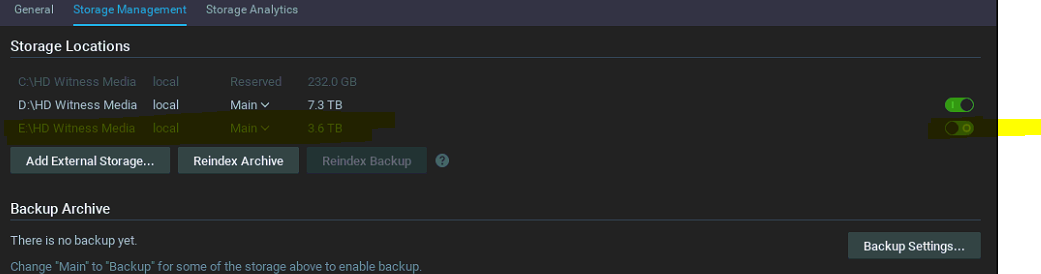
So with that build you provided, doing nothing to the registry is the best course of action. It detects the drive, but wont auto-enable it like the previous build, and any other regedit settings.
Thank you.
Any idea when that patch is being published officially? currently its still safer for us to just disable USB storage at a windows level completely.
Regards,
Michael Carbone
0 -
Hi Michael,
The release version (4.1.0.31398) still works on my test server even though adds the allowRemovableStorages value. There's nothing we've changed in the patch build. The main point of your test might be the "clean uninstall" procedure.
It should be all working fine in the 4.1 version and you could repeat the test again on 4.1.0.31398.
By the way, I noticed that in your previous screenshot: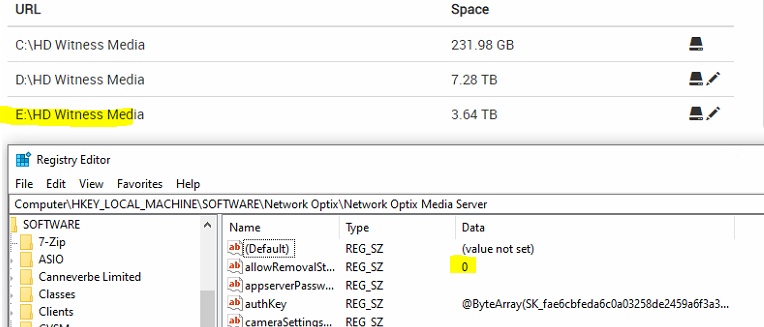
You put the string "allowRemovalStorages" instead of "allowRemovableStorages". Maybe that was why you cannot get it to work correctly.
Thank you.
0 -
Great,
Thank you!
Yep..my typo would explain why changing to 0 or 1 did nothing lol. Sorry!
Still odd that during testing it was already a fresh install with no registry entry created, and it didn't work. But then your build with no registry entry also and it worked.
Can consider this closed, hopefully the info may help other people in the future, and if people are really worried they can just disable the OS from detecting external drives altogether like i have ended up doing.
Thanks Wendy.
0
Please sign in to leave a comment.
Comments
12 comments