Two Wisenet WAVE problems
Answered
Hello,
we currently have two problems with Wisenet WAVE software, mayby you can help me.
1) How can I set sender in Client. Now when I become E-Mail alert I have only als sender email adress (sample@sample.de). I would like to have Sample Text sample@sample.de. How can I set this?
2) How can I change interval with cam network problem form 10 seconds to examply 30 seconds. Eventuell how can I set alert that the cam is again available.
Thank you very much for your help!
Sincerely
Lukas
IT – Administrator
aluplast GmbH
-
Official comment

Hi @...,
For Hanwha Wave software I would recommend reaching out to Hanwha for support.
Regarding question 1: The following support articles should help you resolve the issue: 1 and 2.
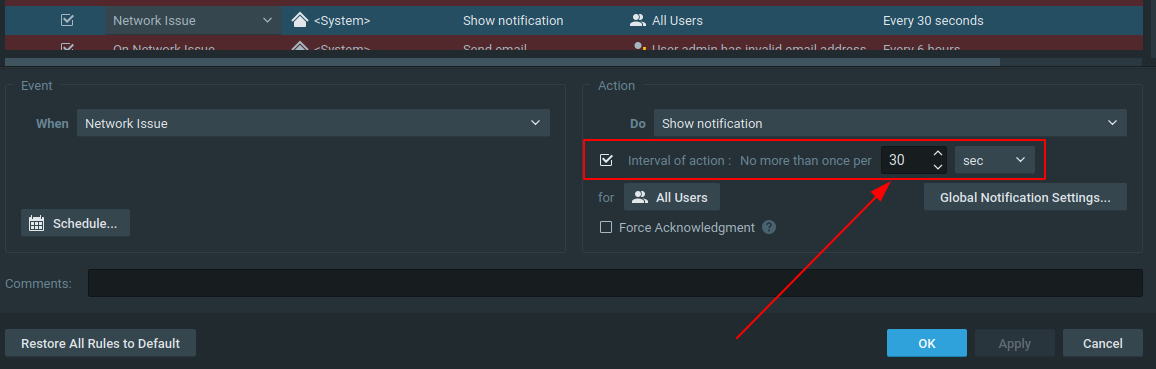
If you want custom texts, you could send an email, based on a Generic Event.Regarding question 2: The default setting for Show Notification is 30 seconds, and you can change the interval in the rules engine for the applicable rule to 1 till 59 seconds, or 1 till 59 minutes, or 1 till 59 hours, or even days.
Regarding:
"Eventuell how can I set alert that the cam is again available."
At this stage you can't.
-
Thank you very much for your answer.
I wrote here because our salesman told us that you are Wisenet developers.
I guess I misdescribed the problem when it comes to the network error. I didn't mean the frequency of the message. Only when the message is sent. For example. The server doesn't have a network connection to the camera for 10 seconds, the system sends out an alert. How can I change the 10-second value to, like, 35 seconds.
Alternatively, how do I receive an alert that the camera's network connection has been re-established?
Thank you
Sincerely
Lukas
IT – Administrator
aluplast GmbH0 -
Hi @...,
Your salesman is right, but we are not involved in the other Hanwha products.
That is also the reason I recommend you to ask for support from the Hanwha team, since some questions are related to the equipment connected to Hanwha Wave and in that case Hanwha can provide you must better answers than we can.Regarding your question. If you get the notification that the server doesn't have a network connection to the camera for 10 seconds it is pretty serious and you cannot change it to another value.
You also would be fooling yourselves. It is like ignoring the notification a bit longer, but it won't go away.
The best thing is to resolve the issue. Some guidelines can be found in THIS support article.
Not always, but most of the time such issue is a camera issue and can be avoided by reducing the load on the camera by reducing the framerate and/or the bandwidth(quality).
0 -
Thank you.
I will check the guidelines.
Sincerely
Lukas
IT – Administrator
aluplast GmbH0
Please sign in to leave a comment.
Comments
4 comments