Image export
Answered
On a motion detection event, how can an image ( snapshot / thumbnail ) be exported to the local file system ?
-

Hi Roets.
Thanks for your question.
Nx Witness now does not have the built-in function to export the image when there is a motion.
The original idea is that if there is a motion, then a video would be able to show the motion instead of a static picture.
However, we provide the generic event to let you trigger the snapshot in a workaround.
You can check the detail from this article.
If you really need a static picture to be sent to a specific place, at the moment, you can simply set the event on the camera.
Most of the modern cameras can send the static page to a NAS/FTP/Local SD card/...etc.
This would help you to get a static image if it is required.
Thanks.0 -
Thanks for the advise, however, the cameras in use only support emailing as well.
It is to be noted that the image is required with the least amount of delay as to allow analysis and then numerous other actions thereon.
In all regards, upon event "Motion on camera" create action "Write image" and specify "a folder" location

A minor adjustment to the "Send email" action that is available ...
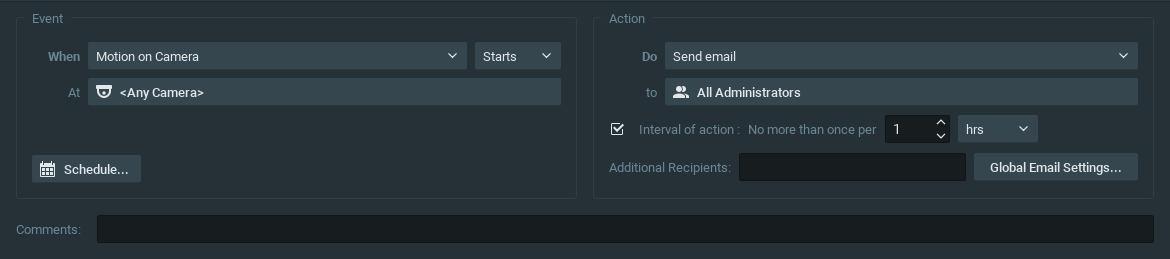
The only other interaction with Nx would then be a /createEvent API call as to start recording at a specific camera, only if required, depending on the image analysis.
0 -
Hi Roets,
Thanks for your response. I can understand you want to legacy some functions on the VMS.
From the procedure you provided and the idea in another post, my understanding is that1) You need a static image to do some works.
2) The static image may come from an existing one in a local folder or a remote place but you need to save it to a local folder.
3) Your service/application is able to do some HTTP Request to request something from a remote location.
Under such conditions, you could do the following -
1) Write a script or API, its function is to call the Nx Mediaserver API and save the thumbnail to your local filesystem.
2) Setup the Event Rules on Nx - When there is a motion, Do HTTP Request and execute your API.
3) Then your application could grab the image from the local filesystem.The benefit of this is that you can grab any camera from any server that you are able to connect.
It means even though the Nx server and your applications are not on the same machine, you can still work with the image.
Ex: If you have an Nx at the office, but your application is running on the machine in a datacenter or cloud, you would still able to get the image, and no need to change the existed program.And, we understand the limitation and some additional work might be needed, however, this would give some flexibility to layout your architecture likely. We also saw your suggestions in another post, we really appreciate this.
As we mentioned, this kind of feature(snapshot in HTTP Request or export to local) is on the wishlist, we regularly discuss the feature and improvement internally. I believe the product team would have a discussion for our future release.Thanks.
0 -
BTW, I moved your suggestion to the "New Feature Idea" section, since it is more like a feature request,.
Thanks Roets0 -

As mentioned in the other topic, we have submitted an internal feedback form.
https://support.networkoptix.com/hc/en-us/community/posts/360046669994JIRA-FDBK-198
0 -
Can you provide an example how a script would be called via the "Do HTTP request" ?
0 -
We have a node.js library that can do that: https://support.networkoptix.com/hc/en-us/articles/360026544554-Node-js-Integration-Library
0 -
Sorry to necro this thread, but this feature would make integrating with other systems (like facial recognition, home automation, and messengers like telegram and discord) much easier.
"Save a snapshot" should be a first class action in the rules engine rather than making an HTTP request to a service that uses the API to request a snapshot.
0
Please sign in to leave a comment.
Comments
8 comments