Vivotek Firmwire compatibility in NX server
Answered
Dear NX team,
We are using vivotek camera to install in NX server. But we are facing firmware mismatch issue from NX server.
So far we analysed the solution from NX supports forum. We already applied solution #A. But we failed. So by the instruction of forum we need to raise the issue to NX Witness Dev Team.
Informations as below.
- Vivotek Camera Info:
- Vendor: VIVOTEK
- Model: IB9360-H
- Firmware: 0223
NX server Issue#1
FAILED: Camera request “GetProfiles” failed with error “Fault info: Reason: Action Failed. The requested SOAP action failed.. Additional: SOAP-ENV:Receiver. Sub info: “http://www.onvif.org/ver10/error”:Action. “. Please try to reboot the cameras, then restore factory defaults on the web-page. Finally, try to update the firmware. If the problem persists, please contact support.
Confirming target camera provides media stream.
FAILED: Camera request "GetStreamUri" failed with error "Fault info. Reason: The specified media profile does contain either unused sources or encoder configurations without a corresponding source.. Additional: SOAP-ENV:Receiver. Sub info: "http://www.onvif.org/ver10/error":Action. ". Please try to reboot the camera, then restore factory defaults on the web-page. Finally, try to update firmware. If the problem persists, please contact support.
BR
Md Saidul Islam Ziku
Principal SE
BJIT
-

Since we listed the firmware version that has been reported, it is likely that some other versions might have the same issue. (The ONVIF integration and unexpected response from the firmware)
As a result, you can simply update the camera firmware - from other users, IB9360 series on VVTK2.2 firmware should be working. It is also suggested that you can try the same test on v4.2.0 Nx Witness did some workaround for this issue and it should be fixing on 4.2.0 rc already.
In-Client Upgrade:
Build Number: 32631 Password: lyvwh8 0 -
Hi Team,
I have NX 4.2.0.32840 installed.
I have just updated Vivotek Cameras FD9830-H toVersion: 2.2002.13.01j
The cameras now do not connect no matter what I do.
Thanks Guys
0 -

Hi @...,
In the next public patch of version 4.2, there will be a fix in the Camera Settings menu, tab Expert, where you can choose which media file source has to be used.
If you like I can offer you a non-tested build for verification purposes, but since there was no standard QA control applied to this build, minor or even major bugs might appear and therefor it isn't recommended using it in a production environment.
0 -

Hi Norman,
I have the same issue with VIVOTEK IB9388 camera and newest Firmware and NX 4.2.0.32840. When you will release the new software?
0 -
Hi Andreas,
The new monthly patch, that includes a solution for the Vivotek issue, should be released this week.
0 -

Problem still exists with Vivotek Cameras
Nx Version 5.1.4.38659
Vivotek Bullet Model # IB9391-EHTV-v2
Latest Firmware release 1.2303.37.01 (30/04/2024)
Can find and add the camera - however it shows as offline and diagnostics presents:
FAILED: Camera request "GetProfiles" failed with error "Fault info. Reason: Action Failed. The requested SOAP action failed.. Additional: SOAP-ENV:Receiver. Sub info: "http://www.onvif.org/ver10/error":Action. ". Please try to reboot the camera, then restore factory defaults on the web-page. Finally, try to update firmware. If the problem persists, please contact support.
Rebooted the camera,
Restarted Nx Server,
Defaulted the Camera.
Changed H265 back to H264 - Cameras shows online for a few seconds before going offline again.
0 -
Update:
Changed the primary stream to h.264 and added the camera - Live image appears until recording is enabled and confirmed or "Force Motion Detection" is set.
Once theses options are set the camera goes offline again.
I can successfully add the camera via the rtsp stream directly and force motion, however advanced functions of the camera are not useable in Nx.
rtsp://192.168.0.200:554/media/stream.sdp?profile=Profile100
0 -

Hi Ashley Grembka,
Please try to switch the different options for Use Media2 to fetch profiles and see if it resolves the issue:
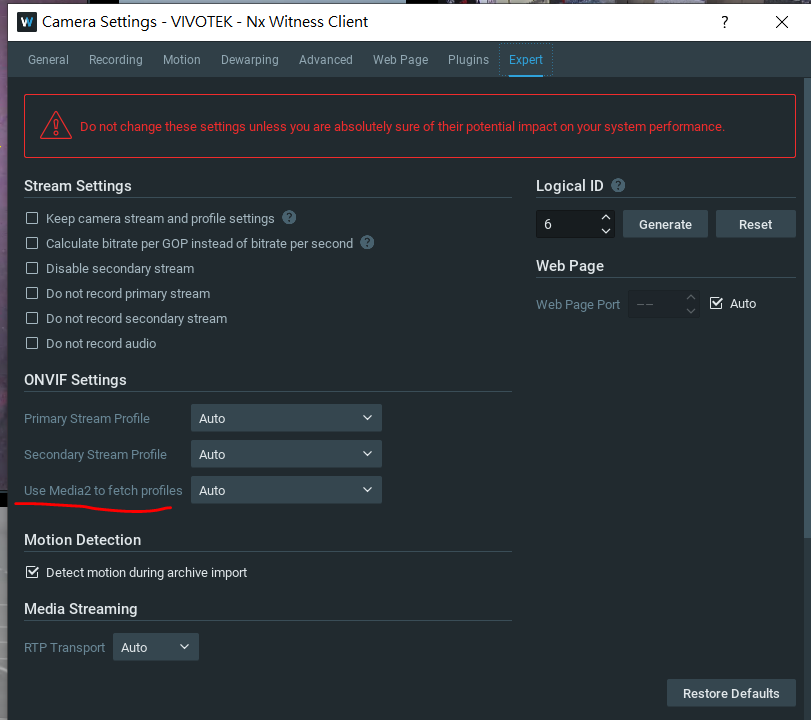
If the issue still persists, could you forward the camera to us for further investigation?
Thank you.0
Please sign in to leave a comment.
Comments
8 comments