Failed ONVIF Integration
Answered
Hey,
I'm trying to connect a camera via ONVIF and first I got one time this error :
"
"Confirming server availability.
OK
Confirming camera is accessible.
FAILED: Camera request "getCapabilities" failed with error "Fault info. Reason: Connection refused. Additional: SOAP-ENV:Receiver. Additional details: connect failed in tcp_connect(). ". Please try to reboot the camera, then restore factory defaults on the web-page. Finally, try to update firmware. If the problem persists, please contact support.
Diagnostics complete"
and after that, I'm getting all the time this type of error:
Camera information:
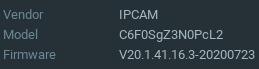
Note:
I'm already succeed connect this type of camera via ONVIF before, the only difference was in the firmware. (the camera model I have inserted here is newer).
Is there anything I can do to make it work?
Thanks,
-

Hi Lital Akulov,
If you have added the camera successfully, but it failed after you update the camera firmware, then it is likely you need to check with the camera manufacturer.
You may try to restore the camera back to default and/or downgrade the firmware.
The error message tells the camera can't provide correct response while Nx Witness asks for its configuration via stand ONVIF requests.
Another possibility is that the camera firmware might have some issue that it does not unlock the capacity for new coming connections. Maybe you have more than one VMS/Nx Witness was pulling the streams, however, the camera might not be able to handle such number of requests.
It is suggested you reboot and restore the camera then try again.
Thanks.0 -

Hi Lital Akulov,
Did you follow the recommendations in the error notification?
- Did you reboot the device?
- Did you factory defaulted the device?
Also, can you use the device in the Onvif Device Manager?
0
Please sign in to leave a comment.
Comments
2 comments