Server certificate and Mobile App
Answered
With the new mobile app the "security" option is on by default however this causes an issue with our wildcard certificates. It still prompts "trust this server?" and "Server presented a certificate that is unable to be automatically verified."
Our certificates are valid on chrome and firefox and issued by TrustCor
What can we do to avoid this issue on the mobile app.
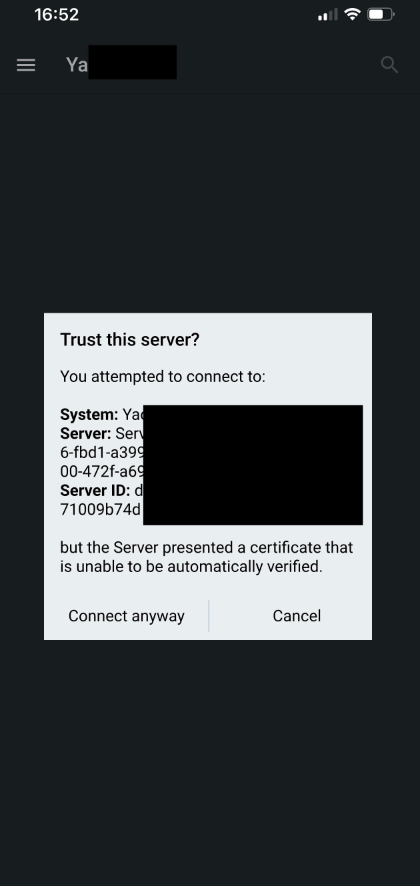
-

You wrote:
It still prompts "trust this server?"
As in, each time you log in to the server with the same device?
It should give the notification just once.0 -

Hello!... I have the very same problem!
We get this every time we open the mobile app!
This happens on ios as well as on android clients.
Seems windows client does not has this problem.
It gets words, cause most of our customers have the same problem, we run nx on ubuntu, maybe this has someting to do with it.
But i really hope you have a solution for this, as it harms the confidence of our customers in the safety of nx software.
Kind regards,
Joy de Ruiter
Linq Solutions BV
The Netherlands.
0 -
Hello @...,
We created a supported article that describes the issue, which actually isn't an issue, but just a notification that a self-signed certificate is used. You can find the article HERE.
Also, no worries about the confidence of the safety of the Nx Witness software suite. This warning is just an added layer of security. Before, the check was made, without the notification, the latest version of the app checks the validity of the self-signed certificate, and offers the option to confirm certificates (the default setting: Recommended), only use issues certificates from a Certificate Authority (CA) (Setting: Strict) or to disable the Security Settings at all, and it won't check for any certificate.
More about Self-Signed Certificates HERE and the standard we use, the RFC 3280, and HERE.
0 -
Support article published about this topic:
Why am I receiving an SSL Certificate notification on Nx Mobile?
0 -
Hi, on the mobile app version 22.3.35088 in security settings there is only "recommended" and "strict", but no "disabled" option. How can i disable it ? Its both the some on iphone and android
Thank you
0 -
I Have another question as well, some of the servers do not automatically refresh the certificate after a reboot, thus the "trust anyway" message is still shown every time a user opens the app.
Simple solution to just disable the security is not favourable.
0 -
Hik @...,
There are 2 options; Security Enabled and Security Disabled.
By default, of course, security is enabled.You can toggle it with the switch:
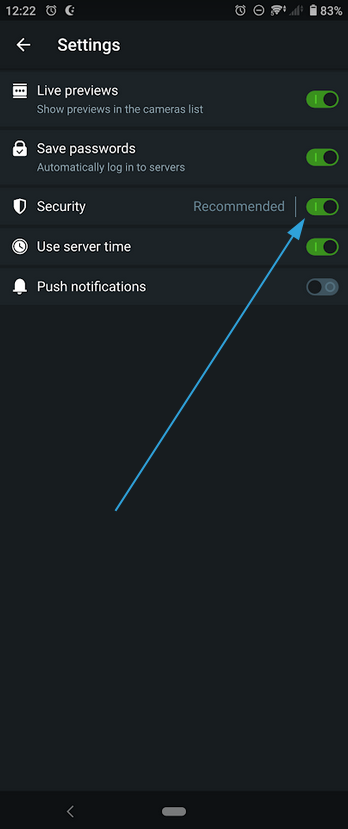
If the Security option is enabled, you have another 2 options:
- Recommended, which is the default option, basically accepts all certificated, issued and self-signed.
- Strict, only accepts issued certificated by a Certificate Authority (CA).
1 -
Hi @...,
Could you create your own topic, since the issue you mention, seems different?
Please keep THIS support article in mind when submitting a topic, so we have a good understanding of your local system and might be able to reproduce the issue.
0 -
Thank you Norman. ok. know i see how it works.
How can we disable the certificate check completly on nx server side ?
We have many clients , its not practicabel to reconfigure every single client.
0 -
Hi @...,
You can't prohibit a system to check for a certificate. You only can prohibit the mobile app to verify the certificate.
That being said, it is a one time exercise for the customer to mark the tap Connect Anyway option, and they should be good to go.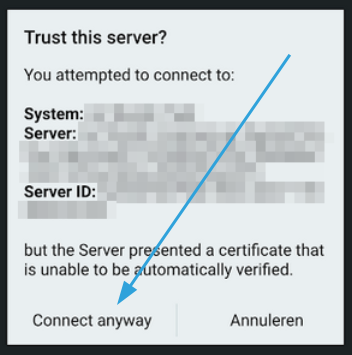 0
0 -
"they should be good to go" Thats not the case. We have some servers where the certificate is expired and doesnt update after restart, so the easiest would be to deactivate the check completely on server side. I think it should be possible, when its not possible, you maybe should make it possible again , cause before mobile app update there where no certificate warnings.... We use the nxcloud for its easy login without any problems, but after that mobile app update its not so nice and uncomplicated anymore...
0 -
Hi @...,
If you disable the certificate check as shown in this reply, no check will be made.
You can also disable this in the Nx Desktop client in the Local Settings menu as shown below: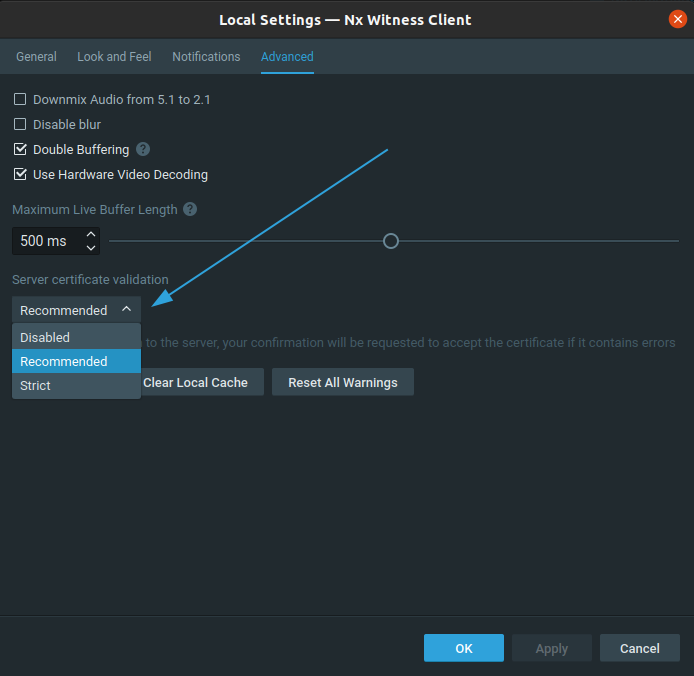 0
0 -
yes, i know, but that is not on server side.
On server side , i could configure it and no customer would need to do anything. that would be better.
We have some servers where the certificate is expired and doesnt update after restart, can you help me with that ? Thank you
0 -
Hi @...,
I transferred your request into a ticket. Please work with my colleagues towards the solution.
0
Please sign in to leave a comment.
Comments
14 comments