the microphone button displayed when an IP speaker is connected
Answered
Is it possible to display this button in the window of another camera device like the soft trigger of the camera rule?
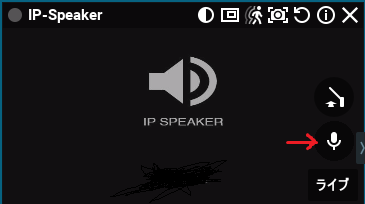
While outputting the sound of a camera with a microphone, the sound output will stop if the focus goes out of the camera window.
It would be easy to use if the microphone button of the IP speaker could be displayed in the camera window.
-

Hi @...,
In version 5.0 we will offer the Audio Video Mapping feature:
-
Audio Video Mapping:
-
The audio source from a camera or I/O module can be used in place of a microphone for another camera. (1)
-
The 2-way audio button can be used on cameras without speakers to transmit the audio to another device that has a speaker. (2)
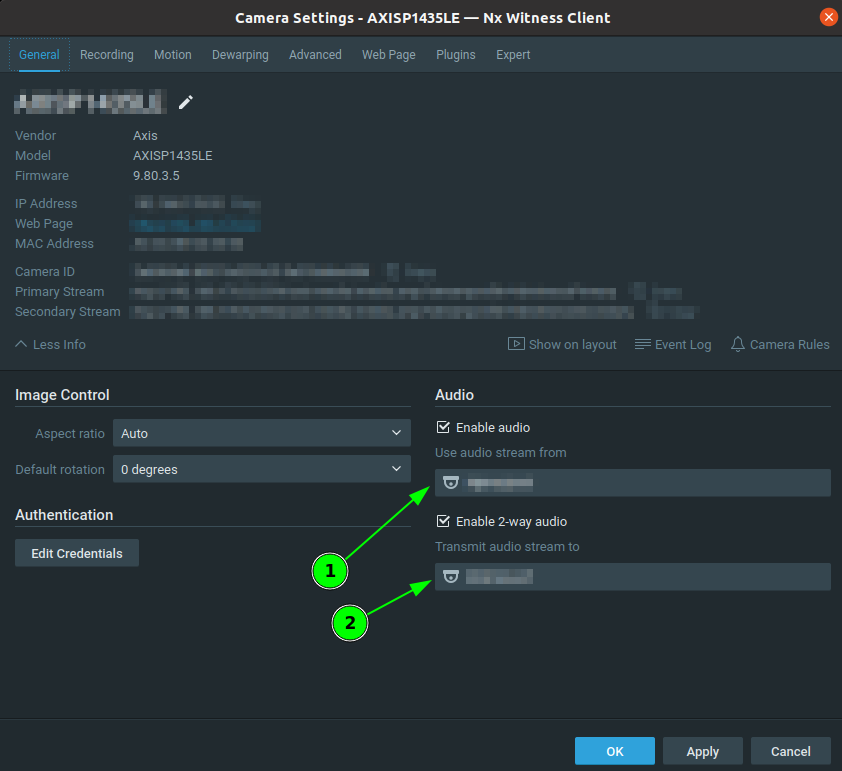
If you want to try this feature, you can download the 5.0 Beta version from my.networkoptix.com
0 -
-
Hi Norman, thank you for your reply.
The suggested method seems to be useful. I will try it.
And I discovered menu item that "Local settings->General->Play audio from all cameras on layout".
This will prevent the audio output from stopping. This solved my problem.
Thank you very much.
0
Please sign in to leave a comment.
Comments
2 comments