CPU usage when server-client encryption functionnality is activated
Answered
Hi,
Is there a way to calculate the % increase on CPU use when we activate video encryption between client and server ?
CPU increase might occurs on server side only ? Or also client too ?
The encryption method of video is the same as the one for data ? https://support.networkoptix.com/hc/en-us/articles/360017020073-Cyber-Security-and-Nx-Witness
-

Hi Guilhem Decoux,
Sorry for the late reply.
It is likely both server and client will consume more CPU resources if enable the video encryption, since the server will do the encryption, and the client do the decryption. Due to the hardware configuration varies from one computer to another, it is hard to evaluate the increase of resource consumption.
The best way to get the increased CPU usage number is to enable the video encryption and monitor the resources consumption on both server and client. Nx Witness supports the "Health Monitor" function comes to help in this usage.
You may monitor both server and client computers hardware resource usage on one computer simultaneously by:
A. Opening the health monitor on the Nx Client software for monitoring the server hardware resource usage.
B. Opening the Windows Task Manager for monitoring the client computer.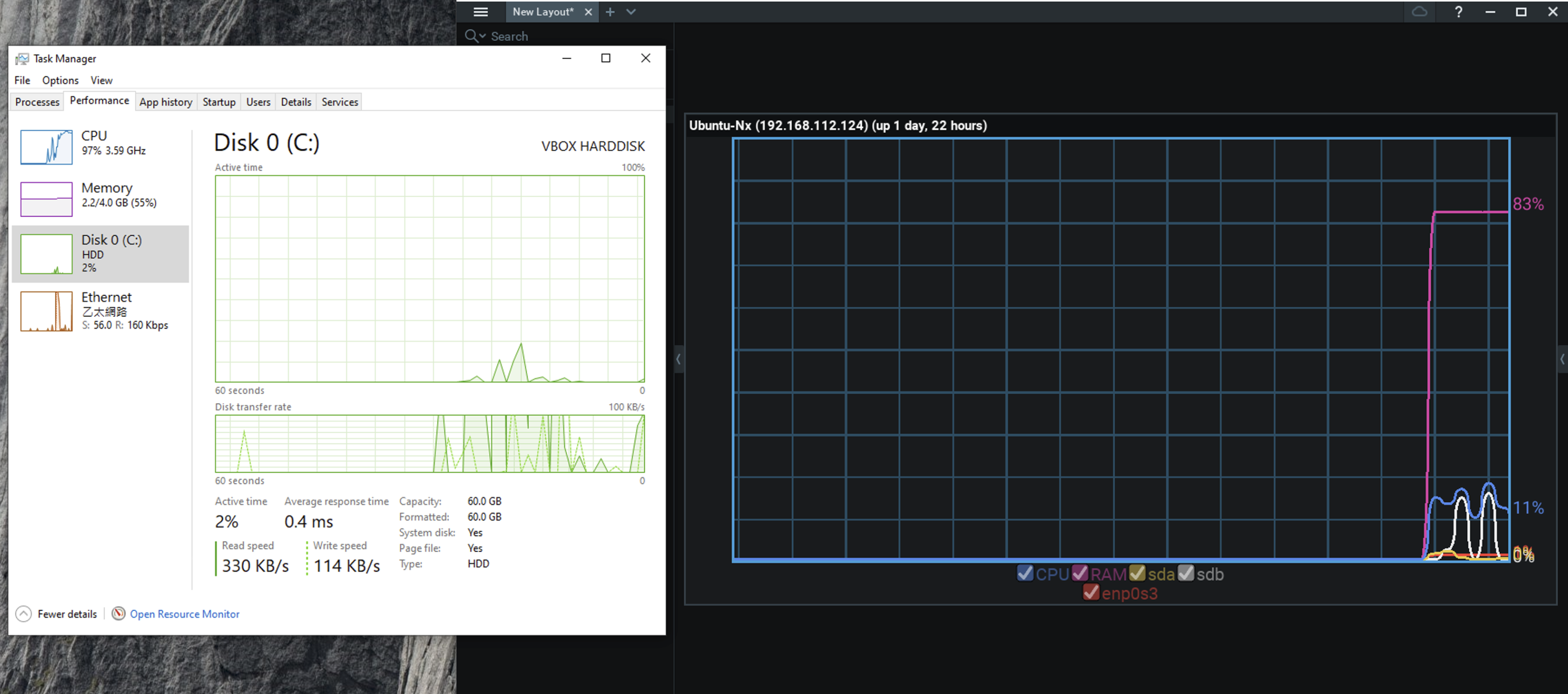
The encryption method of video is the same as the one for data ?
Once enabled, the video will be encrypted by TLS.
For your reference, here is the support ARTICLE that explains the security of each connection of Nx Witness.Thank you.
0 -
Hello,
Yes we made that test already, but see no significant increase in our test environement...
We will try to extract some figures, because we usually need to giver server calculation to SI, including this data.
Regards
0
Please sign in to leave a comment.
Comments
2 comments