unauthorized please check authentication information
Answered
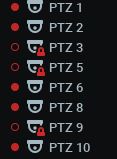
Hello, My server was having a problem with the HDD and I replaced it, I reinstalled the Ubuntu operating system I reinstalled nxserver and so far I am accessing the server from a client computer, the cameras are appearing with the following message as shown in the print
can anyone help me please

-

Hi @...,
According to your description, I assume that after you reinstall the Ubuntu and Nx Server, the cameras are added to Nx System automatically, but the Nx Server does not have the credentials to access the cameras.
There are two options to make the Nx Server get back the camera credentials: A) Restore the database backup file (*.db), B) Re-config the camera credentials.A) Restore the database backup file (*.db)
You will need the backup file from the original server, the file could be retrieved by:- If you have done the backup manually.
- If you can still access the original HDD, you may try to access /opt/networkoptix/mediaserver/var/backup/ to see whether there are any automatic backup files exist.
The file name format is esc_<build_number>_<time_stamp>.db, get the latest one.
Then follow the below instructions to restore the database backup:
- Go to Main Menu > System Administration page.
- In the General tab click on the Restore from Backup button.
- Locate and select the desired backup file.
- You will be prompted if you want to restore the database. Click Ok to restore the database.
- Once restored, a dialog with the message “Database successfully restored” will open, and the server application will be restarted automatically.
B) Re-configure the camera credentials
If you do not have the backup file of the original server, then you may reconfigure the camera credentials.- Select the camera on the Resource Tree, then right click and select Camera Settings.
- You may select multiple cameras if their login credentials are identical. - In the General tab click on the Edit Credentials button.
- Enter the username and password then click OK to save.
- Click OK to close the Camera Settings window.
Thank you.0 -
hello Anderson I no longer have access to the old HDD, as it was damaged. When I did the second option, I re-registered the cameras password, some already worked, they are working, but some cameras are still missing. I did the following basic procedure, I restarted each one of the cameras but still some cameras are still missing, follow the print. Something to do on the server?
0 -
 0
0 -
Hi @...,
The "lock" icon on the PTZ 3, PTZ 5 and PTZ 9 cameras indicate the credentials of these cameras are still incorrect.
Please check and set the credentials of these cameras again.
You may verify the credentials by accessing the camera web page.If you do not remember the credentials of the camera, you may consider resetting the camera to the default setting, then using the default credentials to access the camera.
If you are not sure how to do so, please contact the camera manufacturer for help.Thank you.
0 -
Hi @...,
There is another reason which may cause the issue.
Are those Hikivision cameras which the Nx Witness is not able to access?Some of the camera manufacturers, including Hikvision, support "Brute Force Protection" mechanism, which will block the certain IP address which has failed to login within a short period of time, to prevent the attacker from trying to guess the credentials of the camera. The blocking time may vary from 5, 10, 30 minutes to permanent, depending on the manufacturers or the custom settings.
In this case, if you have the correct credentials which can login the camera web page, you may:
1. Edit the credentials on the Nx Witness.
2. Check whether there is the option to unblock the Nx Server IP address.
3. (if there is no option to unblock) Wait for the blocking time to pass.
Then the Nx Server should be able to access the cameras.Thank you.
0 -
Hello Anderson Thank you very much for your help but the problem still persists..
I will try to detail the best possible. I have several cameras of the same brand and the same model installed on the same
server and only the ptz 3,ptz 5 and 9 cameras have this problem. I have their credentials, I have access to them through the browser, I did a firmware update on all cameras in most of them it worked after this update, including those that are presenting this exession, I restarted the server several times and the problem persists. the Server is running Linux Ubuntu Server 20.04. my solution is to restore the operating system and start from scratch. Is there anything more I can do? thanks0 -
Hi @...,
Thank you for the information update.
Have you restored the operating system?If not, since the most of the "Brute Force Protection" is blocking the certain IP address, you may try to change the Nx Server IP address, to see whether the server could access the camera.
Moreover, please follow the instruction of this support ARTICLE to capture the packets between the server and the camera, and share the packets with me, I will help to look into it.If you have restored the operating system, however, still not able to access some of the cameras, it is likely we need to have direct access to your devices to have further investigation.
If you agree to provide direct access for us, I will convert this post into our ticket system for you to provide sensitive information.Thank you.
0 -
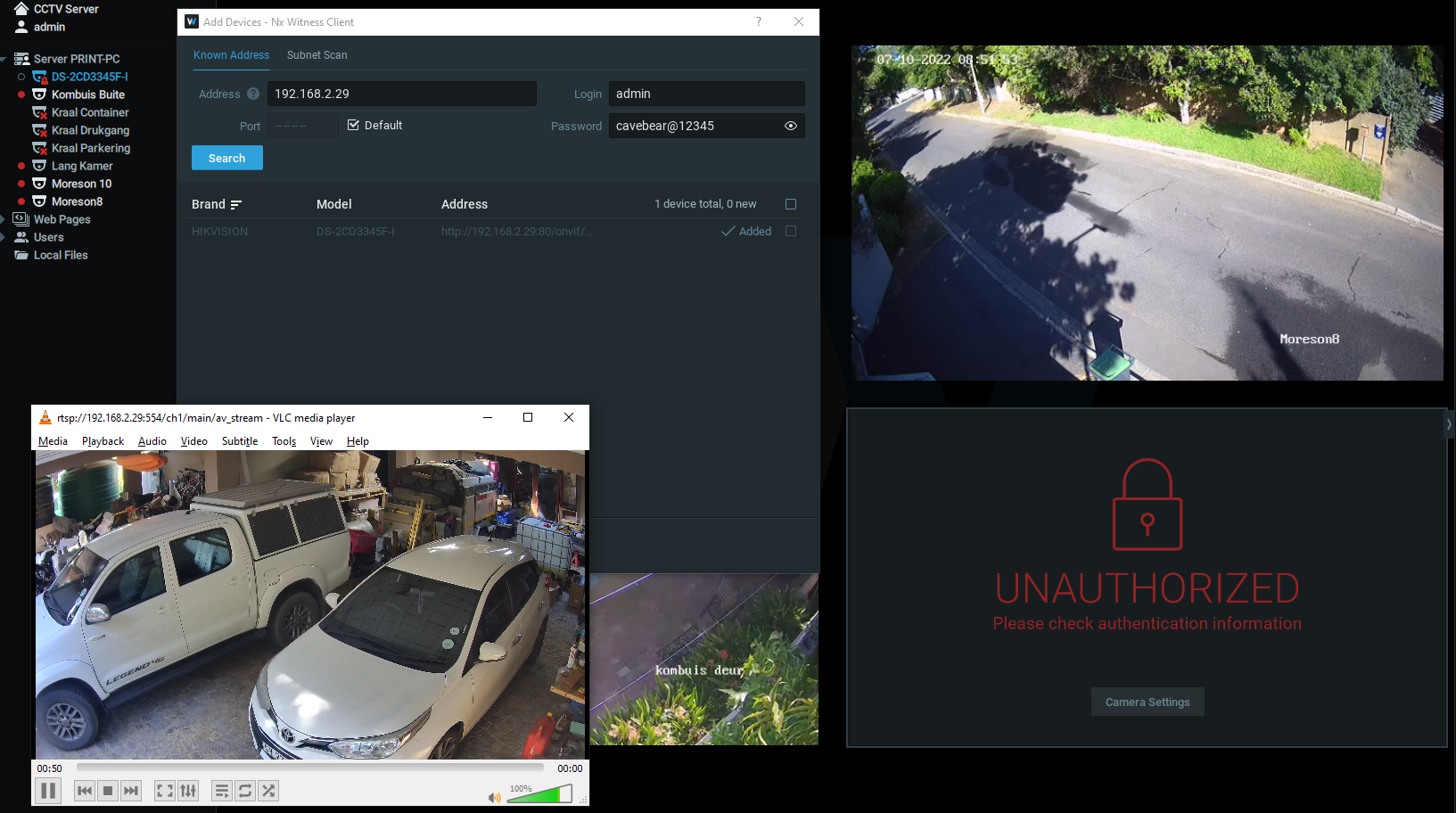
Hi. I have used a hikvision camera(Chinese version DS-2CD3345F-I20180929AACHC54005621) with NX for the past 3 years. In the last week NX could not authorize the camera anymore. Deleted the camera and add it came back again. 1st time it work. Now NX can find and add the camera when the right credentials is supplied. But when I want to view the camera through NX, cant authorize. I can access the camera via the web browser and through VLC network Stream with no problem. I changed the IP of the camera to no effect.
 0
0 -

Hi @...,
That is unfortunate.
What I noticed, it that the Address in the Add Devices menu, shows an Onvif URL, instead of a Hikvision URL. By itself that is fine, but it clarifies why it is Unauthorized, since Onvif for Hikvision device require an Onvif user in the device as described in THIS article of Hikvision.
What is weird though, is that you mention it worked fine for 3 years. Were there any changes in the system? Like a firmware update for the cameras? Or a version upgrade for the Nx Witness VMS? Etc.
Have you tried restoring the factory defaults for the camera?
0 -
Thank you very much for the speedy reply. NX auto discovered the Onvif protocol when I supplied the IP for the camera. Got the camera back now on RTSP stream. It worked on the RTSP for a week after the first authentication problem. Will monitor and report back if there is a problem again.
Thanks again for fast response!! Have a nice day.
0
Please sign in to leave a comment.
Comments
10 comments