ip conflict with AXIS S2224
Answered
Hi, I'm using NX 4.2.0.x and have AXIS ACS S2224 working.
Over 20 Axis IP cameras join the NX witness, and work on S2224, those IPcam now have the IP conflict problem with S2224 the same IP address constantly.
Could you tell me how to fixed this situation ?
Best regards
-

Hi @...,
Both Nx Witness and the Axis device push settings towards the cameras, which will result in such IP conflicts.
You have to select which application will be your main application, and set the other devices as a sort of slave, not able to push setting towards the camera and just pull the streams as is.In Nx Witness you can do that by heading to the Camera Settings menu, tab Expert, and tick the checkbox for Keep Camera stream and profile settings. Also in the System Administration menu, tab General, you disable the checkbox for Allow System to optimize camera settings.
Be aware that this might affect the performance and user experience of Nx and might prohibit you from the benefit of adaptive scaling and smart motion search, in case the other device setts the secondary resolution too high (>1024x706).
0 -

Hi Wang Shengwei,
Are you saying you saw the notification (Server conflict) or you exactly see the AXIS camera all in the same IP address?
Can you explain what you want to achieve on those S2224 and the AXIS devices?
Can you provide the screen recording or screen captures that you saw on the client, please?Thanks.
0 -
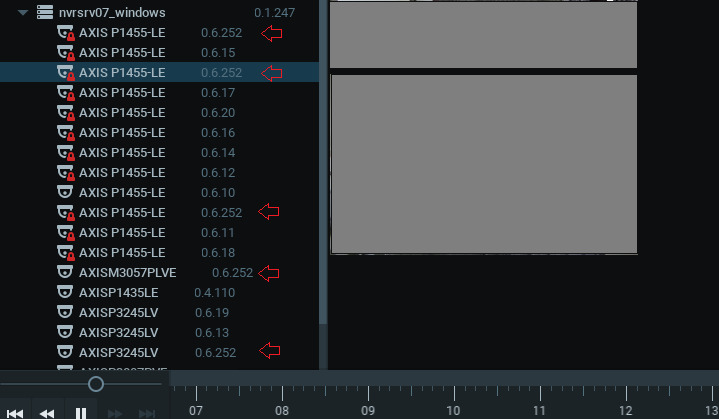
Those camera IP address conflict with the AXIS S2224 server !
0
Please sign in to leave a comment.
Comments
3 comments