Dahua IPC-HFW5842H-ZHE AI functions
Answered
Camera IPC-HFW5842H-ZHE
FW V2.800.0000000.3.R, Build Date: 2019-09-07
I can't choose any AI functions in "Plugin" Bookmark.


-

Hi @...,
You can set up the analytics rules in the rules engine:
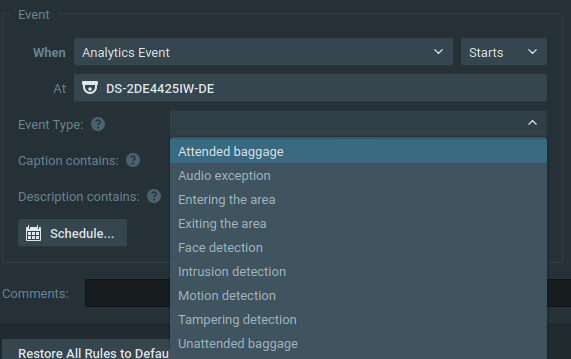
Select the Event Analytics Event and for Event Type, you select the desired analytics you want to use.
In THIS support article you will find a list of supported Event Types.
0 -
hi!
i think, it's not very good solutions. Because i can't see the rules. And, events works not every time. Add video.
0 -
Hi @...,
The rules are created in the camera. We do offer the option for anyone to set up and display analytics inside Nx with our Nx Meta developer platform. Dahua could easily and for free create a plugin to do so.
An example is shown here: LINK
If you have a camera without analytics, you can add them with the OpenVino plugin.
This plugin also has the option to configure the analytics from within Nx Witness.Regarding:
And, events works not every time. Add video.
Can you provide a screenshot of the rule you created?
0 -
I record the video:
In yor's video, many options in plugins.
I don't have any options in plugins.
0 -
Hi @...,
I saw the video before. I saw 1 person is processed in Nx and the 2nd isn't.
Therefore I asked;
Can you provide a screenshot of the rule you created?
Can you provide it?
Regarding:
In yor's video, many options in plugins.
Therefore I wrote:
The rules are created in the camera. We do offer the option for anyone to set up and display analytics inside Nx with our Nx Meta developer platform. Dahua could easily and for free create a plugin to do so.
So, to provide the option of setting up rules inside the Nx Client, Dahua has to sign up for the Nx Meta Development platform, so they can create a plugin that provides such option.
It might be, that one day in the future, we will build the plugin, but at this moment we haven't scheduled this on our roadmap.
So for now, you have to create the rules inside the camera. You can also use the in-client web browser for it or the webpage option in the Camera Settings menu.
0
Please sign in to leave a comment.
Comments
5 comments