Only show cameras with motion
Completed
Is it possible to set up a future feature option whereby one could set their video client to only display camera views when motion is detected on a camera view?
i.e. let's say you have 4 big screens, each showing 25 cameras, and a Guard live viewing it all. To make it even easier for that Guard to spot action/trouble, could it be set as an option that the cameras will only display live camera stream footage when there is motion detected on the camera? So perhaps you might end up with just a handful of cameras at a time on each screen showing actual action happening, and this would vary depending on time of day and what's happening and draw the attention of the Guard to any changes.
-

Hi Edward Dickey,
When playing multiple cameras on the layout, the Nx Desktop Client will show the red rectangular prompt surrounding the camera which detects motion. This should catch the attention of the guards.
If you want the Nx Desktop Client to act more aggressively, then play the live stream from the camera with the motion on the new open alarm layout may meet your requirement.
Please create an event rule with the following config:
1. Select Motion on Camera.
2. Choose the cameras you want to apply the rule.
3. Select Show on Alarm Layout.
4. Set the Interval of action as you need.
5. Choose the users who will be forced to view the alarm layout when motion is detected on cameras.
6. Enable Also show source camera.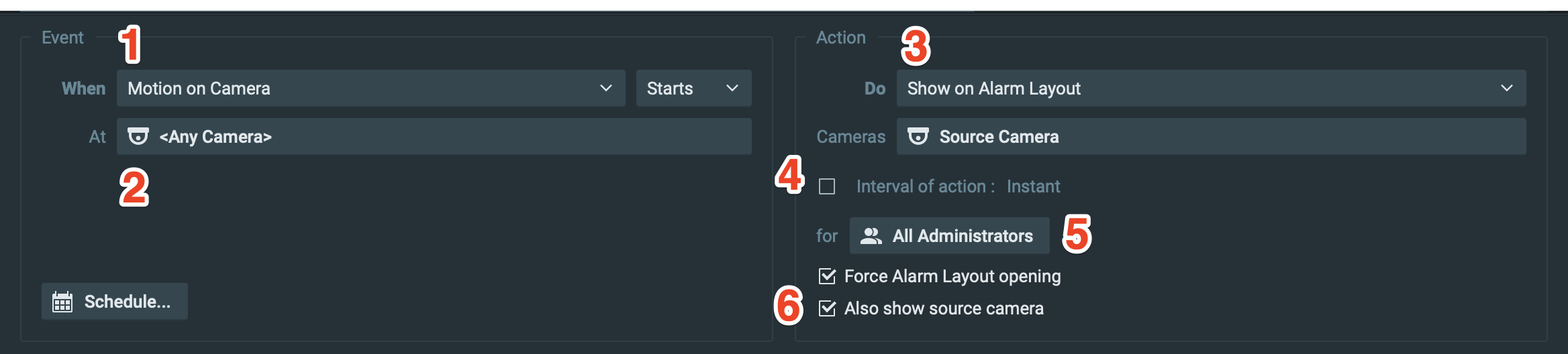
Please let us know whether these options could suit your need, or share your thoughts about the displaying of the cameras with us.
Thank you.0 -
We have not heard back from you in a while, so we are going to assume your question has been answered and set this topic to 'Completed'.
0 -
Hi Anderson,
Thanks. Sorry, I was off work briefly. I will try this out. This can indeed be considered complete for now as I will need to test and play around with this.
Best, Edward
0
Please sign in to leave a comment.
Comments
3 comments