March Network Camera Not Detected with NxWitness Client
Answered
Hi,
I have March Network - MEGAPXNANOD4 IP Cameras. I wanted to integrate it with NxWitness Client application but camera is not detecting.
Steps Followed for testing.
1. Formatted the Camera to Factory Default. Got the Default Ip address.
2. Connect to unmanaged D Link POE switch ( Camera and my laptop ) in same camera ip range.
3. Camera can be viewed by access the camera Ip address and give details of Streamer RTP and MPEG.
4. Now trying to add the Camera to NxWitness client by adding the Ip Address, but camera is not able to detect.
-

Hi @...,
Did you follow our Onvif Troubleshooting guide?
If the camera can be discovered in ODM, it should be able to be discovered in Nx Witness.If it can be discovered and viewed in ODM, but it can't in Nx Witness, please capture the discovery process of Nx with Wireshark.
If the device can't be discovered in ODM as well, I would recommend reaching out to your camera reseller and ask for newer firmware with Onvif support.
When there isn't a fix available, you might be able to add the device manually as an RTSP stream as described in THIS support article.
The following syntax might apply to your device:
rtsp://<cameraIp>/
rtsp://<cameraIp>/h264rtsp:////<cameraIp>/cam0/h264
rtsp://<cameraIp>/live/h264/HD1080P
rtsp://<cameraIp>/VideoInput/1/h264/1
If all fails you can allow the camera to stream to any resource and capture the data with Wireshark and search the packets for the RTSP url.
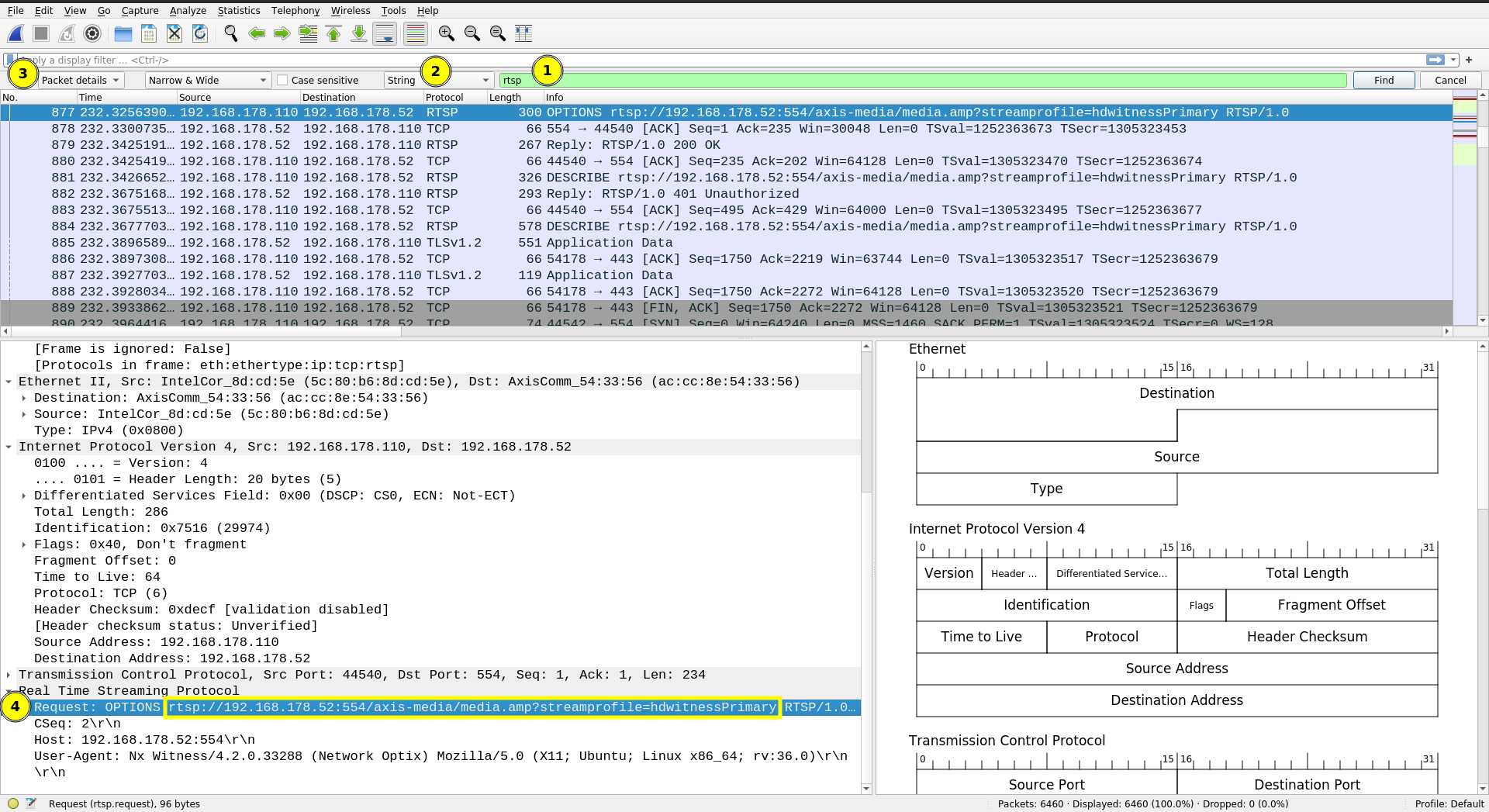
When you captured the communication, you open the search bar with Ctrl+F and enter rtsp (1), select String (2) and Packet details (3) and there (4) you can find the RTSP url syntax for the camera you want to use.
0 -
Hi @...,
We have not heard back from you in a while, so we are going to assume your question has been answered and set this topic to 'Answered'.
0
Please sign in to leave a comment.
Comments
2 comments