Only static image displayed for JVC camera (VN-H168WPR)
Answered
When connected JVC camera (VN-H168WPR) to media server, it looked ONVIF successfully detected that camera. However only static image displayed (no movie). Following is diagnosis message. Could you kindly support it?
--- (Diagnosis Message) ---
Confirming server availability.
OK
Confirming camera is accessible.
OK
Confirming target camera provides media stream.
FAILED: Failed to configure parameter 'stream profile parameters'. First, try to turn on recording (if it is off) and decrease fps in camera settings (error "'stream profile parameters'"). If it does not help, restore factory defaults on the camera web-page. Finally, try to update firmware. If the problem persists, please contact support.
Diagnostics complete
-

Hi @...,
Similar to your other post, please follow the below instructions for the basic troubleshooting:
1. Check the firmware version of Nx Witness and the camera
The latest Nx Witness version is 4.2.0, if your Nx Witness is not running the latest version, you could first try to update the Nx Witness to the latest release.
Check: https://my.networkoptix.com/#/download
Please also make sure your camera is running on the latest firmware as well.2. Check the issue with ONVIF Device Manager
Please follow this support ARTICLE to install the ONVIF Device Manager, and see whether the streaming is correct.If you are not sure how to operate the ONVIF Device Manager, or found the issue persists after you have done all the above, it is likely we need to have direct access to your devices to have further investigation.
If you agree to provide direct access for us, I will convert this post into our ticket system for you to provide sensitive information.Thank you.
0 -
Hi Anderson,
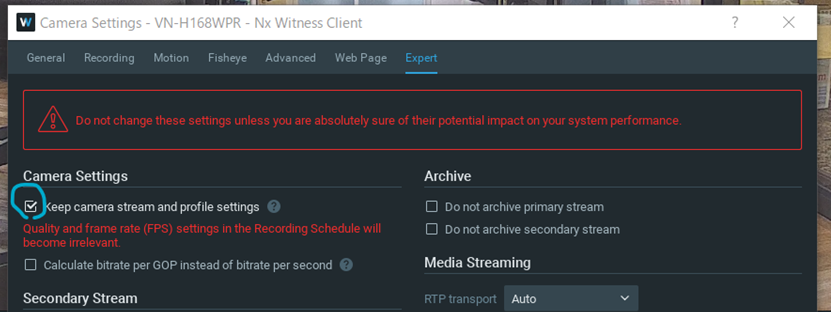
Thank you for prompt reply. I have checked "keep camera stream and setting profiles", then no error message and it works properly. May I know any possibility for the root cause?
 0
0 -

Hi @...,
With the current information, we cannot make a solid statement regarding the root cause, but based on the issue and its solution, the most likely scenario is the way JVC implemented Onvif.
0 -
Hi Norman,
Thanks. Okay I understood the implementation of JVC Onvif caused it.
Regards, Kei
0
Please sign in to leave a comment.
Comments
4 comments