problemen met nx witness bij een klant van ons
Answered
Probleem 1:
Als we geconnect zijn met de UTRNX1 kunnen we bepaalde camera’s niet meer draaien.
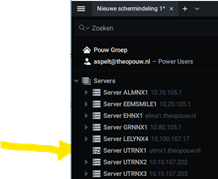
Dit zijn als voorbeeld de Camera’s Utr CTU Parkeren, Utr Betoncentrale en Utr Isotopenweg 15. Dit is nu nog steeds het geval.
Verbinden we met een andere server dan gaat het wel.
Probleem 2:
We zien dat de UTRNX1 de Cloud master-server is. Kan dit worden aangepast naar b.v. UtrNx2? En kan dat ook door ons worden aangepast?
Ik denk namelijk dat onze mobiele devices ook naar de UtrNX1 connecten via de cloud.
Probleem 3:
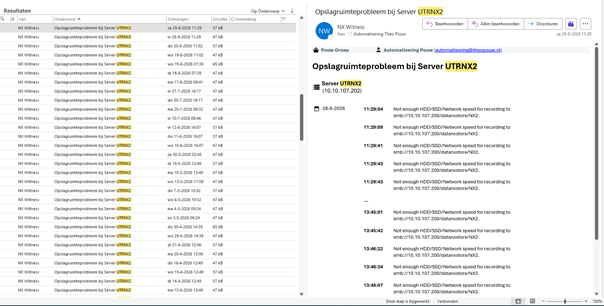
We ondervinden problemen met de Datastore hier in Utrecht.
(ter info: Dit heeft dus niets met de Qnas uit EH te maken).
We hebben de HP server al helemaal nagekeken waarop deze datastore draait.
En het zit allemaal op hetzelfde 107 Vlan. Maar we ervaren veel meldingen in de logs.
-

Hi Michael Reijerse,
Please note that our community language is English. To ensure everyone can participate and assist you, please update your topic in English as non-English posts will be removed.
Here is an overview of the issues you reported:
- Problem 1: Connection Timeout / Network Block It appears that communication is being blocked between UTRNX1 and the remote sites (Utr CTU Parkeren, Utr Betoncentrale, and Utr Isotopenweg). This points to a networking issue, please consult your network administrator to review firewall rules and routing between these endpoints.
- Problem 2: Cloud Master Server Architecture There is no dedicated "Cloud Master" server in this architecture. Instead, system connections dynamically route to whichever server responds the fastest.
-
Problem 3: Storage & Throughput Bottleneck Although the screenshot resolution makes it slightly difficult to read, the image suggest an HDD/SSD throughput issue with your SMB-mounted storage. This usually occurs when the Video Management System (VMS) sends data faster than the storage backend can process and write it.
Common root causes include:
- Shared Storage Overhead: Multiple servers or heavy applications writing to the same external SMB share simultaneously.
- RAID Configuration Issues: Using a single RAID volume per server might disrupt the VMS's default storage management mechanism. Additionally, RAID write penalties can severely reduce total available IOPS (with software RAID generally performing worse than hardware RAID).
- Lack of Caching: External SMB storage often benefits significantly from SSD/NVMe read/write caching to absorb heavy traffic spikes.
Because troubleshooting performance bottlenecks depends heavily on your specific hardware and network infrastructure, we strongly recommend contacting your Authorized Nx Reseller. They can conduct a deeper dive into your environment, diagnose the exact bottleneck, and escalate the issue if needed.
Best regards.
0
Please sign in to leave a comment.
Comments
1 comment