Using event metadeta in Show Text Overlay, Notifications etc
Answered
Looking for the ability to use infomation in the metadata of an event out side of the already provided {event.*} options.
For example I have included JSON (fetched using the V4 API) of an event received from a camera.
{
"timestampMs": 1788924739095,
"eventData": {
"attributes": [
{
"name": "Country",
"value": "AUS"
},
{
"name": "Number",
"value": "YUT327"
},
{
"name": "nx.sys.description"
}
],
"boundingBox": {
"height": 0,
"width": 0,
"x": 0,
"y": 0
},
"caption": "",
"description": "",
"deviceId": "07b4f9a2-a72d-31a2-94d0-2bfc9059f59a",
"engineId": "cb4a4ec3-31e4-7fe7-ba2a-e3464b407edc",
"eventTypeId": "nx.axis.event.LicensePlateDetected",
"key": "",
"objectTrackId": "00000000-0000-0000-0000-000000000000",
"state": "instant",
"timestamp": "1788924739095651",
"type": "analytics"
},
"actionData": {
"detailing": "Country: AUS Number: YUT327",
"deviceIds": [
"07b4f9a2-a72d-31a2-94d0-2bfc9059f59a",
"f10f1937-4ded-c6fe-96cb-0b0d74456ed0"
],
"duration": "5000000",
"extendedCaption": "License Plate detected at Roadway-South-LPR (X) (X)",
"id": "X",
"originPeerId": "f71b5a0e-0d44-decd-d9c8-af9c512e583e",
"ruleId": "16d11bc5-5445-49ad-91f5-467461d71a56",
"state": "instant",
"text": "",
"timestamp": "1788924739095651",
"type": "textOverlay",
"users": {
"all": true,
"ids": []
}
},
"aggregatedInfo": {
"total": 1,
"firstEventsData": [],
"lastEventsData": []
},
"ruleId": "16d11bc5-5445-49ad-91f5-467461d71a56",
"flags": "videoLinkExists"
},
We would like to be able to display the value of “Number”, in “attributes” of “eventData”.
A first guess would think that something like {eventData.attributes[1].value} would be the correct way but that doesn't seem possible.
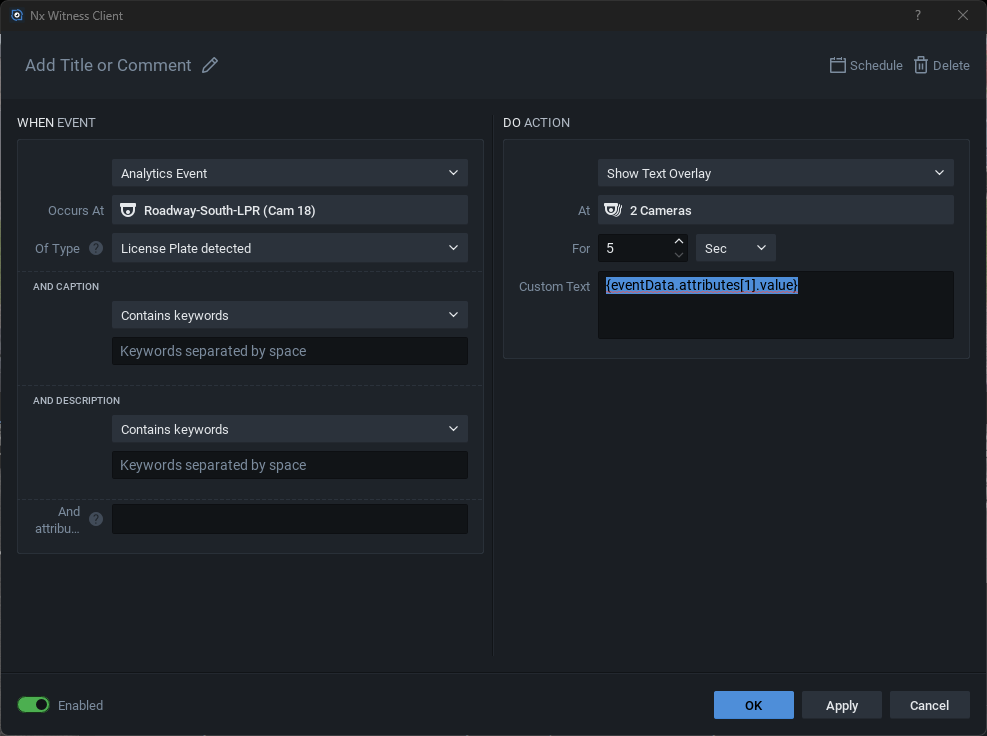
Any pointers on how to achieve the end goal?
-

Hi Nathan Blaney,
By default, the following values can be used for the Text Overlay:
{device.type}{device.mac}{device.name}{device.ip}{device.logicalId}{event.type}{event.source}{event.caption}{event.description}{event.timestampUs}{event.time{event.timestamp}{event.name}{server.name}{site.name}
Anything else, should be transferred to, the
{event.xxxx}values when creating the plugin.
With kind regards.0 -

Thanks for your question.
What you're looking at is the "response" from the API, but what you're trying to use is the "placeholder" for event parameters. These are two genuinely different things, and they're used in different ways and components.
The placeholder is a Desktop Client feature, used for display purposes. It's available whenever the server exposes the attribute you're after.
The API response, on the other hand, has nothing to do with the Desktop Client.
It's the schema the server uses to respond to an API request. So applying an API schema within the Desktop Client isn't feasible; the two don't map onto each other.The available attributes come from whichever plugin you're using.
Whatever that plugin provides gets flowed through into the list of attributes you can reference.
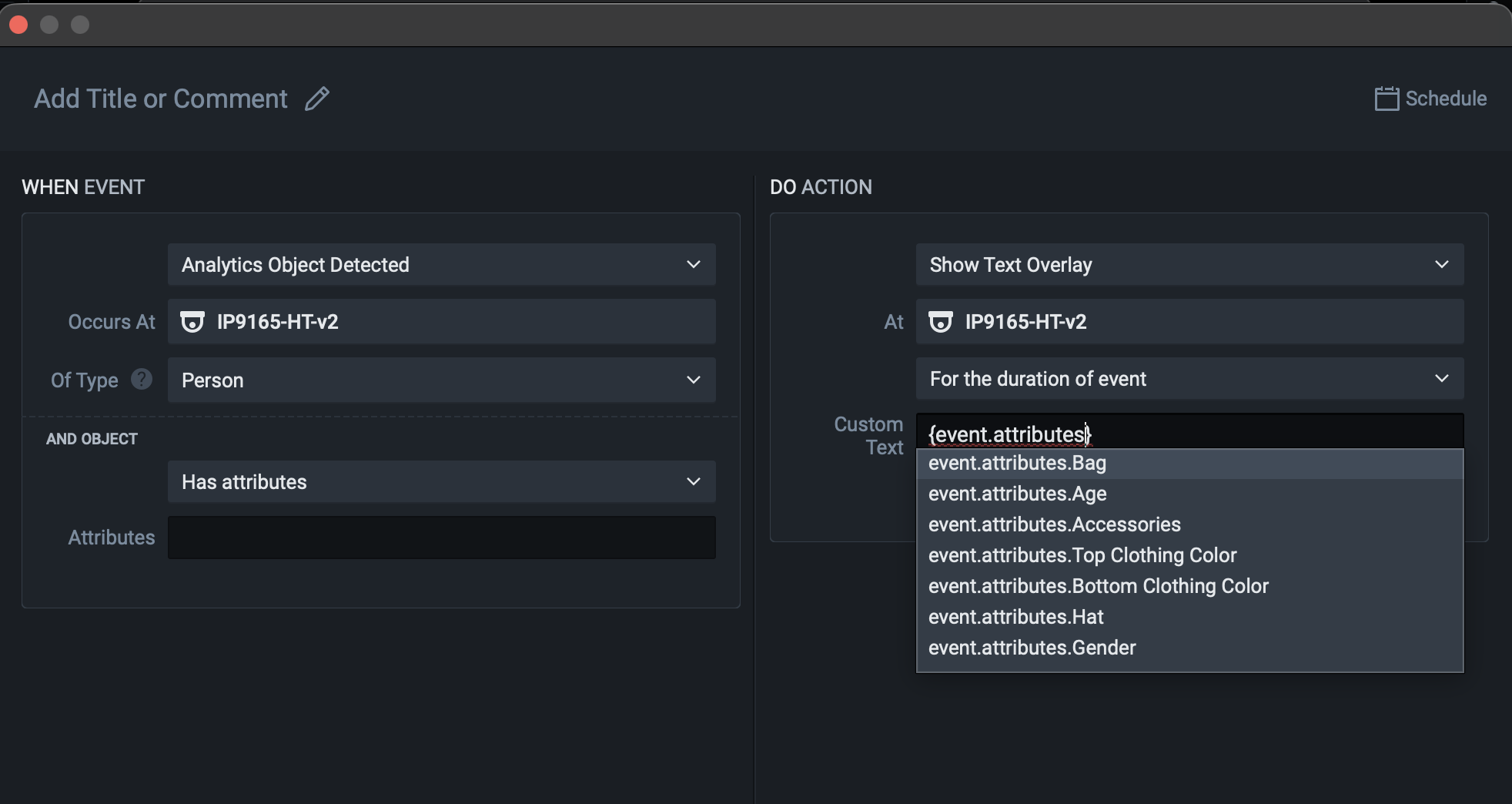
The correct syntax is {event.attributes.*}, assuming the plugin does provide that value.
Hope this helps.
0
Please sign in to leave a comment.
Comments
2 comments