v6.1 rest API starting to report unsupported MediaType
Answered
Previous versions are OK, something has changed somewhere..
This now returned from http POST request:
responseText = "{\"error\":\"10\",\"errorId\":\"unsupportedMediaType\",\"errorString\":\"Unsupported content type.\"}"
/rest/v1/login/sessions
Any ideas before digging deeper?
Cheers.
-

Hi Richard,
Thanks for your question, but the information seems quite limited.
Can you please elaborate what you have requested and maybe the body and full story as well?Thanks.
0 -
Hi,
POST request:
https:127.0.0.1:5001/rest/v1/login/session
c# code:
RootSessionRequest rsr = new RootSessionRequest();
rsr.username = user;
rsr.password = pass;
rsr.setCookie = true; curlConfig = @"https://" + _rolloverServerList[activeRolloverURI] + ":" + this._cred.MM_CRD_PORT_ACCESS + @"/rest/v1/login/sessions"; mmMessage = MMWebReq.Post(JsonConvert.SerializeObject(rsr, Formatting.None), @"application/json", curlConfig, user, pass);
I've tried two differrent POST styles, see attached image.
Customers are reporting that all was OK in NX v 6.0.6.
Anything changed in this area?
Cheers
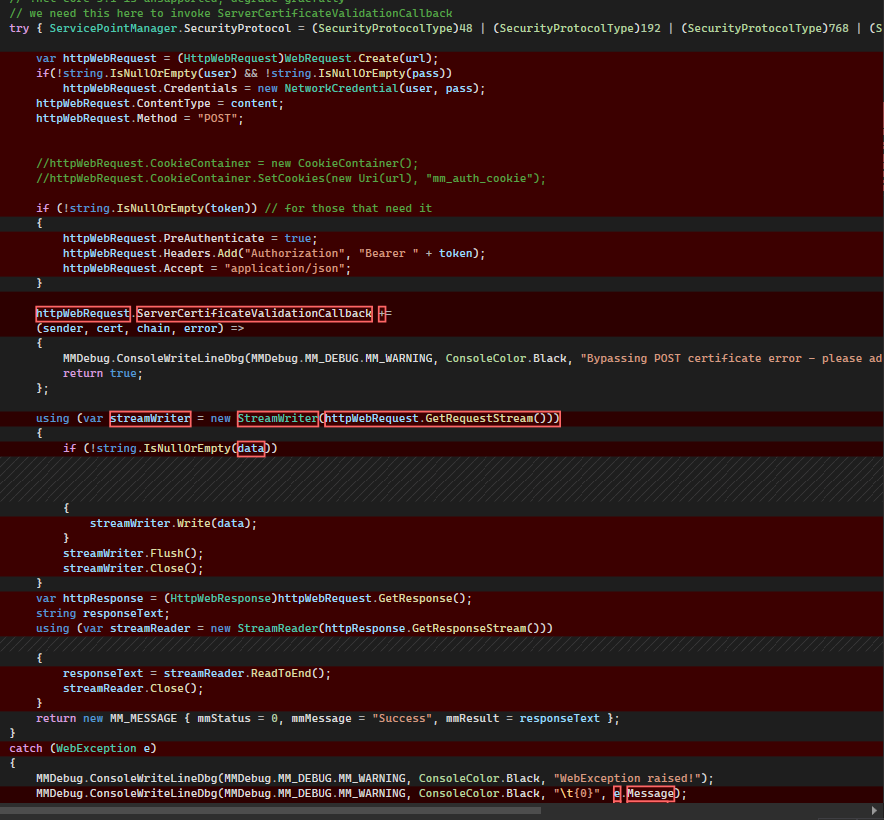
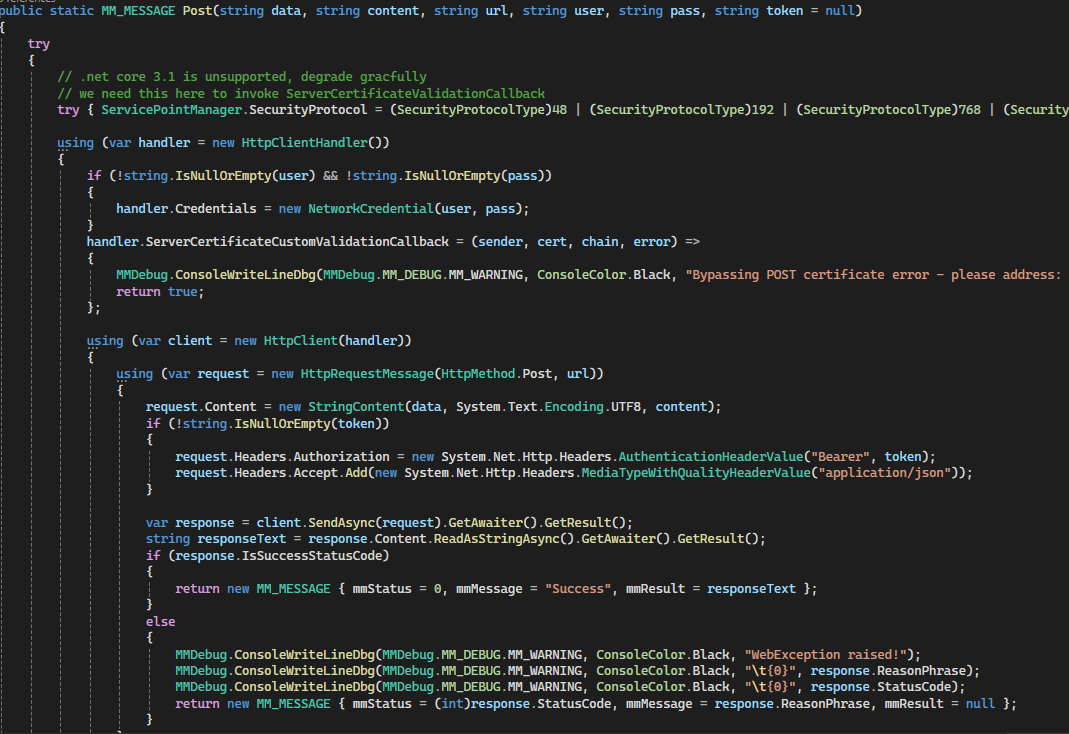 0
0 -
Hi Richard,
Thanks for sharing the code snippet. To troubleshoot this properly, we’ll need to see the exact request body that is being sent out (and ideally the full request details including headers/content-type, if possible).
As far as I’m aware, there have been no API changes for this flow. I can still use /rest/v1|v2|v3|v4/login/sessions to obtain a token on v6.1.0 without additional modifications to the request body.
https://drive.google.com/file/d/1Vu7ERAIZ9xTsCnam_CQBUgReh_pOpjB0/view?usp=sharing
Given that, it’s more likely this is caused by something unexpected in your implementation—such as a change in the request payload structure, encoding, or how the body is built—rather than the POST “style” itself.
If you want to proceed, please share the actual payload being sent (raw JSON/form body) in a real sample, That may help us quickly confirm what’s different and pinpoint the issue.
0 -
Hi Ichiro,
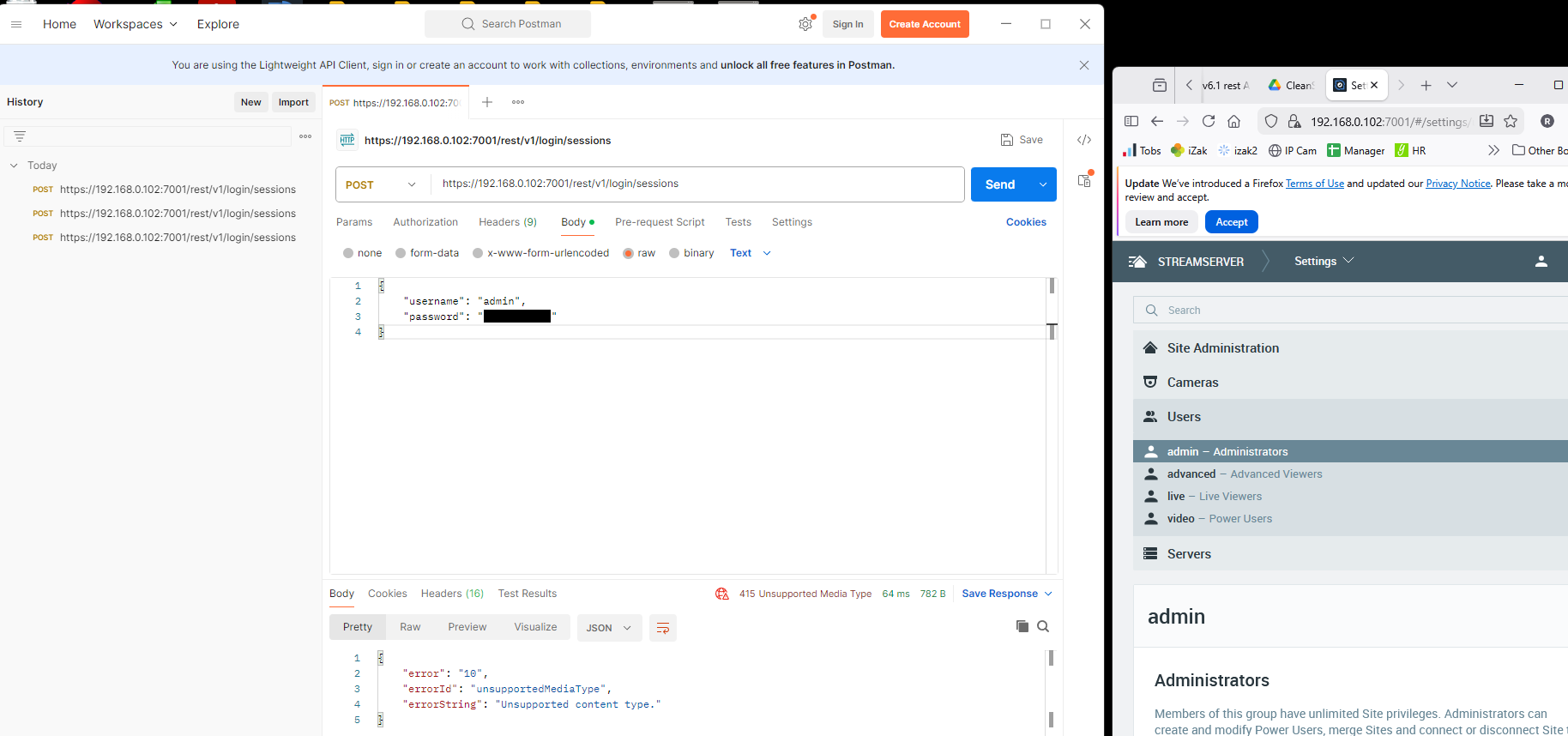
Tested with post man, suprised to see the same result, v1 - v4 tested, see image below, any advice on the test?
 0
0 -

Hi richard lince,
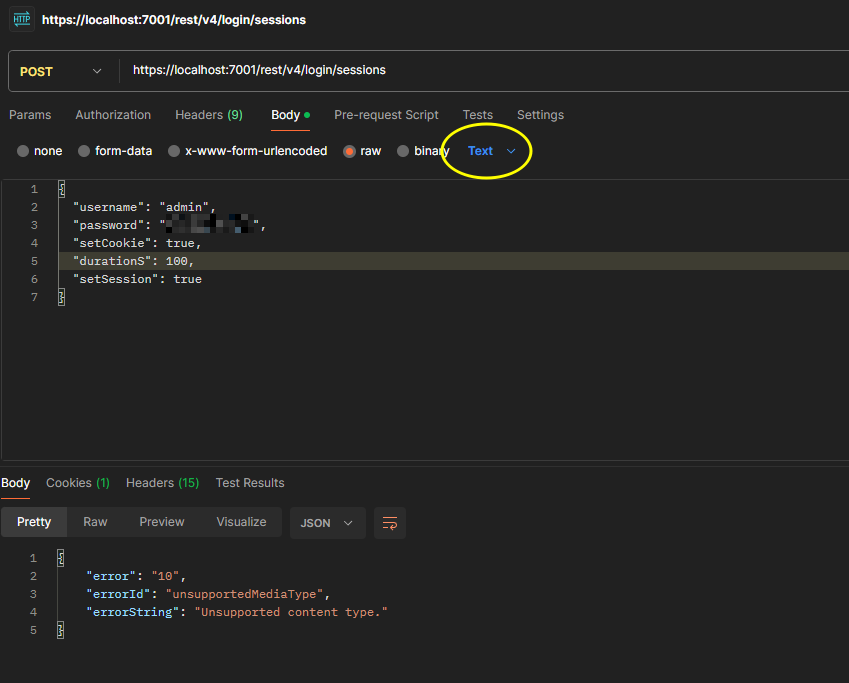
The body you use is incomplete, and not marked as JSON. See below:
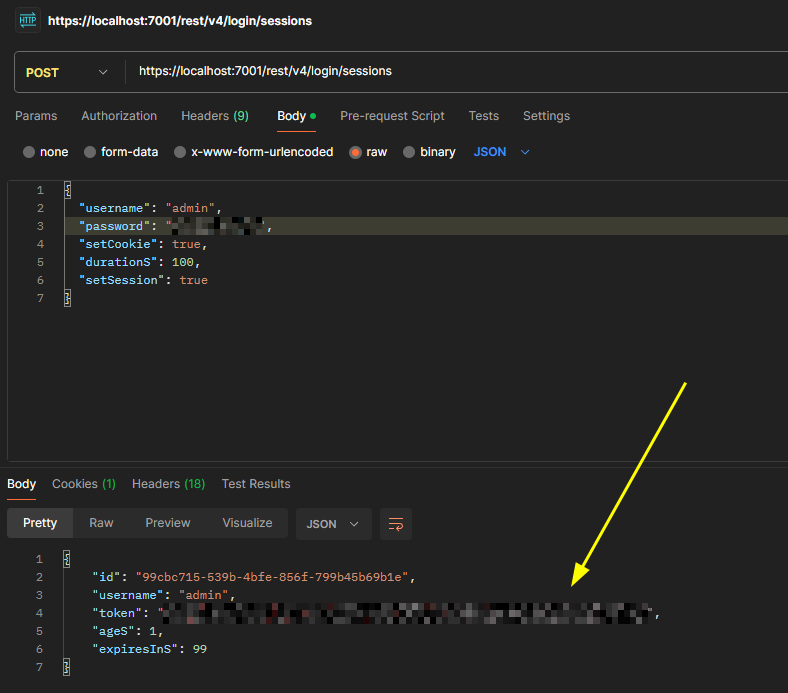
If I use Text, I'll get the same result as you got:
 0
0 -
Hi Ichiro,
OK, thats PostMan working as expected. However, the c# version remains broken. I've written a simple C# program, can you test please?
using System;
using System.Net;
using System.Net.Http;
using System.Text;
using System.Text.Json;

public class Class1
{
    public class RootSessionRequest
    {
        public string username { get; set; }
        public string password { get; set; }
        // public bool setCookie { get; set; }
    }

    public static void Main()
    {
        // Example RootSessionRequest object
        var sessionRequest = new RootSessionRequest
        {
            username = "admin",
            password = "pass"
        };

        string url = "https://192.168.0.102:7001/rest/v1/login/sessions";
        string json = JsonSerializer.Serialize(sessionRequest);

        ServicePointManager.SecurityProtocol =
            SecurityProtocolType.Tls13 |
            SecurityProtocolType.Tls12 |
            SecurityProtocolType.Tls11 |
            SecurityProtocolType.Tls;

        ServicePointManager.ServerCertificateValidationCallback +=
            (sender, cert, chain, sslPolicyErrors) => true;

        using (var handler = new HttpClientHandler())
        {
            handler.ServerCertificateCustomValidationCallback =
                (sender, cert, chain, sslPolicyErrors) => true;

            using (var client = new HttpClient(handler))
            {
                var content = new StringContent(
                    json,
                    Encoding.UTF8,
                    "application/json"
                );

                var response = client
                    .PostAsync(url, content)
                    .GetAwaiter()
                    .GetResult();

                string responseBody = response.Content
                    .ReadAsStringAsync()
                    .GetAwaiter()
                    .GetResult();

                // Handle response
                Console.WriteLine($"Status: {response.StatusCode}");
                Console.WriteLine(responseBody);
            }
        }
    }
}
0 -
Hi Richard Lince,
I don’t think this is related to Nx itself. It appears to be an issue with the C# implementation on your customer’s side. Since POSTMAN works correctly, this almost confirms that the problem lies in the actual code implementation. Also, the statement “previous versions are OK” may not always be accurate. It is likely just the customer’s assumption.
Based on the error message, it is highly likely that the request body/content is not correct.
For example, the payload may be sent as plain text or another format instead of JSON. In such cases, receiving an Unsupported Media Type response is expected behavior. Looking at the code snippet (note that we do not troubleshoot or test external code), you may want to check the line:
using System.Text.Json;In some .NET versions, the charset can be misinterpreted, causing the request body to be treated as text rather than JSON. In certain older .NET implementations, specifying the charset may also lead to unexpected issues. You may want to verify this behavior in your customer’s environment.
var content = new StringContent(
                    json,
                    Encoding.UTF8, //not requried.
                    "application/json"
                );
Alternatively, you can use
PostAsJsonAsync(using System.Net.Http.Json; )using System.Net.Http.Json; //... using (var handler = new HttpClientHandler()) { //..... using (var client = new HttpClient(handler)) { // use PostAsJsonAsync,handling Content-Type: application/json var response = client.PostAsJsonAsync(url, sessionRequest).GetAwaiter().GetResult(); //... } }So far, we still do not see the actual request body generated by the sample code. As a result, we are unable to provide more specific feedback. However, based on the successful POSTMAN test, we are confident that the API itself is functioning correctly. At this stage, the most appropriate troubleshooting direction is to:
- Inspect the request body generated by the C# customer’s code, and
- Verify the content type and payload format* (MOST important)
For your reference, Nx does not test any third-party code. This is a strict policy driven by information security and integrity under a zero-trust approach. Since we cannot verify what external code may do, we must decline any requests to test such code. We appreciate your understanding on this matter.
Thanks.
0 -
Hi,
Both customers in the field see the same error as we do, for now they have downgraded sites back to version v6.0.6, all is OK
Maybe its a Windows platform setting, pushed from updates or IT, however, with the basic http C# request code sample, I can talk to our very similar bluebox JSON API, no issue.
I'm more a low level programmer, can you instruct on how to obtain the request body created by C#? Wireshark is no good as encoded over https? Alternatively, if you could put together a similar simple hardcoded c# example without using my code, I can test that here (took mt 5 minutes :).
I'll keep digging.
Thanks.
0 -
Hi Richard,
I used your code, slightly refactor it and test on Nx Witness 6.1.0. It is likely the charset causing the issue.
using System;
using System.Net;
using System.Net.Http;
using System.Text;
using System.Threading.Tasks;
using System.Web.Script.Serialization;

public class Program
{
    public class RootSessionRequest
    {
        public string username { get; set; }
        public string password { get; set; }
    }

    public static void Main()
    {
        RunAsync().GetAwaiter().GetResult();
    }

    public static async Task RunAsync()
    {
        string url = "https://172.19.7.11:7001/rest/v1/login/sessions";
        var sessionRequest = new RootSessionRequest { username = "admin", password = "Admin12345" };

        ServicePointManager.SecurityProtocol = (SecurityProtocolType)12288 | (SecurityProtocolType)3072;

        var handler = new HttpClientHandler()
        {
            ServerCertificateCustomValidationCallback = (m, c, ch, e) => true
        };

        using (var client = new HttpClient(handler))
        {
            try
            {
                var serializer = new JavaScriptSerializer();
                string json = serializer.Serialize(sessionRequest);
                var content = new StringContent(json, Encoding.UTF8, "application/json");
                content.Headers.ContentType.CharSet = ""; // remove charset

                Console.WriteLine("Send requests...");
                var response = await client.PostAsync(url, content);
                string result = await response.Content.ReadAsStringAsync();

                Console.WriteLine($"Status: {response.StatusCode}");
                Console.WriteLine($"response: {result}");
            }
            catch (Exception ex)
            {
                Console.WriteLine($"Error: {ex.Message}");
            }
        }
        Console.WriteLine("Any keys...");
        Console.ReadKey();
    }
}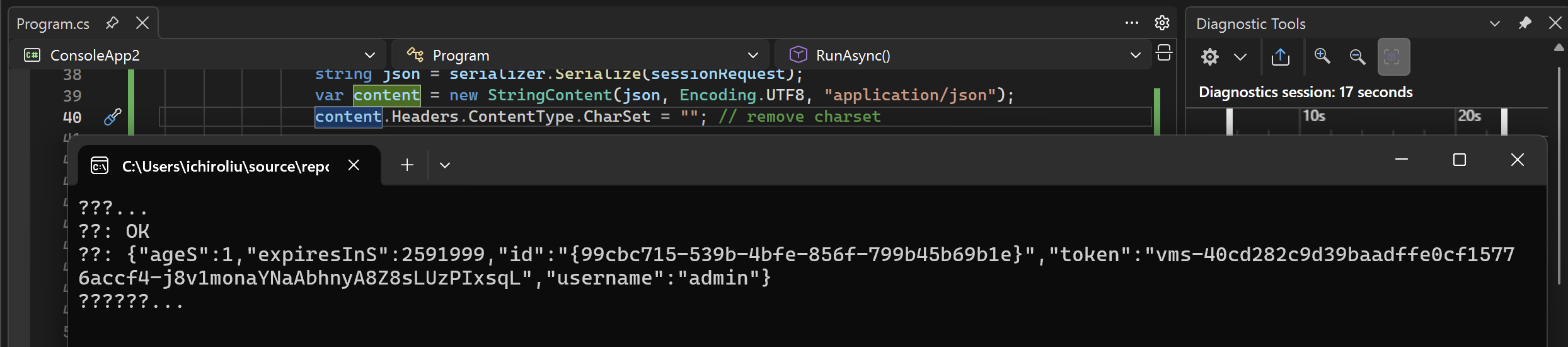
This change will force the header from
application/json; charset=utf-8to pureapplication/jsononly.Please check if that works.
I am not sure if this is something changes recently introduced, but using application/json is the right way all the time.Thanks.
0 -
Hi Ichiro,
That's fixed it.
I'll leave it with you, could be a Windows update or API change from my deductions.
Thank you very much for your excellent support.
Richard.
0 -
Hi Richard,
Thanks for the confirmation.
I think this is something on the Nx server side likely after a few more tests, and this issue has been reported and should be fixed(or resume) in the 6.1.1 version I believed.
0 -
Hi Ichiro,
FYI, I also had to change the content string from:
"application/json; charset=utf-8"
to
"application/json"
But only in POST methods..
Assume all changes are backward/forward compatible and that my latest mods will work with all versions?
Cheers.
0 -
Hi Ichiro,
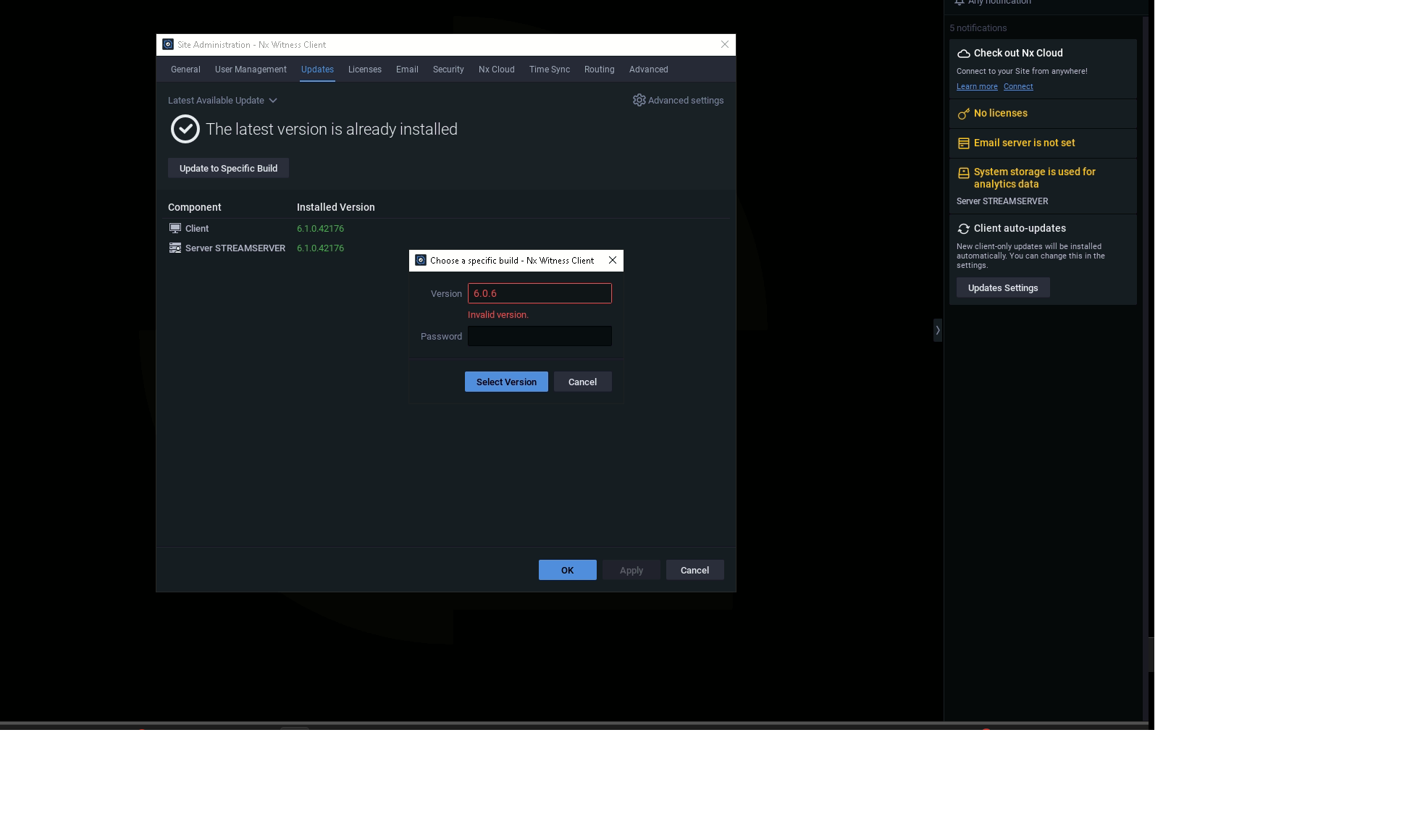
I've sites that need a fix asap, can you confirm the question above? I've tried to answer myself by downgrading the Nx install to v6.0.6 but the GUI is suggesting this is an invalid build? See image below.
Cheers.
 0
0 -
Hi Richard,
Regarding version 6.0.6.41837, here are the details you'll need:
- Build Number: 41837 (i.e. it is the build number)
- Password: tqzzq6
Please note that the downgrade cannot be performed via the in-client update tool. You will need to uninstall and then reinstall the mediaserver manually. You can refer to this Knowledgebase Article for the specific steps on this operation.
I also recommend searching our knowledgebase for additional instructions if you run into any hurdles.
Thanks!
0 -
Assume all changes are backward/forward compatible and that my latest mods will work with all versions?
The fix will be included in the 6.1.1 patch. Once this fix is applied, there will be no need to remove the charset anymore.
After 6.1.1, there is no compatibility concern i.e. - with charset should work as expected, and this behavior will be maintained going forward.
In short - The same code should work correctly with 6.0.6 and 6.1.1. For 6.0.0, however, removing the charset will likely still be required.
0 -
Hi Ichiro,
OK, probabily easier for me to test the patch moving forward with the new code from Nx and our new code removing the character set, covers *most cases.
How / when do you have the 6.1.1 patch?
Cheers.
0 -

Hey Richard,
Sorry for the delayed response.
6.1.1 is going through the QA finalization at this very moment.
So likely will be available in one of the upcoming weeks unless critical bugs are discovered during the cycle.Please stay tuned!
0
Please sign in to leave a comment.
Comments
17 comments