How to update ROI dynamically?
Answered
Hi,
Our company has a smart camera that outputs an RTSP stream containing metadata. I'm currently able to draw bounding boxes, but I'm unable to dynamically adjust the ROI. Is there a way to achieve this?
Thanks
-

Hi 高偉恆
Can you elaborate more about “update ROI dynamically”?
0 -
Hi Ichiro,
The ROI metadata embedded in our Smart Camera's RTSP stream is adjusted based on the user's configuration through our Smart Camera web interface. I would like the ROI displayed on Nx to update synchronously. What's the best way to implement this feature? Thanks a lot.0 -
Hi 高偉恆
Thank you for your response.
When you mentioned that the function is “able to be updated,” could you please clarify what that means in detail? Do you mean something like the line for line-cross detection can be modified or moved? Or that the detection area (ROI) can be changed dynamically during operation?
At the moment, I’m not entirely sure what your customer is trying to achieve. However, in most cases, if the ROI function is implemented in your plugin, it should be possible to modify it directly through the Nx Desktop Client, and then have those settings written back to the camera configuration.
The reason we’re asking for clarification is to better understand the user experience and data flow.
In your example, the customer has already added the camera to Nx and is viewing the video through the Nx Desktop Client. In that case, what would be the purpose of going to the camera’s web interface to make changes? Typically, ROI or similar camera parameters are configured directly through the device plugin settings page within Nx.Please also note that ROI and camera settings generally follow a server → device flow — meaning Nx pushes configurations to the camera. As you may know, the SDK provides methods such as getPluginSideSettings() and doSettings() to handle this.
That said, I don’t see a mechanism where the mediaserver can poll the camera regularly for ROI updates. Therefore, it might be worth revisiting the intended use case — or perhaps you could share more details about the exact scenario?
If your device can send ROI changes back to the mediaserver, then yes, you could use getPluginSideSettings() and doSettings() to update or overwrite ROI settings dynamically. However, this would not represent an ideal user workflow.
In summary:
- The SDK provides methods such as getPluginSideSettings() and doSettings() to update ROI shown on the Desktop Client.
- You would need to design your own method to push updated ROI data from the camera to the server. The mediaserver will not poll cameras for this information, and there’s no built-in feature for that.
- Could you please clarify the exact use case that requires this reversed data flow (camera → server)?
0 -
Hi Ichiro,
I have to admit, we did this to reduce communication effort—so we embedded all the metadata into the RTSP stream and made modifications through the web interface. We didn’t implement any interface between the server and the device. We just use Nx client as a viewer now.Currently, we can indeed retrieve ROI metadata via
getPluginSideSettings. Based on what you said, it seems we can usedoSettings()to trigger an update, which might be feasible.At the moment, the entire data flow is one-way: Camera → Server. All data is carried solely through the RTSP stream.
Thanks
0 -
Hi 高偉恆
Thanks for the update and information provided, now I understand why this request came
getPluginSideSettings()is to summary the changes of the settings, so the source could be either from the Desktop Client or you feed the configurations, in your case, will be your RTSP Stream embeded metadata.Based on what you said, it seems you might be able to achieve the feature by
getPluginSideSettings()and doSettings()0 -
Hi Ichiro,
I'm currently using
getPluginSideSettings()to render the ROI, which works fine. However, when I adjust the ROI through our web interface, the Desktop Client doesn't update accordingly. Is there an API available that allows me to update the ROI dynamically?Thanks
0 -
Hi Ichiro ,
Any update of this issue?
Thanks
0 -

Hello,
> Is there an API available that allows me to update the ROI dynamically?
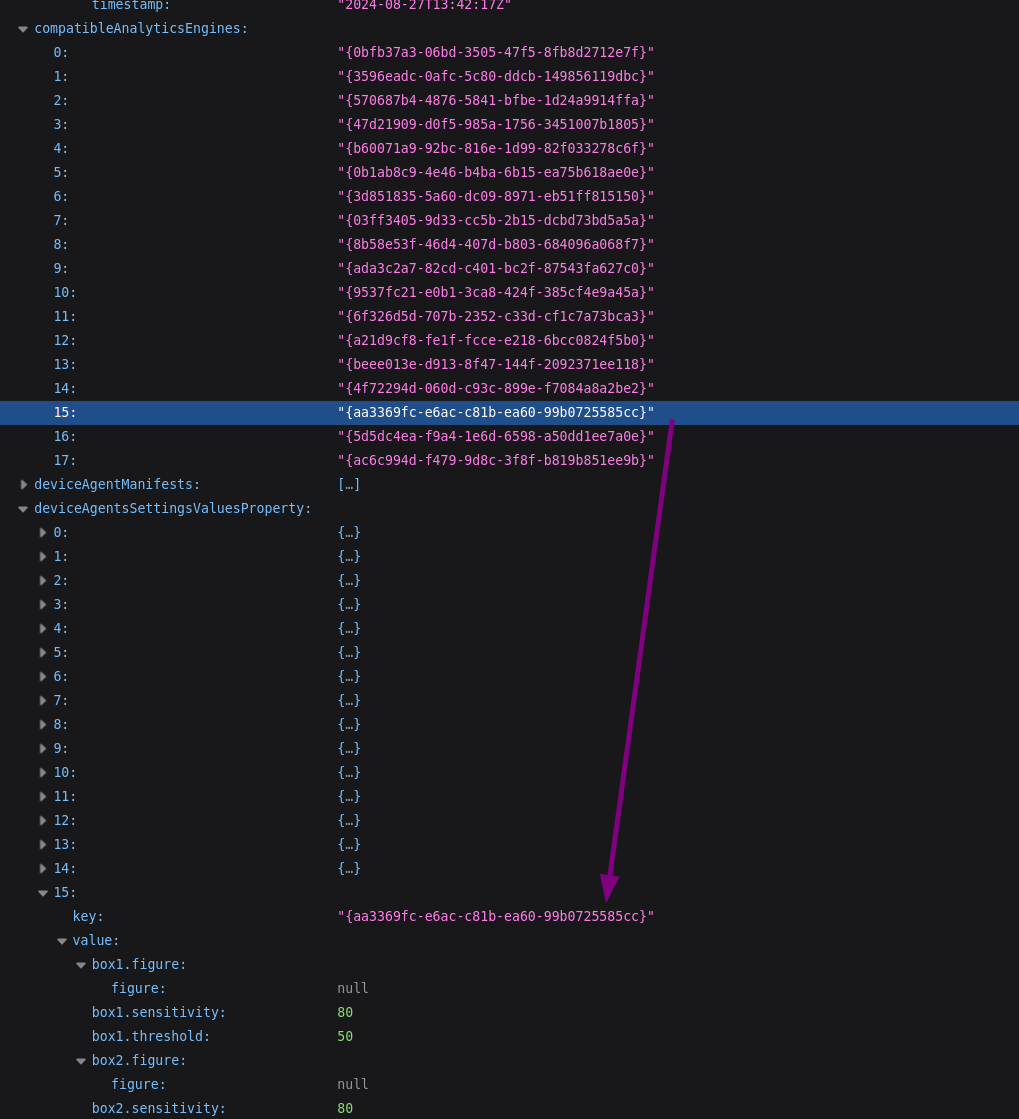
1. You can determine engine id by invoking /rest/v3/analytics/engines2. Update ROI settings with /rest/v2/devices/{id} endpoint. Where id is a camera id.
The keys in response you need are the following.
compatibleAnalyticsEngines - list of device Engines (aka plugin available on this specific camera)
deviceAgentsSettingsValuesProperty - a list of settings values per Engine. Engine id is stored in the "key" parameter.
For example, see the screenshots attached.
The Excluded Area ROI object in the Stub: ROI plugin and its corresponding values in the API HTTP response.
0 -
1
-
Hi Andrey,
I'll try it soon
Thanks
0
Please sign in to leave a comment.
Comments
11 comments