Storage display with Ubuntu Desktop Client
Answered
Hello,
I cannot operate the storage setting because it is shown "Reserved" in Storage Management with NxWitness Ubuntu client(Ver4.1.0.31398).
The same storage is shown correctly in Storage Management on NxWitness Windows client(Ver4.1.0.31398).
Could you tell me any solutions?
Thank you.
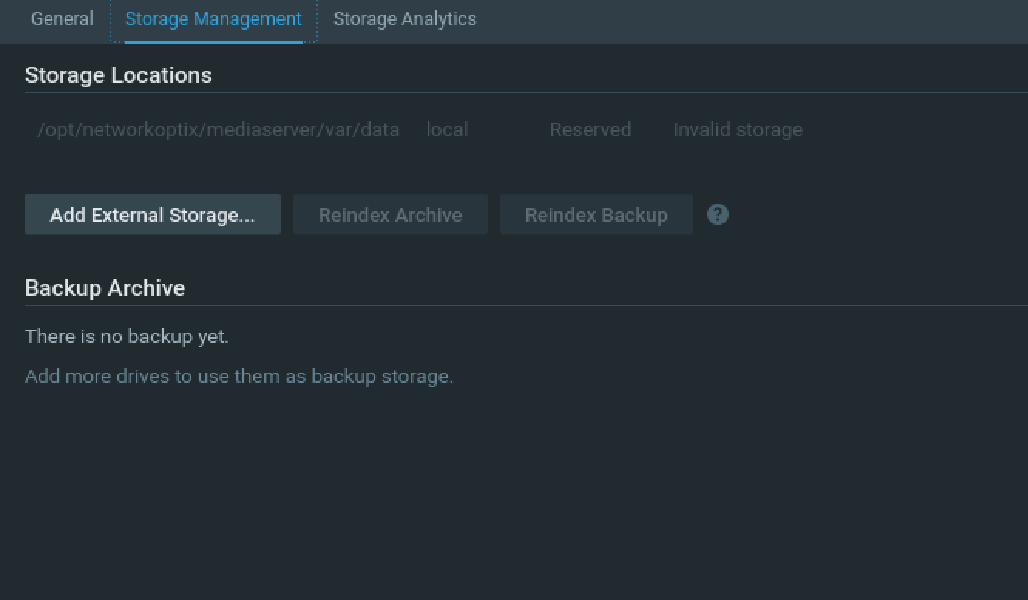
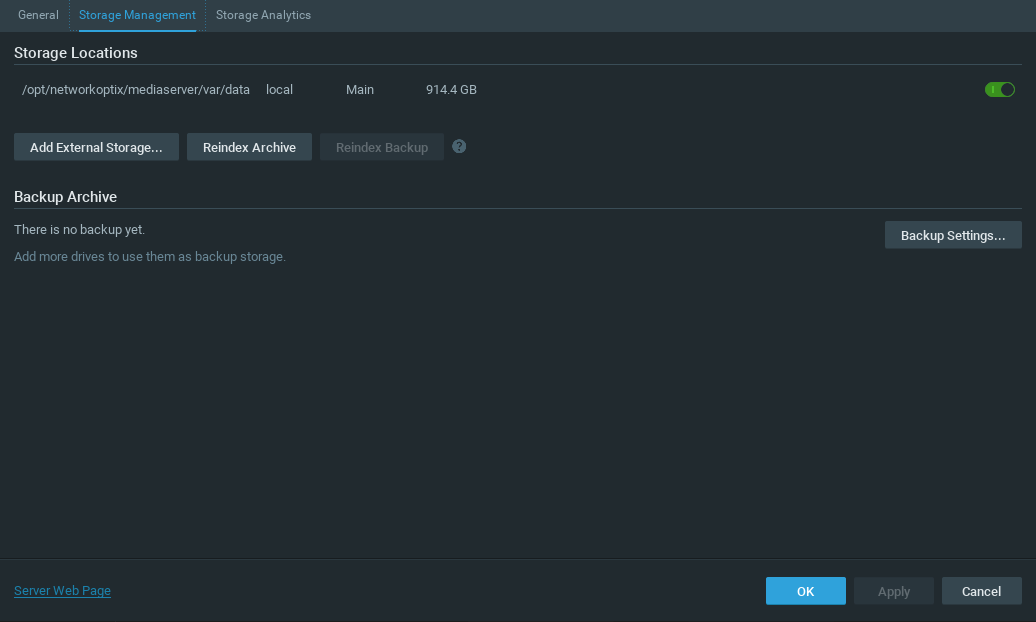
-

Hi Yossy .
This is likely caused by the HDD is not mounted correctly.
You can check mounted point of all the HDD/Storages.It is suggested that you can -
1) Stop the Nx Witness mediaserver.
2) Unmount your storage if you had.
3) Mount the storage back if you had.
4) Start the Nx Witness mediaserver again.You can also try to edit the stab file to configure the storage to be mounted while it is booted.
So far, it is looking like a OS side configuration mismatched.Thanks.
0 -
Hi Ichiro,
Thank you for your reply.
You seem to say this issue is due to NxWitness server. Is is correct?
It happens only to NxWitness Ubuntu client.
When I connect to some NxWitness server with Ubuntu client, I can find the same issue on all NxWitness server.
However, when I do with Windows client, I cannot find the issue.
It would be helpful if you explain a little more.0 -
Hi Yossy .
1) If you are using Windows/Ubuntu Client to access the same Nx Witness mediaserver, then it is likely an issue that we need to investigate.
2) If you are saying using Windows and Ubuntu Client to connect different Nx Witness mediaserver, then it is another topic then.
Can you confirm which case it is?
If it is the first case, then we will need to investigate then.Before we start to investigate, it is recommended and necessary to update the Nx Witness to the latest patch and please help to make sure the issue persists after update.
https://my.networkoptix.com/#/download
Build Number: 32405
Password: h985lc
Thanks.0 -
Hi Ichiro,
Sorry for my late reply.
It is 1) and not Windows Client but Ubuntu Client.
I tried NxWitness Ver.4.1.0.32405, but the issue still happens.0 -
Hi Yossy .
It looks like the issue is due to the disk/HDD was not mounted while Nx Witness was started.
This would be the operation system configuration part most likely.
Please confirm you have mounted the storage before the application was started.You can edit the "/etc/fstab" to make sure the operating system help you to automatically mount the storage every time while the machine is powered up. You can refer to this instruction - edit the "/etc/fstab" and add one new line for the storage that you would like to record on.
That should be helping to solve the issue.
Thanks.0 -

HI @...,
Just checking in to make sure you received our response as it has been a while since we have heard from you. Please let us know if you still need help by responding to this message.
0 -
Hi Ichiro and Norman,
Sorry for my late reply.
When the issue occurred, I checked the "/etc/fstab", but the storage was mounted.I found one recovery way from the issue.
When I display Storage Management after displaying Camera Settings,the storage setting is not shown "Reserved" but normally shown.0 -
Hi Yossy .
Thanks for getting back to us.
Can you provide the screen recording of the way you saw the issue and recover it?If possible, can you also provide the DEBUG server log of the whole procedure?
It would be appreciated and good to investigate the issue.In your case, you might need to use "Configuration File option", so it can audit all the log from the server start. You can find the instruction HERE.
Thanks.
0 -
Hi @...
We have not heard back from you in a while, so we are going to assume your question has been answered and set this topic to 'Answered'.
0 -
Hi Norman,
Sorry for not getting back to you.
I found the recovery way, so there is no problem to set the topic to "Answered".
Thank you.0
Please sign in to leave a comment.
Comments
10 comments