NX1 Update Error
Answered
When trying to update our NX1 firmware we get the following error message:
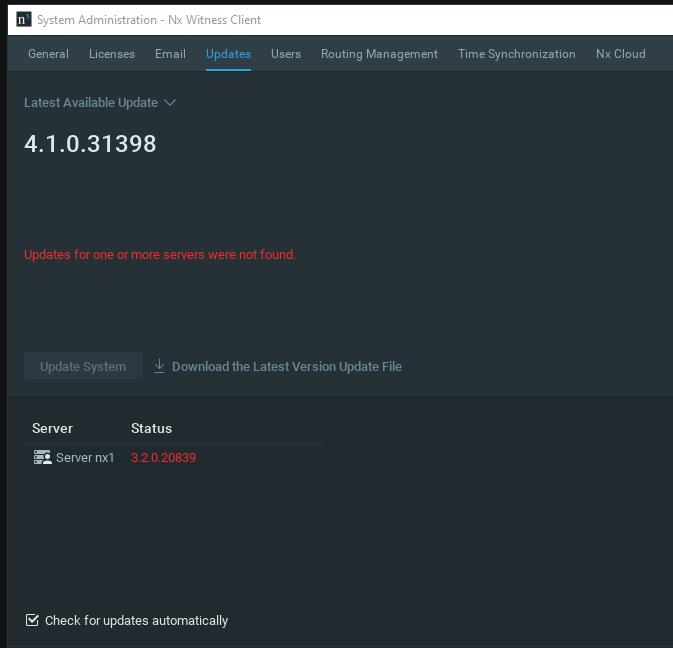 How can we update to at least version 4.0?
-

Hi @...,
You can use the following in-client upgrade credentials:
In-Client Upgrade:
Build Number: 31274
Password: t1u71tWith these credentials, you can upgrade to Nx Witness 4.0.0.31274, which is the latest available version for the Nx1. If you want, you can deactivate the license keys on the Nx1 and activate them on newer, supported, hardware and continue to upgrade to 4.1.
The license keys can be activated up to 3 times, before they void.
0 -
Hi Norman,
thanks for the quick response.
Short (and possibly stupid) question: What does "In-Client-Upgrade" mean? How can i invoke it?
Dieter
0 -
Hi @...,
Short, but certainly not stupid.
1. Open Main Menu > System Administration (Ctrl+Alt+A) > Updates tab.
2. Click on the Latest Available Update menu and choose Specific Build.
3. In the dialog that opens, enter the build number and the corresponding password, then click Select Build.In general, short questions are answered in the in-client manual, longer questions as well, but also in our knowledge base.
0 -
Hi Norman,
this worked fine. The server is now running version 4.0.0.31274.
Since the client has version 4.1.0.31398 it restarts in compatibility mode.
When accessing a camera I get the error message "Unauthorized. Please check authentication information". In Camera Settings > Edit Credentials I entered the login name and password which I use to connect to the camera directly via its IP address. But this didn't help. Any idea to overcome this problem?
Is it possible to download a 4.0 client to avoid this compatibility issue?
0
Please sign in to leave a comment.
Comments
4 comments