Metadata fail on Vivotek VCA
Answered
-

Hi chris gill,
Please be a bit more specific what you mean with metadata streaming fail? If you can describe the expected behavior and the actual behavior, it would help us to understand what it is you want to achieve.
The following analytics are integrated for VIVOTEK as of today:
Vivotek
The Vivotek Smart Events integration was based on the Smart VCA API (version 1.4 of 2020-05-13).
The following events are known:
-
Crowd detection
-
Intrusion detection
-
Line crossing
-
Loitering detection
-
Missing object
-
Running detection
-
Unattended object
-
Face detection
The most actual status can be found in THIS support article.
For each of these event, any or multiple actions can be set.
0 -
-
Is there somewhere I can send screen grabs? It would be way quicker than me trying to explain as I am a relative newbie to this level stuff. My aim is to have the intrusion zones trigger mobile notifications
0 -
Hi chris gill,
Screenshots can be pasted in your responses here, but a link to a cloud service like Google Drive, MS Onedrive, Onecloud, WeTransfer, iCloud, etc. can be used as well.
There is also a video that shows how to use in-camera analytics. It is shown with a Hanwha camera, but it works similar for Vivotek cameras. You can find that video HERE.
0 -
I have to the analytics working ok on other Vivotek cameras on the site with out any hassles at all , it is just one particular camera giving me the issue . I will send screen grab when at my laptop , posting from my phone not happening for me
0 -
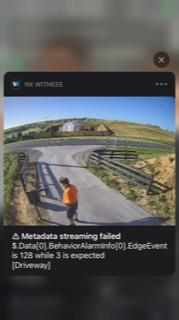
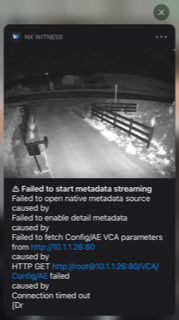 0
0 -
Just to clarify, getting the analytics working is not my issue, the failing metadata is
0 -
Hi chris gill,
Unfortunately it isn't entirely clear to us what kind of issue you experience.
Is there an option to forward the camera, so we can add it to our test environment for further investigations?If that is possible, I'll convert this topic into a support ticket to enable you to share the required login credentials privately.
0 -
i cant really be much more specific than what is on the screen shots.
convert away and i will be able to provide you with login details
0 -
Hi chris gill,
The ticket has been created, please reply to this ticket with the login credentials.
0 -
Hi chris gill,
So far, we didn't get any reply to the ticket. Please reply to this ticket with the login credentials, so we can check the issue you experience.
0 -
opening the ports whilst the unit is onsite is not an option. i will be returning the unit to our supplier who will then give you access to the stream
0 -
Hi chris gill,
We are going to set this ticket to closed for now. As soon as you can provide access to such device, please note that you can reopen the ticket and continue to receive support from us by simply replying to the corresponding email.
0 -

Norman
I think I am facing the same issue here.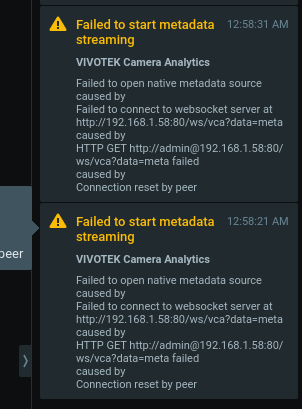 0
0 -
Hi Bert Duyck,
I'll converted your request into a ticket.
0 -
The issue was resolved after a server and camera firmware upgrade.
0
Please sign in to leave a comment.
Comments
15 comments