The tabs of Camera settings dialog is not appeared
Answered
The tabs of Camera settings dialog is not appeared in NxWitness Ver4.1.0.31398.
I can blindly click along the top edge and switch the tab.
Closing and opening the dialog and reinstalling the NxWitness client doesn't fix it.
Could you tell me how to fix it?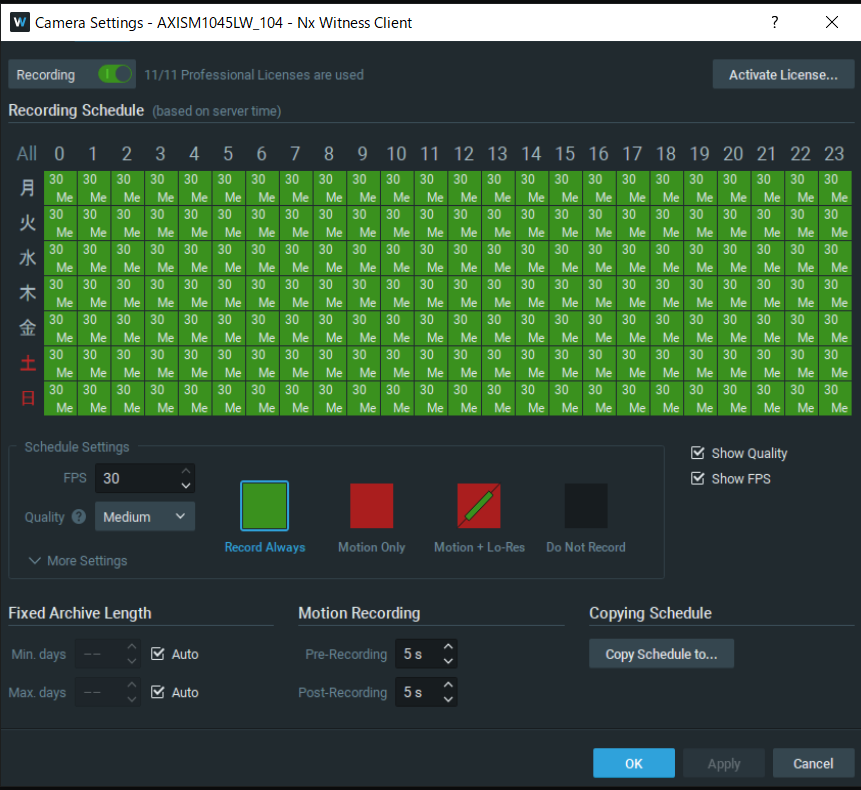
-

Hi @...,
The only related issue I recall was with device that were using Intel HD 620 and 630 on-board GPU.
This was resolved in v4.0.0.30107 which we released on 3 December 2019.
So please tell us a bit more about your system, like OS and hardware specs.
Also, it would be interesting if you can verify this on another device with other specs.0 -
Hi Norman,
Thank you for your response.
Some devices with Intel HD 620 have the issue and some do not.
I confirmed the issue with 2 "LIFEBOOK" devices.
It would be appreciated if you could fix it.The details are as follows.
<the tabs are not appeared>
・Fujitsu LIFEBOOK U937/R
OS:Windows 10 Pro 64bit
CPU: Intel Core i5-7300U CPU @2.60GHz
Graphics Accelerator:Intel HD Graphics 620<the tabs are appeared>
・Panasonic CF-SZ6RDYVS
OS:Windows 10 Pro 64bit
CPU: Intel Core i5-7300U vPro Processor 2.60GHz
Graphics Accelerator:Intel HD Graphics 620・dynabook G83/M
OS:Windows 10 Pro 64bit
CPU: Intel(R) Core(TM) i5-8250U CPU @ 1.60GHz
Graphics Accelerator:Intel UHD Graphics 620・Panasonic CF-SZ5
OS:Windows 10 Pro 64bit
CPU: Intel Core i5-6300U vPro Processor 2.40GHz
Graphics Accelerator:Intel HD Graphics 5200 -
Hi @...,
Please change the loglevel for the Desktop client to DEBUG.
After changing the loglevel, please reproduce the issue and share the logs with us.After the reproduction please change the loglevel back to NONE.
In THIS support article can be read how to change the log level for the server and the client.
Please be aware to change the client log level and share the client logs.0 -
Hi Norman,
I'd like to send the client logs directly to your support team if I can.
Can I submit the logs with the following URL?
"Submit a request"
https://support.networkoptix.com/hc/en-us/requests/newI would be appreciate if you could tell me the better way.
0 -
Hi Yossy,
You can email the files to <email_removed>.
0 -
Hi Norman,
I emailed the files. Thank you.
0 -
Hi @...,
I received them and shared them with our dev team for further investigations.
Can you provide me some more information?
- Which OS and version are you using?
- Is the issue camera dependant or applies for all?
- Which language was the client set to?
- What's the screen font size? The image you shared seems to be zoomed in.
- Did it occur on earlier versions of Nx as well?
- Could you try the latest patch? The following credentials can be use to update to the latest patch:
Build Number: 32045
Password: pjz18g - What about other menus? Are the tabs also invisible?
JIRA-VMS-21052
0 -
Hi Norman,
Please find my answers to your questions.
1.Windows 10 Pro(x64),Version:1909
2.The issue applies for all camera.
3.the client is set to English, but the issue also occurs with another language.
4.The size of text is 125%. However, the issue also occurs on text size 100% and 150%.
5.I confirm it doesn't occur on Nx Ver3.2.
6.I tried the Nx Ver4.1.0.32045 client.Unfortunately it occurred.
7.System Administration tab is also invisible. Sever Settings tab is visible.
0 -
Thank you @...,
I have shared the info with our dev team, and they would like to investigate the system via TeamViewer.
If this is possible, please let me know and I'll convert this topic into a support ticket so you can share the login credentials in a private manner.
0 -
Hi Norman,
I'm afraid the investigation via TeamViewer might be difficult though I try to get permission.
Do you think it is difficult to solve the issue without it ?For your info, the tabs became visible after copying opengl32.dll file following the article,
https://support.networkoptix.com/hc/en-us/articles/115013581987-How-to-run-Nx-Desktop-in-limited-GPU-environments
But I removed the file because the computer became too slow to use.0 -
Hi @...,
Without access to a device with the issue, there is nothing we can do.
Since the opengl32.dll file resolve the issue, I would recommend you to check for the latest GPU drivers for that specific component. I doubt it is something we can resolve in such case.
In general, it is preferred to check for the drivers of the component manufacturer, instead of the laptop manufacturer, Fujitsu in this case.
0 -
Hi Norman,
The tabs became visible after downloading the latest graphics driver in Intel site and updating it.
Before posting this subject, I tried to update the graphics driver in Windows device manager.However, the issue wasn't solved.Thank you so much for your advice.
0 -
Thanks @...
Good news.
Lesson learned. Never trust Windows for driver updates. ;-)
0
Please sign in to leave a comment.
Comments
13 comments