NX on Debian
Answered
Why can’t I upgrade NX Servers installed on Debian using the NX Client GUI?
Why are you not supporting Debian, when Ubuntu is supported?
-
Official comment

Hi @...,
We are aware that Ubuntu is a derivative of Debian and here are tons of Debian and Ubuntu derivatives around, but they have their differences (x11 vs Wayland for example, or what about the ongoing systemd debate in OS communities) that might or might not make it possible to use Nx Witness on your preferred distro.
We have to draw a line somewhere, since we do not have the resources to test Nx for all Debian/Ubuntu based distros. Therefore, we also, only support the LTS version officially, but not the versions in between, although it is reasonable to expect that it will work on the majority. I have a server with 19.10 and it run just fine with the current release, but it might not in the future.
We also have people using Nx on Debian, Elementary OS, Mint, PopOS, etc. without any issues, but when an issue arises we can't support it due to resources.
I hope this clarified a bit why we only support Ubuntu Linux officially. We love to hear your experience with Debian and Nx though.
-
Okay ,thanks for the enlightenment regarding OS.
Why can’t I upgrade NX Servers installed on Debian using the NX Client GUI?Did you put in an 'if not ubuntu, sorry Sam' or is there some thing else wrong?
Is there some changes i can make to make it possible?
0 -
HI @...,
In theory, there are no reasons why it shouldn't work.
Can you elaborate a bit more on versions and build? Both Nx Witness and Debian?
If I have some time this week I'll try to investigate it.0 -
Hi.
I have installed a few boxes With version 4.0.0.29987 With Debian 10.4 or 5 in the bottom and when i go to the gui update page it states missing update package for some servers.
0 -
Hi @...,
Those some servers, are these 32-bit ARM based servers?
What might be the case is that the operator we added in the software to prohibit people with a Nx1 to update from 4.0* to 4.1*.The Nx1 is a 32-bit ARM server we sold in the past and which became end-of-life and 4.1 isn't compatible anymore with the OS (BananianOS) on that specific device.
The update page you describe is similar to the notification you get when updating the Nx1.
Also, which build are trying to update to? 4.1.0.31398 or 4.1.0.31767 or other?
0 -
All of those servers are full blood x86_64 installed Debians running on standard Intel PC hardware.
0 -
Also, which build are trying to update to? 4.1.0.31398 or 4.1.0.31767 or other?
0 -
currently 4.1.0.31398, but this has been the case for all updates after 4.0.0.29987, even tried specific build with no success.
0 -
Thank you @...,
I will try to find some time this week to reproduce it, but no promises yet.
0 -
Just attaching my install notes for Debian:
NX Witness on debian
0. set bios to always boot after power failure.1. Install debian. root/user
Only SSH server and standard utilities.2. export PATH="$PATH:/sbin"
3. Mount harddrives:
fdisk -l
cfdisk /dev/sdb #note-to-self: dos format, not gpt
mkfs.ext3 /dev/sdb
mkdir /disk2
OPTIONAL: mount -t ext3 /dev/sdb1 /disk2
nano /etc/fstab
add '/dev/sdb1 /disk2 ext3 defaults,errors=continue 0 1' last line without '
rebootsudo chmod ugo+wx /disk2
cd /disk2
mkdir test
ls -l
rmdir test
ls -l
4. Install nxwitness server:https://support.networkoptix.com/hc/en-us/articles/360010535793-Ubuntu-Linux-OS-Installation-Guide
http://updates.networkoptix.com/default/29987/linux/nxwitness-server-4.0.0.29987-linux64.deb
1. Move nxwitnsee.deb package to /home/user
2. sudo apt-get update
3. sudo apt-get install gdebi
4. export PATH="$PATH:/sbin"
5. gdebi nxwit<tab>
6. set systename via HTTPNX will find new disk by itself after mount.
0 -
bump
0 -
Hi @...,
To be honest. The topic disappeared from my attention.
So full of shame I managed to reproduce the issue and probably got the same result as you had.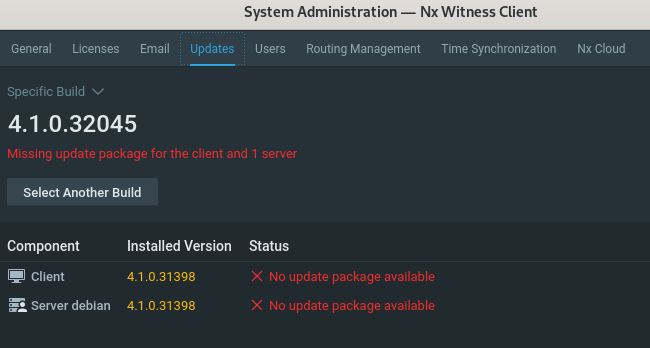
With that information I reached out to our dev team, and they told me that for various reasons, only Ubuntu was added to the software as a supported OS.
0
Please sign in to leave a comment.
Comments
12 comments