Email Notifications not working
Answered
Hi,
we configured the event rules to send an email when any camera is disconnected.
Then I disabled PoE on one camera to trigger the email.
I can see in the event log that the camera gets disconnected and desktop notifications are shown to all users but the email is not being sent.

VMS (4.1.0.31398)
NX Witness Client (4.1.0.31398)
Even when I set the intervall to send the email every 30 seconds no email gets sent from the vms.
What am I doing wrong?
-

Hi @...,
Do you happen to use a Gmail account to send the emails?
If that is the case, please assure you enable the Gmail account to work with 'less secure applications'.Also, important to know is if it only applies to sending emails in case of the Camera Disconnected event or for each event.
0 -
Hi Norman,
thanks for the fast answer.
We are using mailgun as a smtp relay server. This is working fine. The email is not getting sent from the vms in the first place.
It should only apply to events "On Camera Disconnected". I can see the event "Camera Disconnected" in the event log but the email is not getting sent. The second rule "Show desktop notification" on "Camera Disconnected" is working fine and i can see it in the event log.
0 -
Hi @...,
Sorry for the delay.
When you go to System Administration menu and the Email tab, will the test succeed when you click the Test button?
Can you share a screenshot of the Outgoing Email Settings with Advanced enabled?
Here is an example of my settings:
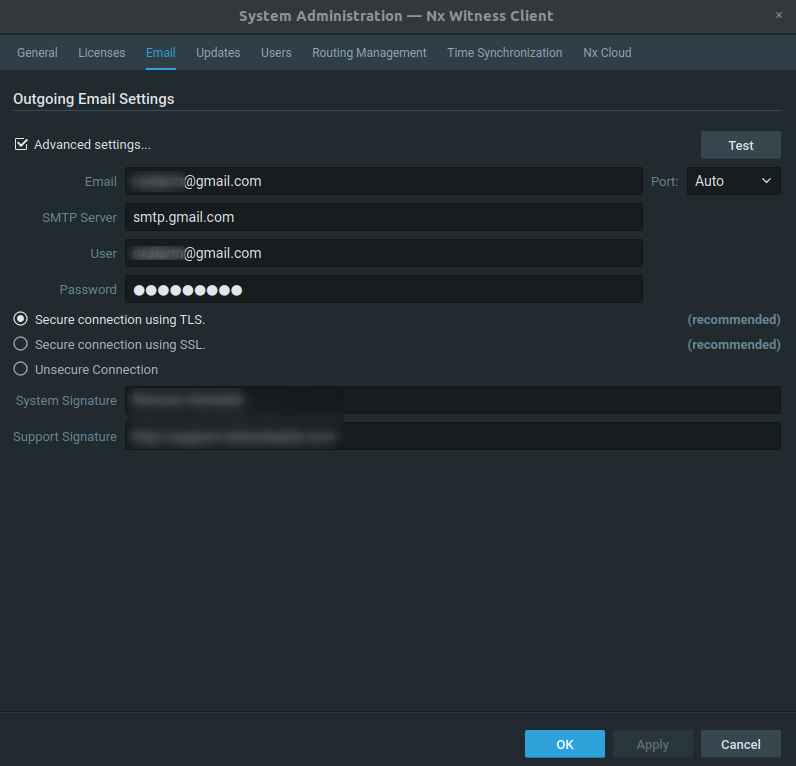
More information can be found in THIS support article.
0 -
Hi @...,
Just checking in to make sure you received our response as it has been a while since we have heard from you. Please let us know if you still need help by responding to this message.
0
Please sign in to leave a comment.
Comments
4 comments