Can I install Nx Witness in the Google or AWS-Cloud?
Answered
Hi Team,
Can I install and use Nx Witness Server in one of the available public clouds? Is it supported?
I'd run a test installation in a micro VM on google cloud but having issues connecting the cameras. For test purposes I use simple port forwarding from the Camera location. The Witness Server is able to see the cameras in the setup but unable to connect to the RTSP Stream.
Install Base: Google Cloud
OS: Ubuntu 18.04
Server Version: nxwitness-server-4.1.0.31398-linux64.deb
Ports open:
Inbound: 554, 7001
Outbound: 554
Camera End:
Camera: Hikvision
Streaming: RTSP
Ports open:
Inbound: 554
I can connect my local client to the Server, can add the camera and NX is able to see the RTSP cameras, but then I'm net getting the live footage.
When I install the server on a local hyper-V VM I'm getting the live stream even when I use the external IP Address.
Jens
-
BTW: I'm getting this error in the logs:
2020-08-16 10:36:18.358 1497 WARNING QnMulticodecRtpReader(0x5573967efce0): Can't open RTSP stream [rtsp://x.x.x.x:554/ISAPI/Streaming/Channels/1mov], SETUP request has been failed
0 -

Hi @...
Yes, the Nx Witness should be able to host on the Google cloud.
Based on the error log, issue is more likely there's a problem occurred during RTSP SETUP process.
Please refer to the ONVIF troubleshooting guide here. Likely you could do more troubleshooting first:
- Is the firmware of HIKVISION up to date?
- Installed the VLC player in your cloud host and try to play the RTSP URL directly and see if the LIVE stream could be played or not
- When you see "NO SIGNAL" on the stream window, press "DIAGNOSTICS" button and provide the result to us
- Using the tcpdump to collect the packet during stream playback. It will help us to check why the SETUP request get failed.
Look forward to your feedback, thank you.
0 -
Hi Wendy,
Thank you for your support. As my Ubuntu server in the cloud comes with no visuals I'll create a second VM in the same google-cloud network and try if I get the RTSP connection on the new VM with VLC. I'll get back to this thread once this is done.
However, I was able to get the stream with VLC on my local system over the same internet connection- but maybe there is still something blocked on the Google cloud firewall.
Thank you,
Jens
0 -
Hi Jens,
Just a little reminder - make sure the firmware of HIKVISION camera is the latest version before further testing.
Thank you.0 -

Jens,
If you setup the VM in the GCP you can allow all HTTP and HTTPS traffic. This way you know it isn't a firewall problem.
I have already successfully setup some NX servers via GCP.Also, if you add the camera do you add them by the RTSP URL? For example: rtsp://IP:554/axis-media/media.amp
If you try to add them via Onvif (just the IP adress) you should also open the HTTP(S) (80/443) port to be able to let the NX server connect to the camera properly.0 -
Thank you all,
I'm not getting it running. Everything is well on my local hyper-v system - with the same external IP Address. I did open all ports from the camera network and even on the GCP machine- but I'm not getting the stream.
However, when I use this test stream: https://www.wowza.com/html/mobile.html I'm getting the stream immediately.
@...
Yes, I use the full RTSP URL- The exact same URL works in VLC and on my local hyper V system. I checked open ports with "sudo netstat -npl" and saw a lot of UDP ports- So I'd allowed the UDP connection in booth directions too - without success. I'll give it another try on the weekend.
Firewall Settings GCP:
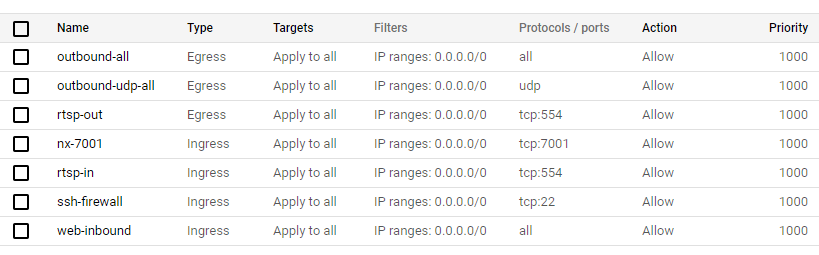 0
0 -
Hi all,
I did an AWS-Test now. Same result. Weird part is, when I spin up a Windows machine in the same network- I can get the stream via VLC- But still not with NX Witness. The client on my PC is not getting the stream.
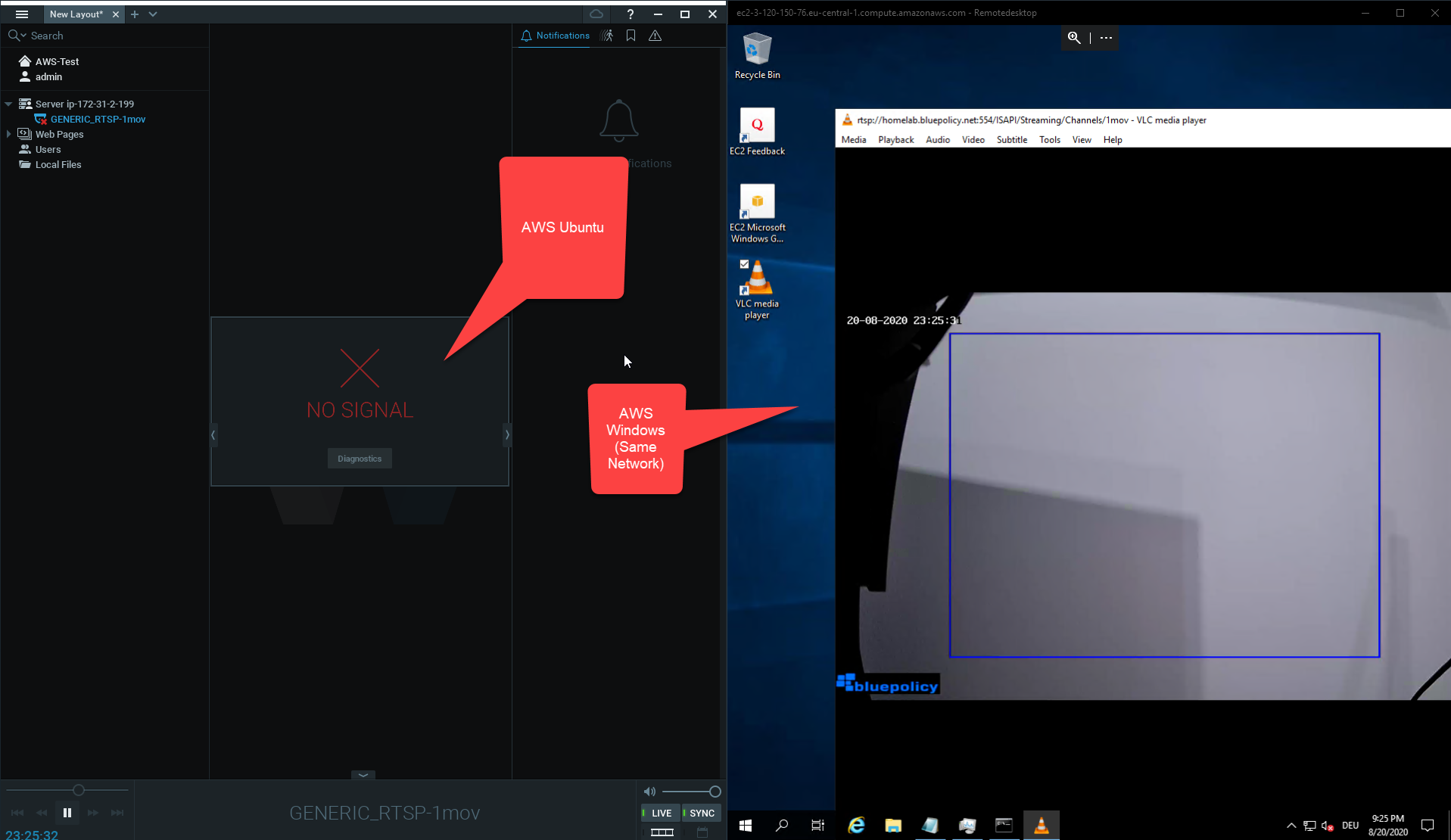 0
0 -
Log:
2020-08-20 21:27:51.512   7971    INFO QnMServerResourceDiscoveryManager(0x7f3a84060560): Mark resource Network resource url: , ip: , mac: 00-00-00-00-00-00, uniqueId: {41481a77-8eda-46ce-bb17-cda583de050b}{99cbc715-539b-4bfe-856f-799b45b69b1e} as offline because it doesn't response to discovery any more.
2020-08-20 21:28:36.510   7971    INFO QnMServerResourceDiscoveryManager(0x7f3a84060560): Mark resource Network resource url: , ip: , mac: 00-00-00-00-00-00, uniqueId: {41481a77-8eda-46ce-bb17-cda583de050b}{99cbc715-539b-4bfe-856f-799b45b69b1e} as offline because it doesn't response to discovery any more.
2020-08-20 21:28:38.907   8408    INFO ThirdPartyStreamReader(0x7f3a8423fe80): got stream URL rtsp://95.xx.xx.xx:554/ISAPI/Streaming/Channels/1mov for camera rtsp://95.xx.xx.xx:554/ISAPI/Streaming/Channels/1mov for role 1
2020-08-20 21:28:49.072   8408 WARNING QnMulticodecRtpReader(0x7f3a800afdf0): Can't open RTSP stream [rtsp://95.xx.xx.xx:554/ISAPI/Streaming/Channels/1mov], SETUP request has been failed
2020-08-20 21:29:05.409   7943 WARNING nx::vms::server::metrics::CameraController(0x7f3a841d1508): Skip missing resource a5c7e570-xxxx-xxxx-xxxx-53acb1xxxxx
2020-08-20 21:30:05.408   7943 WARNING ec2::detail::ServerQueryProcessor(0x7f3a8439a740): Remove resource access status failed
0 -
Hi Jens,
Based on previous error message, the problem should be related to the failed RTSP SETUP process.
Please follow the suggestion and help us to collect the debug info,
1. Update the firmware of HIKVISION to the latest version
2. When you see "NO SIGNAL" on the stream window, press "DIAGNOSTICS" button and provide the result to us
3. Use the Wireshark to collect the packet during stream playback then provide the IP of server/camera to us. It will help us to check why the SETUP request get failed.
Thanks for your cooperation.
0 -

Hi @...,
After the reply of my colleague Wendy Chuang, is there something we can do for you?
0 -
Hi Norman,
I was not able to get the RTSP camera connected to the AWS or google cloud system.
I've postponed this for now. Thank you, Jens
0
Please sign in to leave a comment.
Comments
11 comments