Client version is not booting
Answered
I just installed nxwitness-client-4.1.0.31398-win64 but when launching the application freez.
Any idea's how to solve?
-

Hello Kevin,
Could you share a bit more information about your problem? It will help us to identify your case more efficiently.
Likely you can answer the questions below:
1). The machine information: Windows OS version, CPU, Graphic card and memory size. If your installed Nx client in the virtual machine, please also let us know.
2). Detailed issue symptom: What does the "application freeze" means? It's better to share the screen recording to us.
3). Is the Nx media server running?
4). Do you install the Nx at the first time, or it's upgrade from the older version?
Look forward to your feedback, thank you.
0 -
Below the following answers:
1). The machine information: Windows OS version, CPU, Graphic card and memory size. If your installed Nx client in the virtual machine, please also let us know.
Windows 10 Pro 64 bit (with latest updates), AMD Ryzen 9 3900X, 9800-TI, 32 GB. Nx client installed on C drive
2). Detailed issue symptom: What does the "application freeze" means? It's better to share the screen recording to us.
I found the problem. I have two screens.. When I open the application in my main screen (number 1), no problem but when opening in my extended screen. Why? No idea but it's what I noticed
3). Is the Nx media server running?
This is a free test environment, connected with local storage at my desktop
4). Do you install the Nx at the first time, or it's upgrade from the older version?
Current version is v4.1.0.31398..
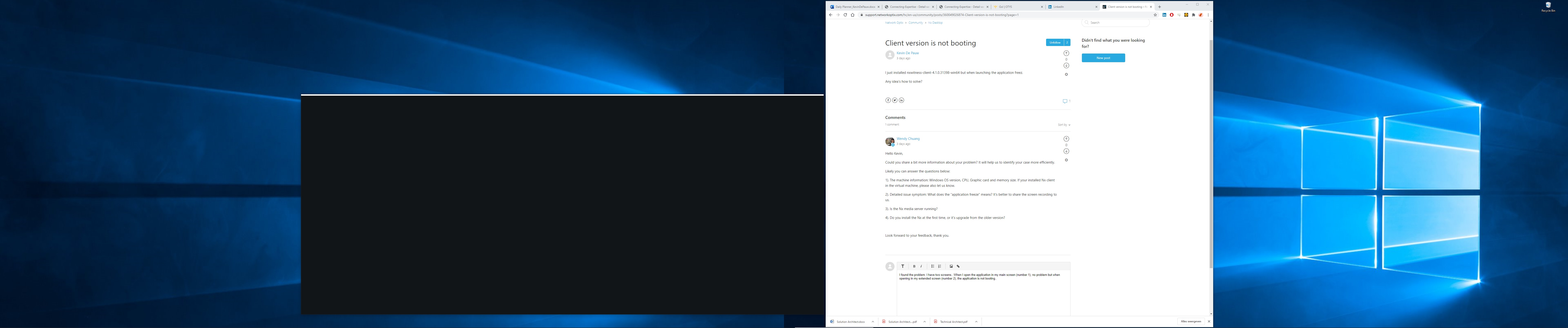 (number 2), the application is not booting..0
 -
Hi Kevin,
Does the driver of graphic card is up to date?
Could you take the screenshot of "Main Menu > About" page when you launch the Nx client on the main screen?
Thank you.
0 -
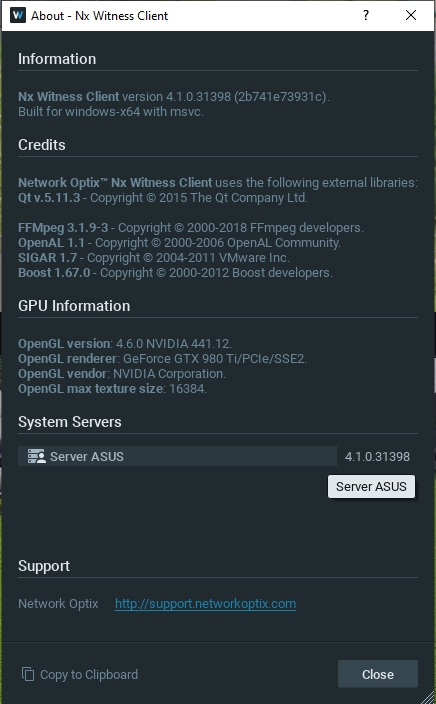 0
0 -
Hi Kevin,
Thanks for your information.
Based on your description, the application will freeze when you open on the 2nd screen.
Supposed that the 1st screen is the main display and the display mode is Extend.
Could you make the test with the following scenario :
- Change the 2nd screen to the Main screen
- Switch between different display mode(duplicate, 2nd screen only)
Thanks for your help.
0 -
I switched it, and it's only possible to boot the ap via the 1st screen or when I duplicate the screen, than both screens work.
0 -
Hi Kevin,
Thanks for confirmed. It is likely that the monitor output connected to the video adapter/driver that does not meet the (minimal) requirement of the client. Based on your hardware spec, AMD Ryzen 9 3900X should not support integrated graphic so there should be the only one GPU (NVIDIA GTX980Ti) in your computer.
Maybe you could try to adjust the NVIDIA setting from NVIDIA control panel and NVIDIA instant replay.I've ever met one special case that client cannot launch correctly while enabling instant replay with the latest video driver installed.Thank you.0 -
What do you mean with ' Maybe you could try to adjust the NVIDIA setting from NVIDIA control panel ' ?
I changed instant replay off to on but still the same problem..
0 -

Hi @...,
Do I see it correctly that you have a regular widescreen (16:9) monitor and an ultra widescreen monitor?
I also assume they have different resolutions?
Can you tell me how you open the applications?
Could it be that you drag the client from monitor 1 (with for example 1920x108 resolution) to the second monitor (with a higher resolution then 1920x1080)?In the monitor settings, can you make the resolutions temporarily equal for verification purposes only? When you did this, the issue should be gone. Can you confirm?
What you could try is to forcefully open the client via a bat script to the second monitor. In theory this should resolve it as well. The parameters can be found in THIS support article.
The parameters to use are:
--no-single-application
--screen
0 -
I have two wide screens (Samsung SE790C), running both at a resolution of 3440x1440 / 59 Hz.
I start the app via the taskbar. Boot the app S1, works perfect. S2 same as the printscreen above.
Working with a script is possible, but that's not necessary because I think this issue is more a bug.
Maybe someone can try it in a similar dual setup, app pinned in the taskbar and try to boot via both screens?
0 -
Hi @...,
I tried to reproduce the issue, but unfortunately we weren't able to reproduce the issue.
We didn't have a setup similar to yours, but we had a setup with 1 x 1920*1080 and 2 x 3840*2160 and were able to open 1, 2, or 3 clients and even more, without any issues.Can you do the following 3 things for us?
- Assure that the GPU is updated with the latest driver of the GPU manufacturer. If not, please update the latest drivers.
- Share a screen recording of both monitors at the same time that shows the whole process from opening till the freeze. (a useful tool to achieve this is OBS Studio)
- Share a process dump that has been created immediately after the freeze.
You can do this as follows:
To get the process dump file, please perform the following steps:
- Press Ctrl+Alt+Delete on your keyboard.
- Select Task Manager.
- Right-click the process (the Nx Witness client in this case) for which you need to create a dump file.
- Select Create Dump File.
- Wait until you get the notification on successful creation of the file.
- Copy the path to the dump file.
- Click OK.
- Press Win+E combination on your keyboard.
- Paste the copied path to the folder to the address line.
- Press Enter on the keyboard.
The folder with the dump file will open and you can share this *.dmp file as you would share any file.
0 -
- All drivers are up-to-date..
- My dumbfile: https://wetransfer.com/downloads/118774e7ec47d8cb5f2294201f122dee20200831185011/419611688671763147d6ac20e67c889820200831185027/a2e7f1
- Recording via OBS Studio: https://we.tl/t-A3DeKeJ06S
Remark: Video rights is screen 1, left screen 2..
Ideas?
0 -
Hi @...
Based on the screen recording, I do not have a clue.
I share the dumpfile and the screen recording to our developers, and they will investigate these and get back at me.JIRA-VMS-19952
0 -
I am very curious what the problem is.. Hopefully they have a suitable solution.
OK, it's not a big issue, now I know to open it always via screen 1, but others will think is a problem with the software and not troubleshoot the problem..
0 -
So are we @....
It is a pity we can't reproduce it yet. Hopefully your dumpfiles will clarify it all.0 -
Hi @...,
We found the root cause of the issue in the dumpfile.
It seems to be caused by the Nahimic Software which can cause an issue with various software applications which results in freezing, the program not starting or outright crashes/access violations (Asus, MSI, etc), so you may not even realize that you have it or that it is running.
The only solution is to disable or uninstall the Nahimic software.
You should be able to uninstall it via the standard Add/Remove Programs section of the Windows Control Panel and you should remove the programs that start with the name Nahimic. We STRONGLY recommend that you create a restore point before doing that. There shouldn't be any issues when removing the Nahimic software and by removing it, it solves those issues with the Nx Witness Desktop client and a number of other programs.
If you want to disable Nahimic rather than uninstall it, please check their website for information on how to do that as it varies from version to version.
0 -
I have no Nahimic software installed at this desktop..
0 -
@...
Sure? Did you check the DLL on your device as well? In general, it is part of the drivers that come with the motherboard or audio card.
You should be able to see this running in the 'Services' tab in the task manager of Windows.
Also, it should be visible under your driver in the audio section.
0 -
Any update @... you can share?
0 -
Stopping the service was the solution.. Thank you very much for the support!
0 -
Thank you for the instant feedback. I'll close the task on my side.
1
Please sign in to leave a comment.
Comments
21 comments