ONVIF discovery from VirtualBox
Answered
I have NxWitness server installed on my VirtualBox Ubuntu VM.
When I add a camera with ONVIF, the server keeps losing the connection and the logs have the following. ONVIF discovery goes over UDP port 3702. When I Wireshark, I don't see any 3702 traffic at all. Is this because NxW can't multicast from with the VM?
2020-07-02 11:31:37.048 3457 INFO QnMServerResourceDiscoveryManager(0x7f83ec07e0c0): Mark resource Network resource url: http://192.168.14.102:80/onvif/device_service, ip: 192.168.14.102, mac: BE-EF-DD-47-A1-A5, uniqueId: BE-EF-DD-47-A1-A5 as offline because it doesn't response to discovery any more.
-

Hi Jim,
I also have the Virtual machine on my test server, and all the multicast packet (includes the udp port 3702) could be captured on the main host. Did you add the camera by auto-discovery or manual added? If the camera was added by auto-discovery, that means the multicast should be able to send outside of the VM.
If the "losing connection" problem means the status of camera will become offline, then please help us to provide the information:
1. The network adapter type of the virtual machine
2. How do you add your camera into Nx server, by manual added or auto-discovery?
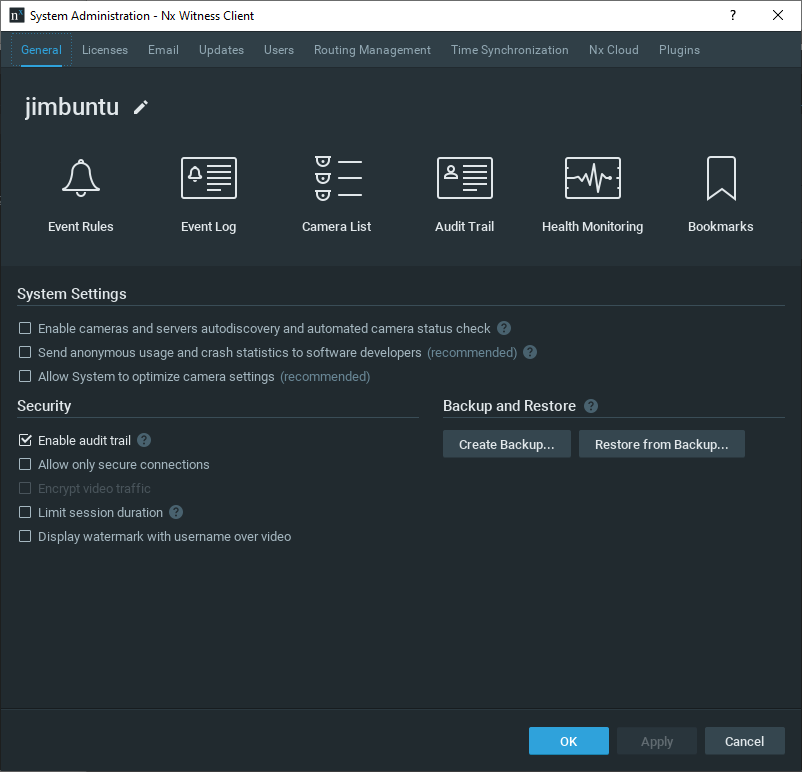
3. The screenshot of System Administration > General tab
4. The Nx server version
5. When the camera's status turns to offline, please help to check if the LIVE stream is still able to playback.Thank you.
0 -

Hi Jim,
This is a common issue with VirtualBox. (see this BUG report)
Most likely you have set your network traffic to NAT which might have issues with UDP packages.
When set to BRIDGE, it seems to be fine as it is in my case (VirtualBox 6.0.14_Ubuntu r132055).0 -
When I opened the ticket I had both NAT and Bridged enabled. Now I have disabled NAT. I have the same results with only the Bridged adapter: no 3702 packets.
I manually add the device.
Version is
4.0.0.29987 Here is the screenshot of the General tab:
After I add, I see this:
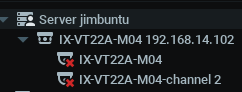
until I actually double-click to view live, at which point I can see the live stream and the 'x' goes away.
If I close the live stream then I get the 'x' again.
0 -
Hi Jim,
Thanks for sharing the info and your configuration. It looks like the expect behavior.
The multicast packet including UDP port 3702 packet should be sent when you enabling the auto-discovery option from System Administration page. In order to save the network resource, Nx will try to minimize the transactions between server and devices. You may refer to the article here for detailed.
If your configuration meet the following case:
- Auto-discovery is disabled
- Camera was added manually
- The camera is not opened on the layout
- Camera recording is not enabledIn this situation, there's is not multicast request in the network and no HTTP request sent to the camera.
The status of cameras will be changed to offline on resource tree, although the camera might be still available. There is a exception of the case : when you have several servers in the system and failover is enabled, then Nx will check cameras status and show its status accordingly.We plan to slightly adjust the mechanism in v.4.1.(ETA might be 2020/August).
Since 4.1, Nx will show the last situation(status) of the camera when the auto-discovery is disabled or no failover configured of the multiple servers.Thank you.
0 -
Ah, OK. I verified this by enabling recording and the camera is no longer marked as offline.
Thanks for clarifying this.
0
Please sign in to leave a comment.
Comments
5 comments