Cheap Genbolt Camera Integration and Humax Eye
Answered
Any integration for Genbolt Cameras, I would imagine not practical as low end but would like to know.
Also Humax Eye ?
Thanks in Advance
-
Official comment

Hi Robert,
We do not care if the cameras are low end or high end. If they were $15 or $15000. If they are Onvif compliant, we most likely can add them to our system.
And even if they are not, we often can add the streams through the RTSP of HTTP stream format.
The best thing is to just download Nx Witness and try it. In the case of Onvif, they should be auto-discovered when they are in the same LAN. If they aren't Onvif compliant, the could be added manually.
-
Hello
Thanks for getting back to me Norman
I have tried on my phone and cannot set up the Camera with NX Witness
The Camera is this one
https://youtu.be/8m49yBxy2-YI have tried setting up on LAN using NX Witness on Samsung Note 9 Android Phone and also tried adding by IP, both with no joy
 Can you help any further please, I can give you direct access to the Camera if needed but would need to message direct with username and password rather than publish here
Many thanks
Robert0 -
Hi Robert,
You can share the login credentials to <removed> with a reference to this thread.
For further investigation, you also can check this support article. The Onvif Device Manager (ODM) is the most convenient tool to investigate such cases.
Can you elaborate a bit more about how you tried added the camera?
Did you add the camera via the regular method as an Onvif device or also as an RTSP/HTTP stream?
In the case of the last option, which RTSP/HTTP stream URL format did you use?0 -
Good Morning Norman
So I have an app for Genbolt camera on my Note 9 Android phone, the Genbolt app
The camera and phone are on same LAN so I just tried to add the camera through the app with add camera, simple
Then I tried to add the camera via http with camera ip and username and password to connect
Still no joy through NX witness app though I can connect to camera through camera's own app and a web browser on the LANNext I have downloaded NX Witness Bundle on Win 10 pro machine on same LAN and this time I CAN CONNECT though I get an image on screen and then it times out with
Confirming server availability.
OKConfirming camera is accessible.
OKConfirming target camera provides media stream.
FAILED: Failed to configure parameter 'stream profile parameters'. First, try to turn on recording (if it is off) and decrease fps in camera settings (error "'stream profile parameters'"). If it does not help, restore factory defaults on the camera web-page. Finally, try to update firmware. If the problem persists, please contact support.Diagnostics complete
I don't have a license for the NX witness server as just trialing and so I need a trial key as well I think
So in short - it looks like I can get the software to work on Windows with this camera, just need to perhaps tweak settings. However I cannot get it to work on Android?
Many thanks
Robert0 -
Further to this
I have reset the camera to defaults and plugged it into the LAN with a cable rather than using wireless
Now what happens is that I can get a video stream with the local server over a web browser (Internet Explorer), although this only happened once and now is no longer happeningI cannot connect with NX client / server
I cannot connect with onvifI can connect with a web browser and view video and also the Genbolt camera App on a phone
I can control PTZ functions using ONVIF but cannot render any video
SO I will make the camera publicly accessible and send you some details to log-in via email
I don't think this Genbolt camera will work with NX
Thanks0 -
Hi Robert,
Due to the fact, the camera isn't able to connect via the Onvif Device Manager, it is highly unlikely that you will be able to connect the camera to Nx Witness or another 3rd party VMS or NVR.
The only option would be adding them through the RTSP or HTTP stream.
You can find it by using Wireshark. Please follow the steps below:
- Start Wireshark and start capturing the packages.
- Open the camera in the browser or default application on the same device as you re running Wireshark on.
- When you have a live stream of the camera, you can stop the capture of Wireshark.
- In Wireshark press Ctrl+F and change Display Filter to String and change Packet List to Packet Details.
- Enter rtsp:// in the search field.
In the capture, you should see rtsp in the Protocol column and you find something like GET_Parameter rtsp://<camera-ip-address> etc etc in the Info column.
Now you can add the RTSP stream manually to Nx Witness and when it is added, you can add the secondary stream as well (if available.
1 -
Hi Robert,
I just noticed you shared the camera login details with us, but unfortunately, I can't use them. The link provided redirected me to the Dyn website and not to the camera webpage.
0 -
Hey Norman,
rather than click the link copy the text and paste into a browser, that should work
Will look at Wireshark
Thanks0 -
I did what you suggested with rtsp:// and adding that in NX and everything is NOW working
THANKS0 -
Hi Robert,
That great news! Wireshark is an impressive and very useful tool.
Were you able to capture the primary and secondary stream? Or could you guess the format for the secondary stream.
0 -
Yes captured both streams but does that use two licenses ?
0 -
Hi Robert,
If you follow the instructions in THIS support article, it will require only 1 license. Summery, first add the primary stream and add the secondary stream to the primary stream.
1 -
That's great thanks
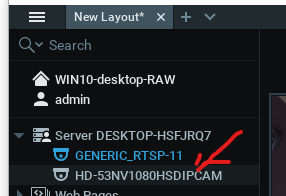
Now for the LAST question, hopefully on all this.The NX windows app still picks up the camera automatically but won't connect that way as we have demonstrated. is there a way to stop it showing as every time I delete the camera it reappears
Thanks
0 -
Hi Robert,
When you open the System Administration, tab General, you disable the autodiscovery and the camera won't appear anymore after deletion.
1
Please sign in to leave a comment.
Comments
14 comments