How to capture intercom button press event in plugin DLL via Metadata SDK (SDK 5.1.3)
Answered
I'm working on a plugin DLL using the NX Meta Plugin SDK (version 5.1.3) and I need help capturing events from an intercom device (Hanwah TID-600R device).
Currently, I'm successfully detecting motion events by checking for IMetadataPacket with motion metadata, and then triggering a 10-second video download using DeviceAgent::pushUncompressedVideoFrame.
Now I’d like to do something similar for an intercom button press—specifically, when someone presses the call button on the intercom device, I want to capture that event and start recording.
My question is:
- Is it possible to detect a button press event from an intercom device using the Metadata SDK?
- If so, how can I receive that event in my plugin DLL?
- Is there a specific metadata type or event packet I should be listening for from the VMS?
Any guidance or examples would be greatly appreciated.
-

Hi Subramanian,
Thanks for your question, and it is good to know that you have been doing the integration with MetaSDK.
In fact, the Intercom event has no difference to the motion events. They are the same logic.
You will implement the device_agent for the intercom device, and you will listen to the event that generated by the device - It could be proprietary API of the device or other communication protocol..etc.Is it possible to detect a button press event from an intercom device using the Metadata SDK?
Yes, this is possible. The logic is the same as you detect the motion events.
If so, how can I receive that event in my plugin DLL?
As mentioned above, you will need to implement the logic in the device_agent for the intercom device, and you will listen to the event or signal that generated by the device - It could be proprietary API of the device or other communication protocol..etc. In short, you listen to the intercom events from devices.
Is there a specific metadata type or event packet I should be listening for from the VMS?
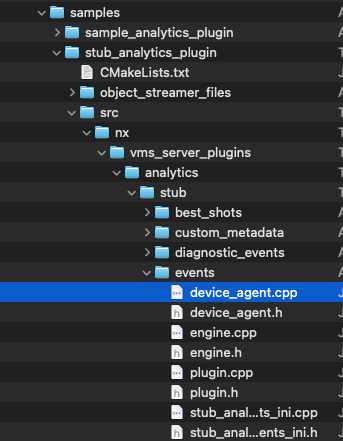
No, this is your custome event, you are able to define your own eventType. Please refer to the manifest.md and taxonomy.md in the MetaSDK. The STUB:events sample also gives the general idea to start with.
Hope this helps, thank.
0 -
can i use this method if i can is there a sample to capture the eventsDeviceAgent::generateEventMetadataPacket()
0 -
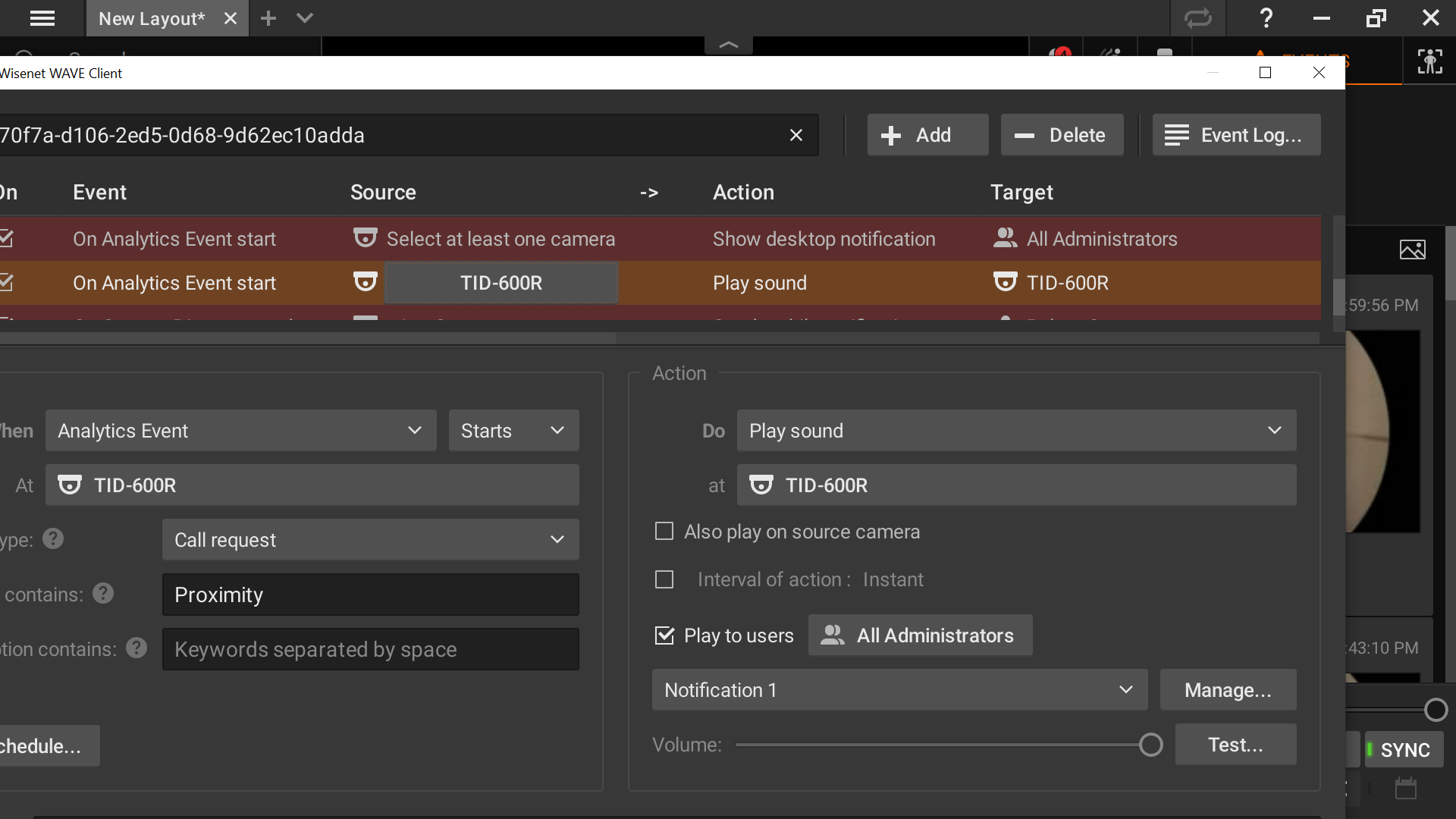
I would like to capture this event exactly in my plugin .I can very well see the event in vms when Proximity sensor is triggered and can hear bell sound .so need to know is it possible to capture this event when trigger
is it possibleto use any of the code from this git
https://github.com/networkoptix/nx_open_integrations/tree/master/cpp/vms_server_plugins/opencv_object_detection_analytics_plugin0 -
**What I’ve Tried:**
- Implemented a device_agent to listen to device signals.
- Injected EventMetadataPacket with custom eventType.
- Queried IEventMetadataPacket in plugin DLL.**Code Snippet:**
```cpp
for (int i = 0; i < metadataPacketCount; ++i)
{
const auto metadataPacket = metadataPacketList->at(i);const auto objectDetectedEventMetadataPacket = makePtr<EventMetadataPacket>();
const auto eventPacket = objectDetectedEventMetadataPacket->queryInterface < IEventMetadataPacket>();
if (eventPacket)
{
PLOG_INFO << "eventPacket Received";
return true;
}
}
Is this the correct approach to receive custom intercom events in the plugin DLL? Should I be listening for a specific metadata type?0 -
Will this method emits the event that i am expecting
DeviceAgent::MetadataPacketList DeviceAgent::eventsToEventMetadataPacketList(
const EventList& events,
int64_t timestampUs)
{
if (events.empty())
return {};MetadataPacketList result;
const auto objectDetectedEventMetadataPacket = makePtr<EventMetadataPacket>();
for (const std::shared_ptr<Event>& event: events)
{
const auto eventMetadata = makePtr<EventMetadata>();if (event->eventType == EventType::detection_started ||
event->eventType == EventType::detection_finished)
{
static const std::string kStartedSuffix = " STARTED";
static const std::string kFinishedSuffix = " FINISHED";const std::string suffix = (event->eventType == EventType::detection_started) ?
kStartedSuffix : kFinishedSuffix;
const std::string caption = kClassesToDetectPluralCapitalized.at(event->classLabel) +
" detection" + suffix;
const std::string description = caption;eventMetadata->setCaption(caption);
eventMetadata->setDescription(description);
eventMetadata->setIsActive(event->eventType == EventType::detection_started);
eventMetadata->setTypeId(kProlongedDetectionEventType);const auto eventMetadataPacket = makePtr<EventMetadataPacket>();
eventMetadataPacket->addItem(eventMetadata.get());
eventMetadataPacket->setTimestampUs(event->timestampUs);
result.push_back(eventMetadataPacket);
}
else if (event->eventType == EventType::object_detected)
{
std::string caption = event->classLabel + kDetectionEventCaptionSuffix;
caption[0] = (char) toupper(caption[0]);
std::string description = event->classLabel + kDetectionEventDescriptionSuffix;
description[0] = (char) toupper(description[0]);eventMetadata->setCaption(caption);
eventMetadata->setDescription(description);
eventMetadata->setIsActive(true);
eventMetadata->setTypeId(kDetectionEventType);objectDetectedEventMetadataPacket->addItem(eventMetadata.get());
}
}objectDetectedEventMetadataPacket->setTimestampUs(timestampUs);
result.push_back(objectDetectedEventMetadataPacket);return result;
}0 -
Hi Subramanian,
Based on what you’ve described, the overall logic and steps appear sound and should generally work as expected:
- Implemented a device_agent to listen for device signals.
- Injected EventMetadataPacket with a custom eventType.
- Queried IEventMetadataPacket within the plugin DLL.
However, please note that we’re unable to troubleshoot or debug any external code or implementation directly. If you encounter error messages or unexpected behavior, please provide detailed information along with relevant code snippets with comments and details..
We won’t be able to trace or analyze your code otherwise — we can only offer suggestions based on the reported errors, observed behavior, and described use cases.
Thank you for your understanding.
0 -
I would like to create an event that triggers an HTTP request—similar to what can be configured via the Rules Engine UI—but entirely from code.
Specifically, I want to:
- Define a custom event from my plugin (e.g.
MyPlugin.dll) - Automatically associate it with an action like
Do HTTP Request - Configure the HTTP method, URL, headers, and payload
-
Ensure this setup is applied without requiring manual UI configuration
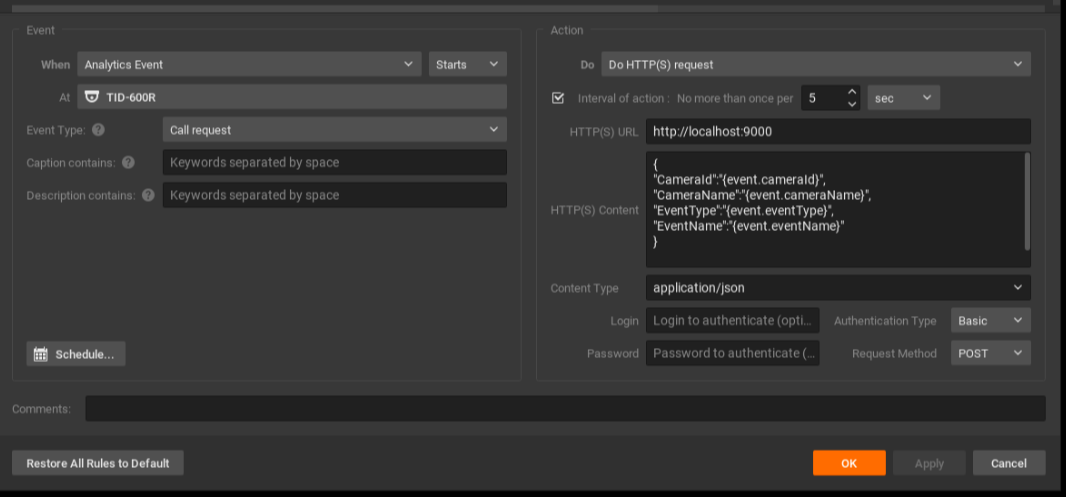
Is there a supported way to do this via the SDK or any internal APIs? If not, is there a recommended approach to simulate or inject such rule-based behavior programmatically?
i have used the following
Step 1
/ec2/getevents to get event id and details
Step 2
/ec2/saveEventRule:{ "id": "c4259d8d-8fe6-43e9-b3ac-02a5ef4e1c55", "eventType": "analyticsSdkEvent", "eventResourceIds": [ "a4870f7a-d106-2ed5--9d62ec10adda" ], "eventCondition": "{\"analyticsEngineId\":\"{d018384f-8f08-6a40-70a8-1405ba18b455}\",\"eventTimestampUsec\":\"0\",\"eventType\":\"undefinedEvent\",\"inputPortId\":\"nx.sys.CallRequest\",\"metadata\":{\"allUsers\":false,\"level\":\"\"},\"omitDbLogging\":false,\"progress\":0,\"reasonCode\":\"none\"}", "eventState": "Active", "actionType": "execHttpRequestAction", "actionResourceIds": [ "c4259d8d-8fe6-43e9-b3ac-02a5ef4e1c55" ], "actionParams": "{\"allUsers\":false,\"authType\":\"authBasic\",\"contentType\":\"application/json\",\"durationMs\":5000,\"forced\":true,\"fps\":10,\"httpMethod\":\"POST\",\"needConfirmation\":false,\"playToClient\":true,\"recordAfter\":0,\"recordBeforeMs\":1000,\"streamQuality\":\"highest\",\"text\":\"{\n\\\"CameraId\\\":\\\"{event.cameraId}\\\",\n\\\"CameraName\\\":\\\"{event.cameraName}\\\",\n\\\"EventType\\\":\\\"{event.eventType}\\\",\n\\\"EventName\\\":\\\"{event.eventName}\\\"\n}\n\",\"url\":\"http://:@localhost:9000\",\"useSource\":false}", "aggregationPeriod": 10, "disabled": false, "comment": "", "schedule": "", "system": false, "EventState": "string" }
i get the following result{ "error": "2", "errorId": "invalidParameter", "errorString": "Can't deserialize input Json data to destination object." }but my jon is valid and i am using GUID generator for "id": and "actionResourceIds":
Thanks in advance!
0 - Define a custom event from my plugin (e.g.
-

Hi Subramanian,
If you only update the
“id”, the rule will work correctly. The“actionResourceIds”field is fixed for that specific device and shouldn’t be modified, unless it applies to another device.For future troubleshooting, a helpful approach is to create two identical rules through the GUI and then compare the results of the
GET /ec2/getEventRulesrequest using a tool like DiffChecker (or any similar comparison tool).As shown below, the only difference is the
“id”value. I also added a“comment”field to make it easier to locate the rule in the JSON output.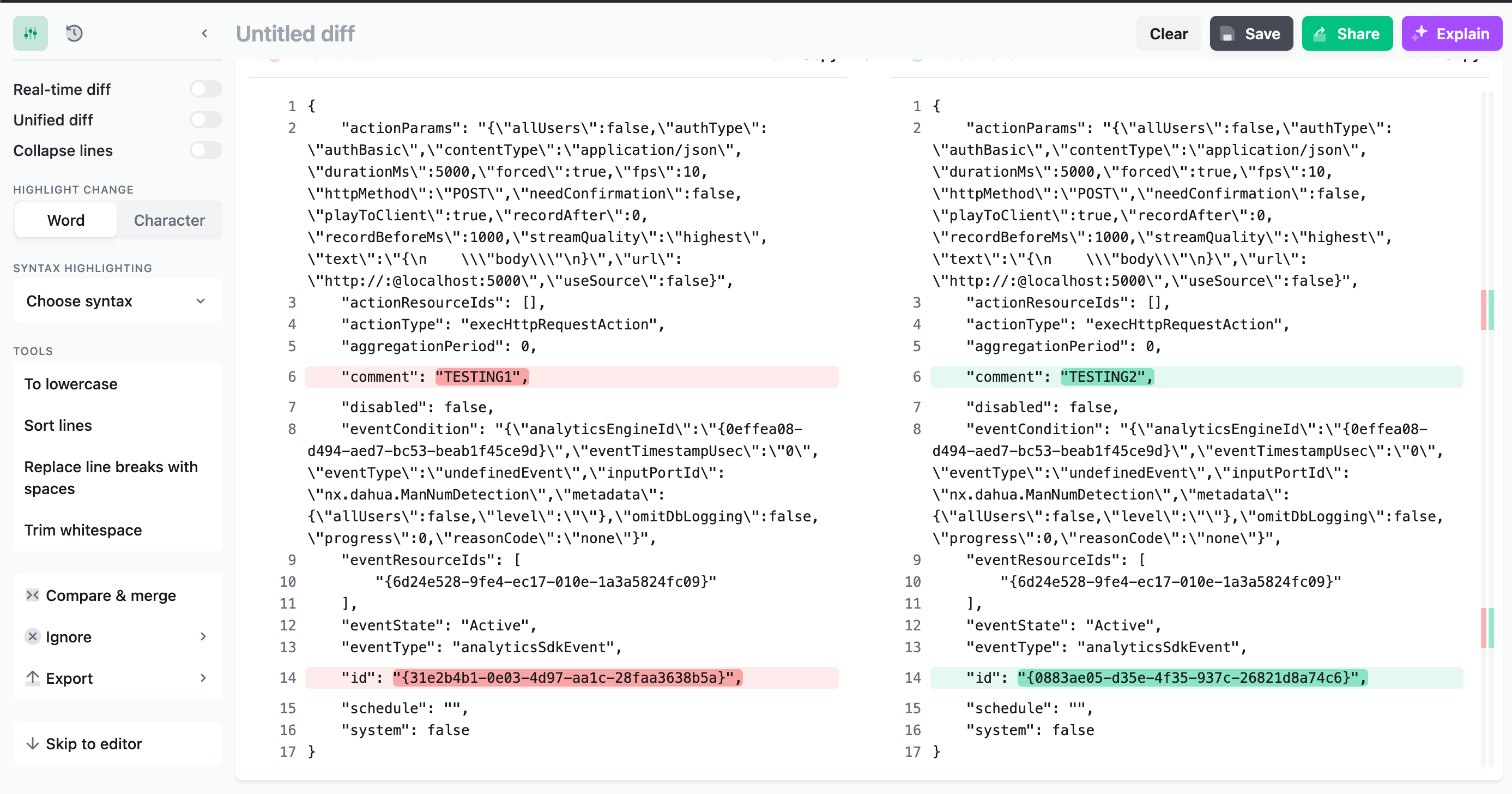
With kind regards.
0 -
{
    "id": "6a361330-d7d9-46a8-8a43-498e253eefa6",
    "eventType": "analyticsSdkEvent",
    "eventResourceIds": [
        "a4870f7a-d106-2ed5--9d62ec10adda"
    ],
    "eventCondition": "{\"analyticsEngineId\":\"{d018384f-8f08-6a40-70a8-1405ba18b455}\",\"eventTimestampUsec\":\"0\",\"eventType\":\"undefinedEvent\",\"inputPortId\":\"nx.sys.CallRequest\",\"metadata\":{\"allUsers\":false,\"level\":\"\"},\"omitDbLogging\":false,\"progress\":0,\"reasonCode\":\"none\"}",
    "eventState": "Active",
    "actionType": "execHttpRequestAction",
    "actionResourceIds": [],
    "actionParams": "{\"allUsers\":false,\"authType\":\"authBasic\",\"contentType\":\"application/json\",\"durationMs\":5000,\"forced\":true,\"fps\":10,\"httpMethod\":\"POST\",\"needConfirmation\":false,\"playToClient\":true,\"recordAfter\":0,\"recordBeforeMs\":1000,\"streamQuality\":\"highest\",\"text\":\"{\n\\\"CameraId\\\":\\\"{event.cameraId}\\\",\n\\\"CameraName\\\":\\\"{event.cameraName}\\\",\n\\\"EventType\\\":\\\"{event.eventType}\\\",\n\\\"EventName\\\":\\\"{event.eventName}\\\"\n}\n\",\"url\":\"http://:@localhost:9000\",\"useSource\":false}",
    "aggregationPeriod": 10,
    "disabled": false,
    "comment": "TESTING1",
    "schedule": "",
    "system": false,
    "EventState": "string"
}
the ID value is guid generated value is that correct still
if so i am still getting error
one more question can this saverule works under liveuser login
i need to create new one insted of updating to evey system
so need to know
{\"analyticsEngineId\":\"{d018384f-8f08-6a40-70a8-1405ba18b455} where this is coming from because i need to put inside the plugin code to call this api if engine id is diffrent then how to get that
can u provide the api steps and procedure which i can use to dynamically generate on every system to create a new rule on starting the engine0 -
Hi Subramanian,
I updated my previous comment, since I created some confusion.
You want a generic rule, not a specific rule.{ "actionParams": "{\"allUsers\":false,\"authType\":\"authBasic\",\"contentType\":\"application/json\",\"durationMs\":5000,\"forced\":true,\"fps\":10,\"httpMethod\":\"POST\",\"needConfirmation\":false,\"playToClient\":true,\"recordAfter\":0,\"recordBeforeMs\":1000,\"streamQuality\":\"highest\",\"text\":\"{\n \\\"body\\\"\n}\",\"url\":\"https://:@localhost:5000\",\"useSource\":false}", "actionResourceIds": [], "actionType": "execHttpRequestAction", "aggregationPeriod": 60, "comment": "TEST", "disabled": false, "eventCondition": "{\"analyticsEngineId\":\"{0effea07-d494-aed7-bc53-beab1f45ce9d}\",\"eventTimestampUsec\":\"0\",\"eventType\":\"undefinedEvent\",\"inputPortId\":\"nx.dahua.ManNumDetection\",\"metadata\":{\"allUsers\":false,\"level\":\"\"},\"omitDbLogging\":false,\"progress\":0,\"reasonCode\":\"none\"}", "eventResourceIds": [ "{30c35075-4dbb-bf75-0f93-11700c76bd4f}" ], "eventState": "Active", "eventType": "analyticsSdkEvent", "id": "{53aaad7a-b38c-4656-8bf4-3553692128a3}", "schedule": "", "system": false }In this rule there are three UUID:
-
analyticsEngineId- this ID determines which Event should be set. This UUID can be reused in any system, however, it specific for a certain plugin + Event Type. If the plugin or Event Type don't exist, the rule will be created with blank value. -
eventResourceIds- this ID determines to which device it applies. It is identical to the Camera ID, you collect withGET /rest/v3/devices. -
id- This is the unique ID for this rule, and this rule only
0 -
-
{
"actionParams": "{\"allUsers\":false,\"authType\":\"authBasic\",\"contentType\":\"application/json\",\"durationMs\":5000,\"forced\":true,\"fps\":10,\"httpMethod\":\"POST\",\"needConfirmation\":false,\"playToClient\":true,\"recordAfter\":0,\"recordBeforeMs\":1000,\"streamQuality\":\"highest\",\"text\":\"{\\n\\\"CameraId\\\":\\\"{event.cameraId}\\\",\\n\\\"CameraName\\\":\\\"{event.cameraName}\\\",\\n\\\"EventType\\\":\\\"{event.eventType}\\\",\\n\\\"EventName\\\":\\\"{event.eventName}\\\"\\n}\\n\",\"url\":\"http://:@localhost:9000\",\"useSource\":false}",
"actionResourceIds": [],
"actionType": "execHttpRequestAction",
"aggregationPeriod": 5,
"comment": "",
"disabled": false,
"eventCondition": "{\"analyticsEngineId\":\"{d018384f-8f08-6a40-70a8-1405ba18b455}\",\"eventTimestampUsec\":\"0\",\"eventType\":\"undefinedEvent\",\"inputPortId\":\"nx.sys.CallRequest\",\"metadata\":{\"allUsers\":false,\"level\":\"\"},\"omitDbLogging\":false,\"progress\":0,\"reasonCode\":\"none\"}",
"eventResourceIds": [
"{a4870f7a-d106-2ed5-0d68-9d62ec10adda}"
],
"eventState": "Active",
"eventType": "analyticsSdkEvent",
"id": "{86754159-bf73-a590-6919-4ed5805eb85a}",
"schedule": "",
"system": false
},
this is the output of the event from /ec2/getevents
so i entererd
eventResourceIds": [
"{a4870f7a-d106-2ed5-0d68-9d62ec10adda}"
], → camera id
\"analyticsEngineId\":\"{d018384f-8f08-6a40-70a8-1405ba18b455} → event id
"id": "{86754159-bf73-a590-6919-4ed5805eb85a}", → i generated using guid generator
so i think i got what u trying to explain
but still getting the error0 -
Hi Subramanian,
I see the mistake you made, and could reproduce it:
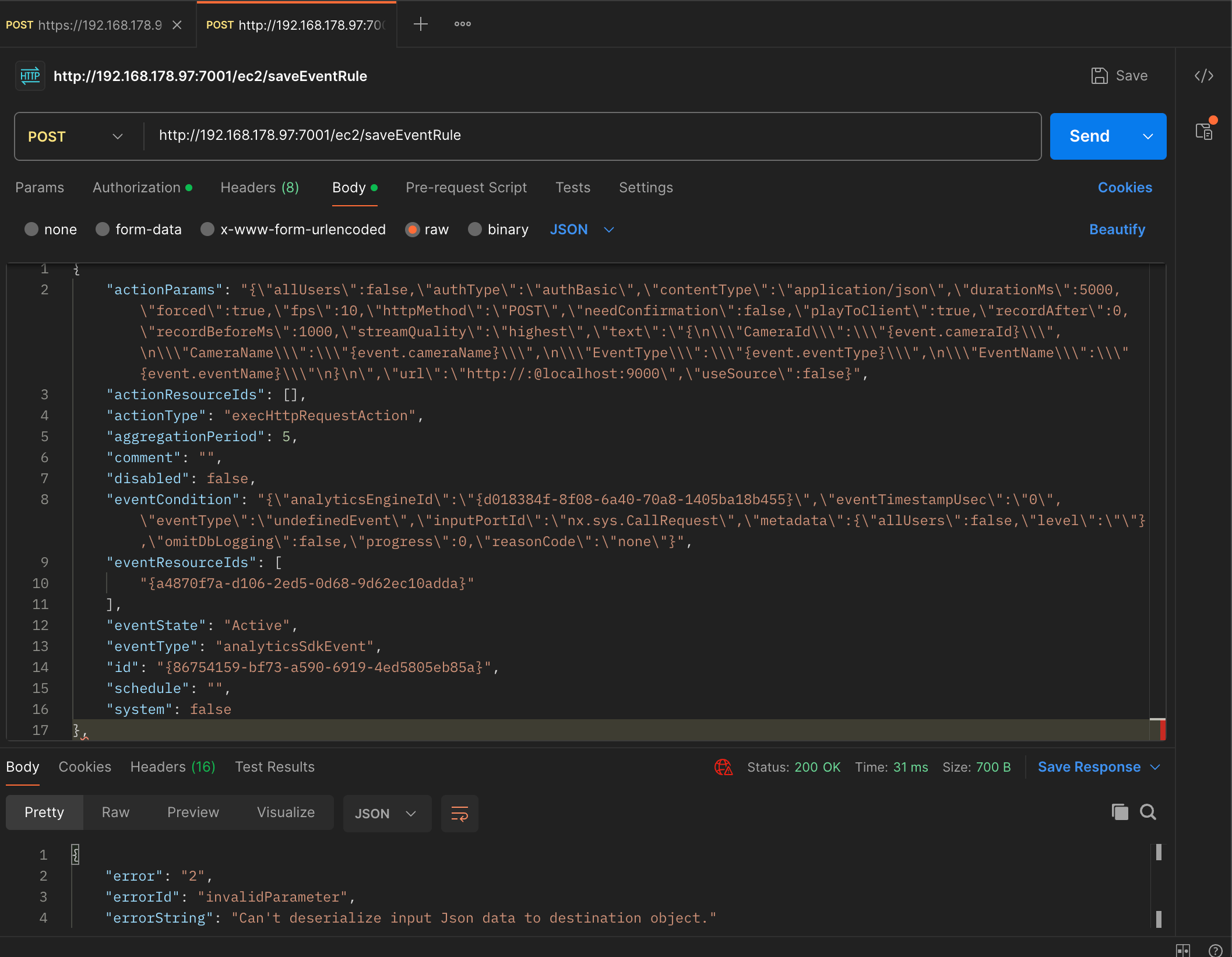
Please, when using JSON formatted text, validate it; for example with https://jsonlint.com/:
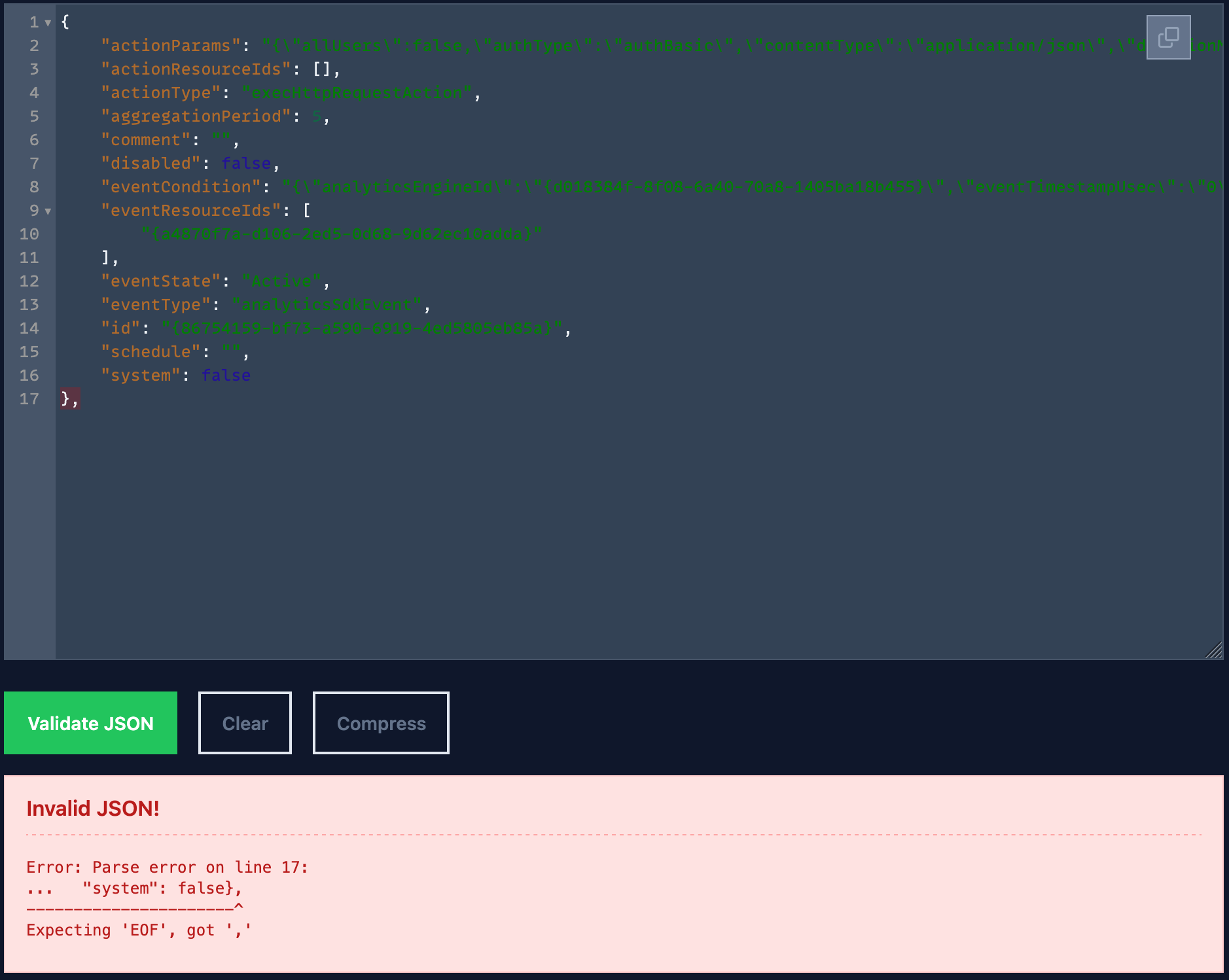
So, I fixed the issue (removing the
,in the end, then it is valid: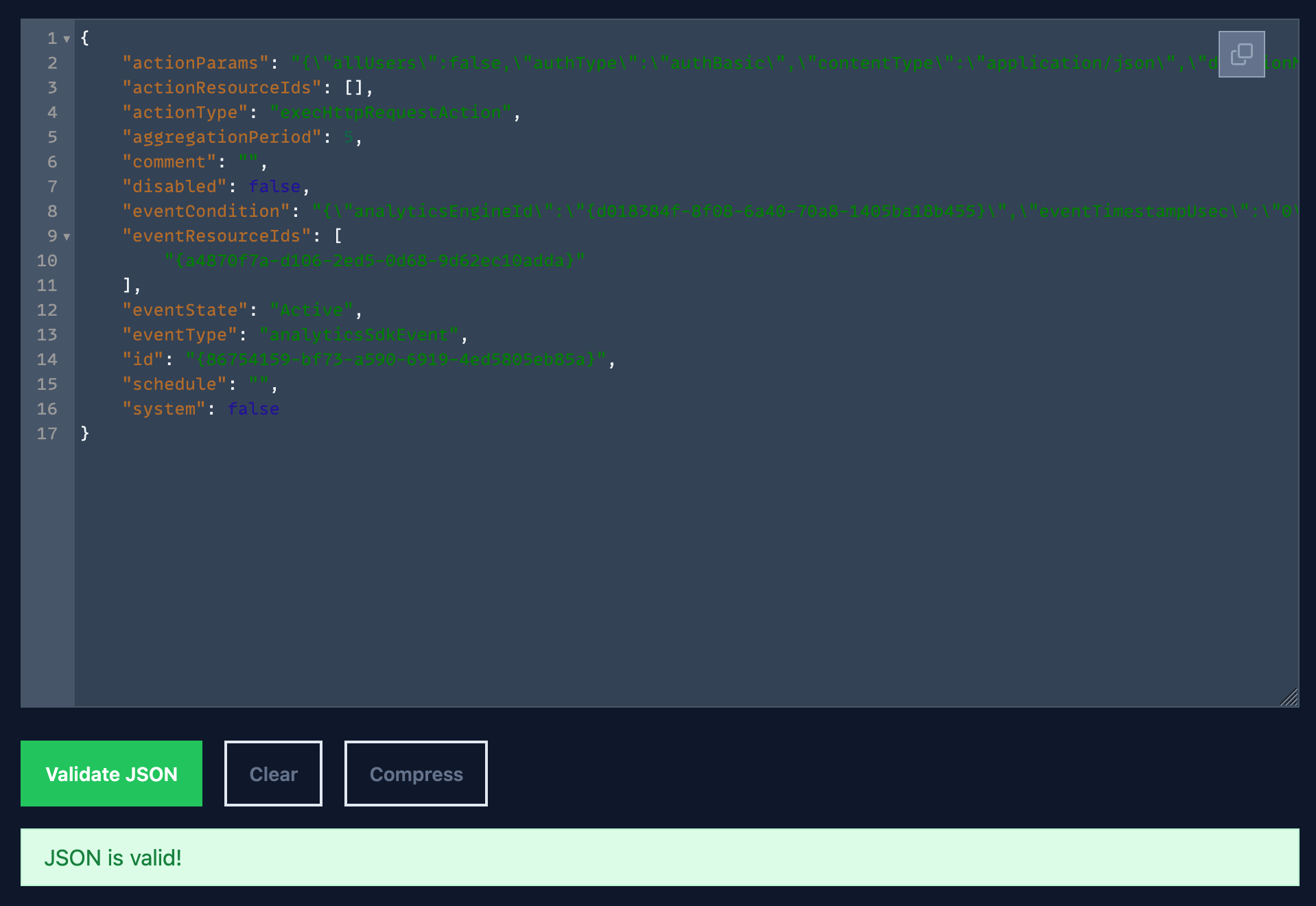
Then when I I took the body you shared - without the
,- and used Postman to add the rule to my system, and I could do it without any issues. See below: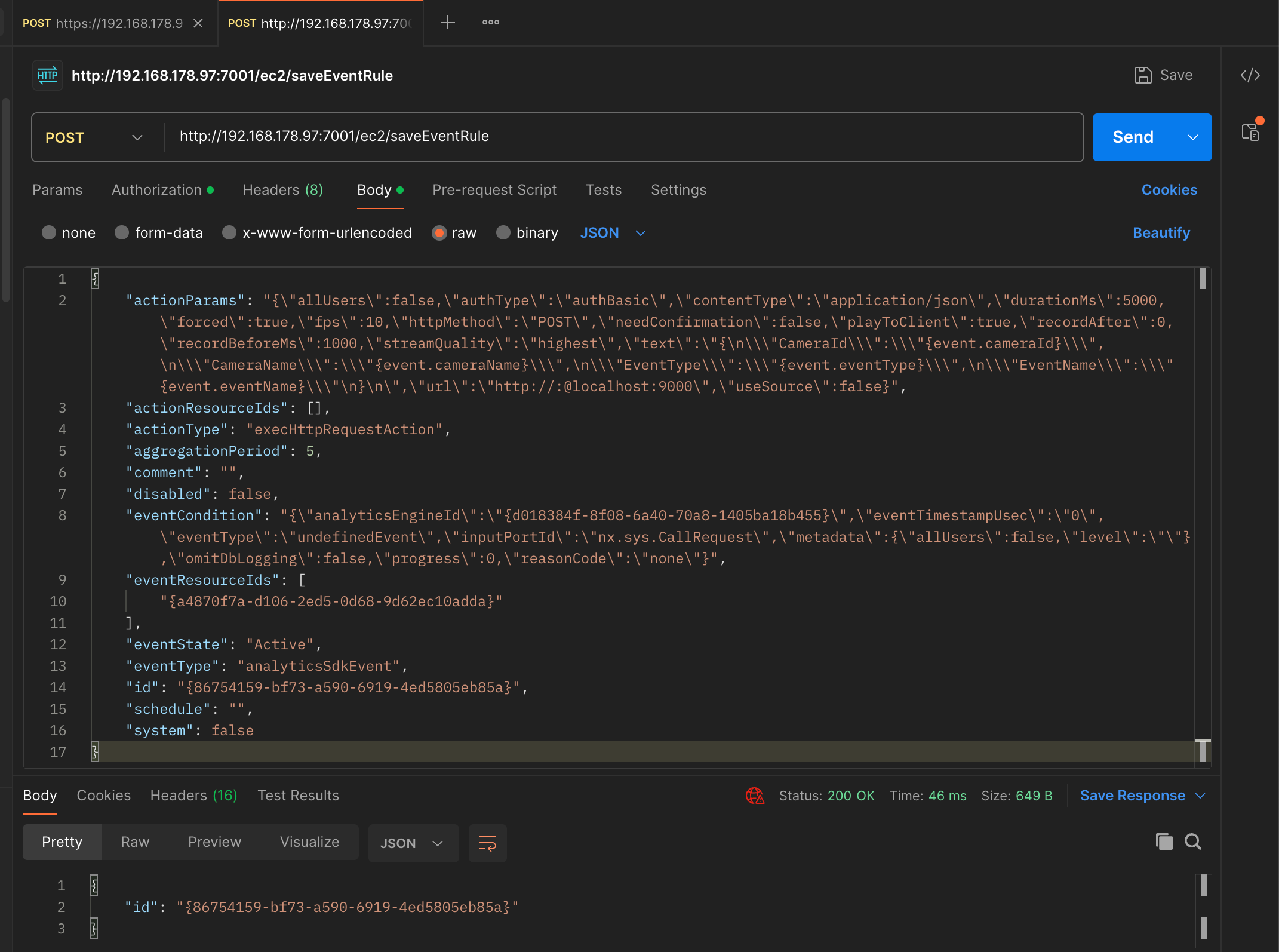
And there is the rule:
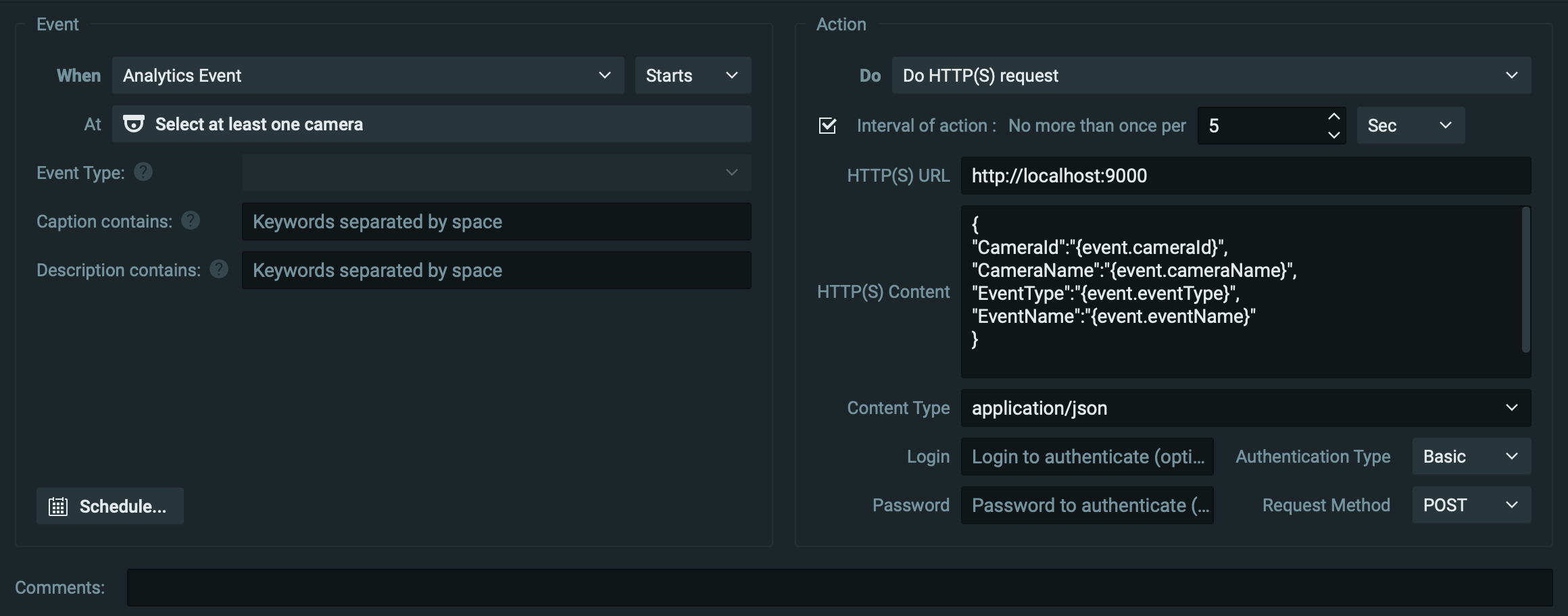
Without the proper Camera assigned, since your camera ID, doesn't exist in my system, and the same applies to the Event Type, since I don't have your Plugin. Both are expected.
0 -
curl --location 'https://127.0.0.1:7001/ec2/saveEventRule' \
--header 'Content-Type: application/json' \
--header 'Authorization: Basic ZXZvbG9uOkV2b2xvbkluc2l0ZXM=' \
--data-raw '{
  "actionParams": "{\"allUsers\":false,\"authType\":\"authBasic\",\"contentType\":\"application/json\",\"durationMs\":5000,\"forced\":true,\"fps\":10,\"httpMethod\":\"POST\",\"needConfirmation\":false,\"playToClient\":true,\"recordAfter\":0,\"recordBeforeMs\":1000,\"streamQuality\":\"highest\",\"text\":\"{\\n\\\"CameraId\\\":\\\"{event.cameraId}\\\",\\n\\\"CameraName\\\":\\\"{event.cameraName}\\\",\\n\\\"EventType\\\":\\\"{event.eventType}\\\",\\n\\\"EventName\\\":\\\"{event.eventName}\\\"\\n}\\n\",\"url\":\"http://:@localhost:9000\",\"useSource\":false}",
  "actionResourceIds": [],
  "actionType": "execHttpRequestAction",
  "aggregationPeriod": 5,
  "comment": "",
  "disabled": false,
  "eventCondition": "{\"analyticsEngineId\":\"{d018384f-8f08-6a40-70a8-1405ba18b455}\",\"eventTimestampUsec\":\"0\",\"eventType\":\"undefinedEvent\",\"inputPortId\":\"nx.sys.CallRequest\",\"metadata\":{\"allUsers\":false,\"level\":\"\"},\"omitDbLogging\":false,\"progress\":0,\"reasonCode\":\"none\"}",
  "eventResourceIds": [
    "{a4870f7a-d106-2ed5-0d68-9d62ec10adda}"
  ],
  "eventState": "Active",
  "eventType": "analyticsSdkEvent",
  "id": "{86754159-bf73-a590-6919-4ed5805eb85a}",
  "schedule": "",
  "system": false
}'
still no luck
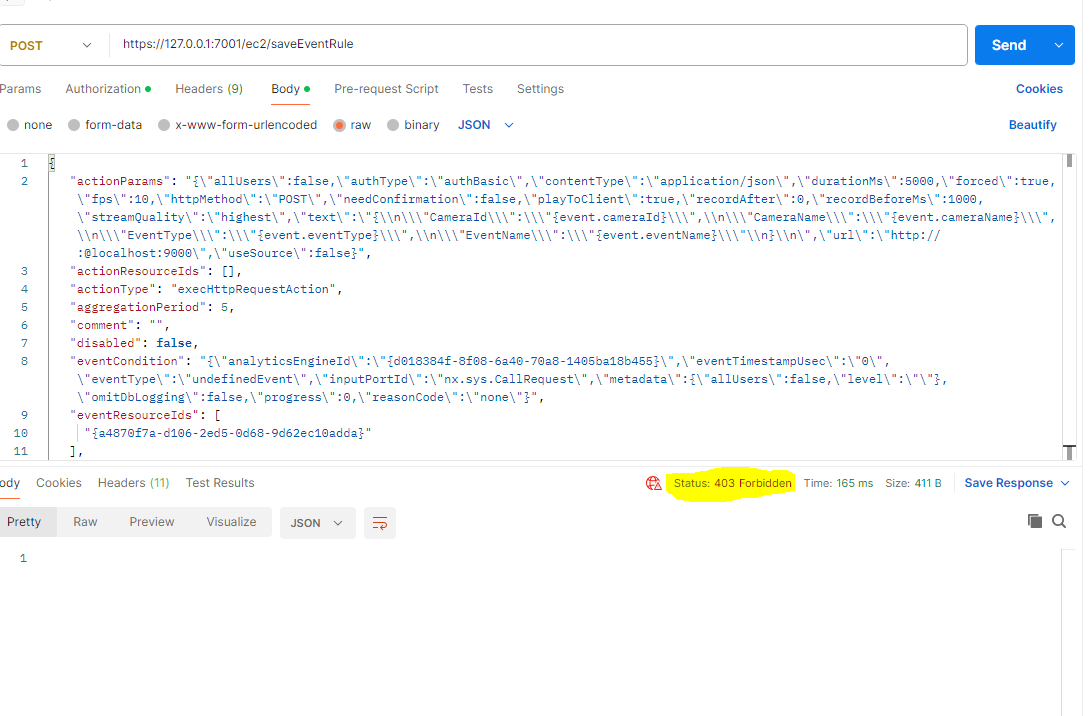
FYI the “},” after the parameters is just a copy past from /ec2/getevents output with multiple camera details so it just a copy mistake
i am using 5.1.3 version of client and server0 -
Hi Subramanian,
In the
cUrlcommand, you use basic authentication, which isn't supported by the VMS. The default method is the use of a Bearer token, like so:curl --location 'https://127.0.0.1:7001/ec2/saveEventRule' \ --header 'Content-Type: application/json' \ --header 'Authorization: Bearer <YOUR_TOKEN>' \ --data-raw '{ "actionParams": "{\"allUsers\":false,\"authType\":\"authBasic\",\"contentType\":\"application/json\",\"durationMs\":5000,\"forced\":true,\"fps\":10,\"httpMethod\":\"POST\",\"needConfirmation\":false,\"playToClient\":true,\"recordAfter\":0,\"recordBeforeMs\":1000,\"streamQuality\":\"highest\",\"text\":\"{\\n\\\"CameraId\\\":\\\"{event.cameraId}\\\",\\n\\\"CameraName\\\":\\\"{event.cameraName}\\\",\\n\\\"EventType\\\":\\\"{event.eventType}\\\",\\n\\\"EventName\\\":\\\"{event.eventName}\\\"\\n}\\n\",\"url\":\"http://:@localhost:9000\",\"useSource\":false}", "actionResourceIds": [], "actionType": "execHttpRequestAction", "aggregationPeriod": 5, "comment": "", "disabled": false, "eventCondition": "{\"analyticsEngineId\":\"{d018384f-8f08-6a40-70a8-1405ba18b455}\",\"eventTimestampUsec\":\"0\",\"eventType\":\"undefinedEvent\",\"inputPortId\":\"nx.sys.CallRequest\",\"metadata\":{\"allUsers\":false,\"level\":\"\"},\"omitDbLogging\":false,\"progress\":0,\"reasonCode\":\"none\"}", "eventResourceIds": [ "{a4870f7a-d106-2ed5-0d68-9d62ec10adda}" ], "eventState": "Active", "eventType": "analyticsSdkEvent", "id": "{86754159-bf73-a590-6919-4ed5805eb85a}", "schedule": "", "system": false }'Alternatively, you could create a dedicated Digest User, and use Digest Authentication on the cUrl command:
curl --location 'https://127.0.0.1:7001/ec2/saveEventRule' \
  --header 'Content-Type: application/json' \
  --digest \
  --user '<user>:<password>' \
  --data-raw '{
    "actionParams": "{\"allUsers\":false,\"authType\":\"authBasic\",\"contentType\":\"application/json\",\"durationMs\":5000,\"forced\":true,\"fps\":10,\"httpMethod\":\"POST\",\"needConfirmation\":false,\"playToClient\":true,\"recordAfter\":0,\"recordBeforeMs\":1000,\"streamQuality\":\"highest\",\"text\":\"{\\n\\\"CameraId\\\":\\\"{event.cameraId}\\\",\\n\\\"CameraName\\\":\\\"{event.cameraName}\\\",\\n\\\"EventType\\\":\\\"{event.eventType}\\\",\\n\\\"EventName\\\":\\\"{event.eventName}\\\"\\n}\\n\",\"url\":\"http://:@localhost:9000\",\"useSource\":false}",
    "actionResourceIds": [],
    "actionType": "execHttpRequestAction",
    "aggregationPeriod": 5,
    "comment": "",
    "disabled": false,
    "eventCondition": "{\"analyticsEngineId\":\"{d018384f-8f08-6a40-70a8-1405ba18b455}\",\"eventTimestampUsec\":\"0\",\"eventType\":\"undefinedEvent\",\"inputPortId\":\"nx.sys.CallRequest\",\"metadata\":{\"allUsers\":false,\"level\":\"\"},\"omitDbLogging\":false,\"progress\":0,\"reasonCode\":\"none\"}",
    "eventResourceIds": [
      "{a4870f7a-d106-2ed5-0d68-9d62ec10adda}"
    ],
    "eventState": "Active",
    "eventType": "analyticsSdkEvent",
    "id": "{86754159-bf73-a590-6919-4ed5805eb85a}",
    "schedule": "",
    "system": false
  }'
That being said, Bearer Authentication is the preferred and more secure method to authenticate.
In the Postman screenshot, there is a
403 Forbiddenstatus code, which means that the client does not have access rights to the content; that is, it is unauthorized, so the server is refusing to give the requested resource. Unlike a401 Unauthorizedstatus code, the users identity is known to the server. In this case, you used the correct authorization method, however the user didn't have sufficient user rights. To process such requests, the user should have access level right of a Power User or administrator.With kind regards.
0 -
Hi Subramanian
You wrote:
i am using 5.1.3 version of client and server
Please update your system to version 6.0.6 since version 5.1.3 of March 2024, isn't supported anymore, and we might be trying to solve something that have been solved already.
With kind regards.
0 -
Thanks a lot for the immediate response and your invaluable help—it’s much appreciated!
I’ve updated to version 6.0.6 as suggested, and the API works perfectly when logged in as an admin user. However, when I try the same API call using a live user login, it doesn’t seem to work.
Is it possible to create event rules via API using a live user account? Or is admin access strictly required for this operation?
0 -
Hi Subramanian,
Glad to see it works!
The creation of rule is restricted to administrators, and Power Users. Other user levels, in general, cannot modify the configuration of the VMS.
With kind regards.
0 -
one more think, I don't see settings for specific camera instead i see a common entry I need to do for specific camera and need to set Event type also like the following
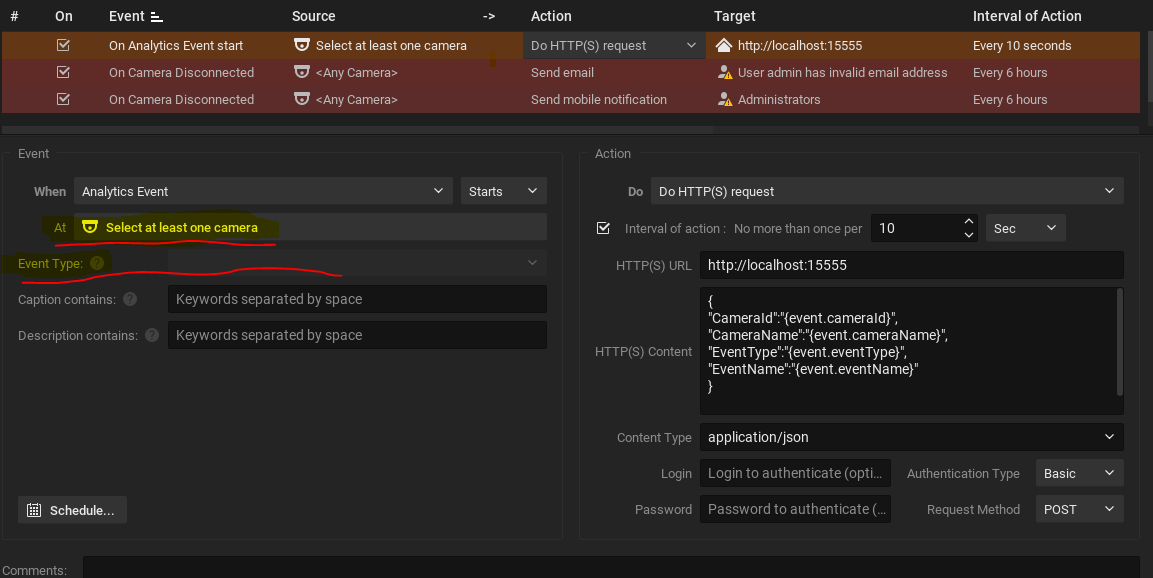
Expected:
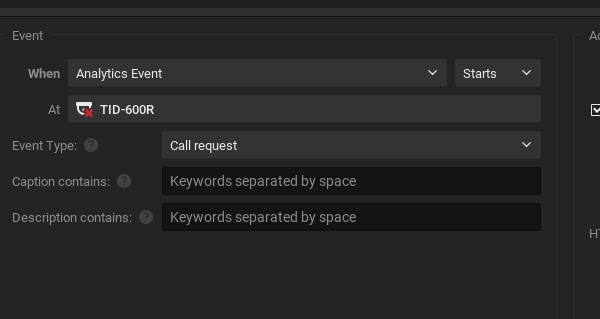
I need to pass or select which camera the rule should apply and for which event type i thought giving event resource id will set this camera
0
Please sign in to leave a comment.
Comments
18 comments