How to Display a Newly Created Layout via REST API
Answered
Hello,
I am creating a new layout using /rest/v3/layouts. Is there a command that allows me to display this layout on the screen? To activate it?
-
Thank you for your response.
The provided article describes launching additional instances of the VMS program with a selected layout — unfortunately, I am looking for a different solution.I would like to open/activate a layout in an already running VMS instance, not open a new one. Using the API, it is possible to create a new layout and add cameras, but I am missing the option to display (activate) a selected layout.
0 -

Hi Mariusz,
This can be done with the Open Layout action.
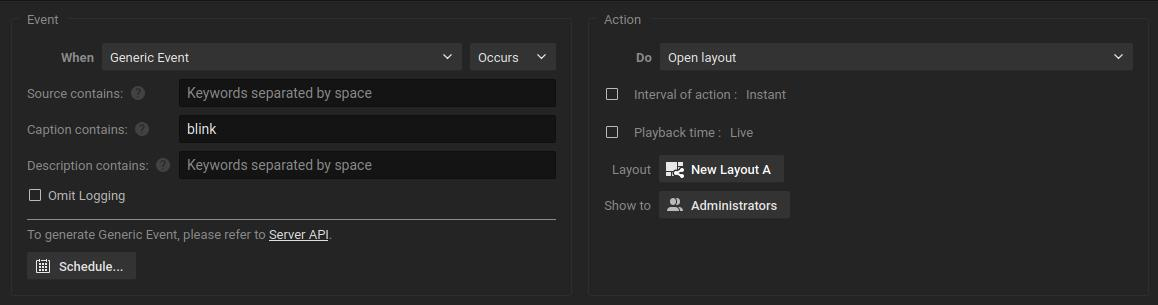
You also can create such rule via the API, with
POST /ec2/saveEventRule.
To get the right formatting, you can useGET /ec2/getEventRules.For example, the rule above looks like this:
[
  {
    "actionParams": "{\"actionResourceId\":\"{d7f13fda-ae85-4e67-ba3d-bd6364e4be32}\",\"additionalResources\":[\"{00000000-0000-0000-0000-100000000000}\"],\"allUsers\":false,\"authType\":\"authBasicAndDigest\",\"durationMs\":5000,\"forced\":true,\"fps\":10,\"needConfirmation\":false,\"playToClient\":true,\"recordAfter\":0,\"recordBeforeMs\":0,\"streamQuality\":\"highest\",\"useSource\":false}",
    "actionResourceIds": [],
    "actionType": "openLayoutAction",
    "aggregationPeriod": 0,
    "comment": "",
    "disabled": false,
    "eventCondition": "{\"caption\":\"blink\",\"eventTimestampUsec\":\"0\",\"eventType\":\"undefinedEvent\",\"metadata\":{\"allUsers\":false,\"level\":\"\"},\"omitDbLogging\":false,\"progress\":0,\"reasonCode\":\"none\"}",
    "eventResourceIds": [],
    "eventState": "Undefined",
    "eventType": "userDefinedEvent",
    "id": "{63eba84f-13db-4094-b90c-9aac87f26775}",
    "schedule": "",
    "system": false
  }
]
NOTE: It is required to use Shared Layouts.
0 -

Hi Mariusz,
Thanks for your question. Here are a few clarifications:
- The API you’re referring to is a Media Server API, which means it doesn’t control client-side behavior. It cannot manipulate how content is presented on the client interface.
- What you’re aiming to achieve is a client-side action, and doesn’t involve any server-side operations.
To handle this, you can configure event rules using a generic event that triggers an “open layout” action (similar to a webhook). For this, you can call:
- /rest/v4/events/generic (for v6.1.0) or
- /api/createEvent (for v6.0 or earlier)
This will trigger the configured rule and execute the corresponding client-side action.

Hope this helps.
Thanks.0 -
Norman Ichiro
Thank you. The generic event and the "Open Layout" action seem to be exactly what I needed.I’m trying to create a new Rule via the API. In your example, d7f13fda-ae85-4e67-ba3d-bd6364e4be32 is the layout ID retrieved using the
GET /rest/v3/layouts.However, I’m not sure what "id": "{63eba84f-13db-4094-b90c-9aac87f26775}" refers to. Could you clarify that?
In the server response, I receive a 400 - Bad Request0 -
Hi Mariusz
ID
63eba84f-13db-4094-b90c-9aac87f26775is the ID of the rule itself.
So for each rule you create, you need to generate a new UUID.If you get a 400 bad request, it typically means an error in the URL you used for the request.
0 -
Yes, the bad request was on my side.
Thanks for the quick responses and helpful guidance — the solution with the Open Layout action triggered via a generic event works as expected.
Really appreciate your support!
To have everything work automatically, I still need to use Shared Layouts. Can I create a layout via API that is immediately shared?0 -
Hi Mariusz,
Sure, you can create of modify layouts.
You can use
POST /rest/v3/layoutsto create new layouts, and if you use the following parentId, it automatically is a shared layout."parentId": "{00000000-0000-0000-0000-000000000000}"For existing layouts, you can use
PATCH /rest/v3/layouts/{id}with just the body to modify the layout to a shared layout.{ "parentId": "{00000000-0000-0000-0000-000000000000}" }Awhile ago I created a script to change all layouts with the trigger word _shared into a shared layout. You can find it HERE. Maybe you find it useful.
0 -
Let's assume that the user is watching recordings on a specific layout. Can I use an API command to force that layout to start playing live?
0 -
Hi Mariusz,
The is no standard option to achieve this. Why forcing the user back to live?
If someone is allowed to playback the archive, it is a bit counterintuitive to swap back to live. I would assume if some isn't allowed to playback, he would have gotten different access rights, but perhaps I'm missing the use case.Looking forward to your feedback.
0 -
I’m integrating the FDS system with the CCTV, and I would like the selected cameras to be displayed in case of a fire. In such a situation, the cameras should be shown in live mode.
0 -
Hi Mariusz,
That one’s pretty simple!
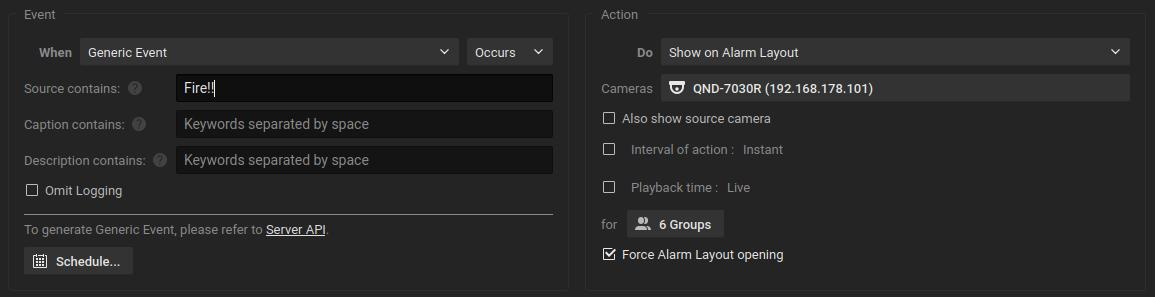
Usually, setting up a rule with Fire Detection as the trigger; whether it’s a Generic Event, Analytics Event, or Analytics Object Detection, and using Alarm Layout as the action will do the trick. When triggered, it’ll pop open an Alarm Layout and show the assigned cameras in Live mode.
For example:
 0
0 -
I’m doing it a bit more complex: I create a new regular layout (not a fire alarm one), then I add as many cameras as I need depending on the alarm zone, and after that, I use a generic event to display the previously created layout.
This way, I can display multiple combinations depending on the alarm zone (so instead of having a single alarm layout, I can have several different ones).
That’s why I need a functionality that allows me to force the live mode in a given layout.0 -
Hi Mariusz,
You have two possible approaches here:
Option 1:
Assign all the desired cameras to the Alarm Layout: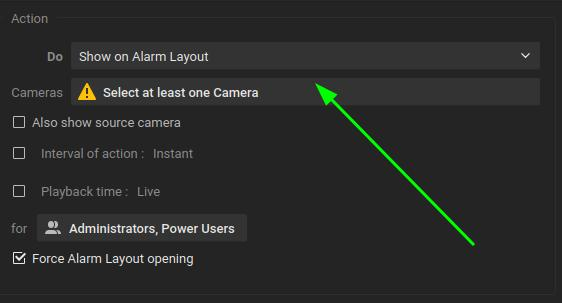
Option 2:
Create the desired Layouts, convert them to Shared Layouts, and then assign the action Open Layout to open the selected one: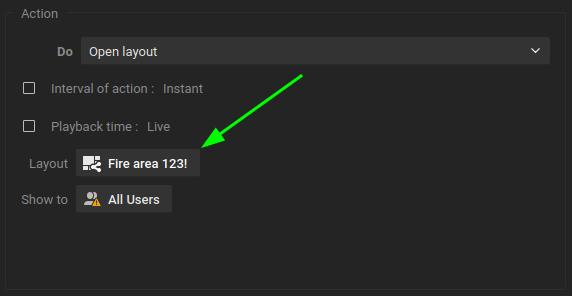
By default, playback will be live, though you can set it to a specific value to playback if needed.
I’d recommend Option 1 when you expect a sequence of events, such as an intruder moving through multiple camera views. Each event will trigger and populate the Alarm Layout, giving you a continuous flow of activity. With Open Layout, each event opens its assigned layout separately, which may result in multiple tabs opening if different layouts are triggered.
On the other hand, for scenarios like a fire, it may be more useful to focus on a single layout that shows all surrounding devices at the desired positions for better context and orientation.
0 -
I know this options, but in my integration I have about 90 scenarios (fire detector–camera mappings), so I would have to configure all of them in the VMS, which is user/configurator error-prone. In addition, if the CCTV or FDS system is expanded, a significant part of the configuration would require major changes. That’s why I decided to create new standard layouts and trigger them via a generic event, while the entire mapping logic between fire detectors and cameras is stored in an csv file from which I read the data.
My integration is almost perfect — the only thing missing is the option to force live playback. Maybe in the future I’ll publish a detailed description of how my integration works, so you’ll have a clearer picture of what I mean.0 -
Hi Mariusz,
If you have a CSV with data and a logic, you can add the camera IDs as well to this CSV (since these are a fixed value), and use this to create the layouts (
POST/rest/v3/layouts) and this can be done to create the desired layouts or you do it dynamically, so the layouts are created in case of the event, and deleted after the event. This only will fail, if the data in the CSV is incorrect or incomplete.0 -
I used to work with an Alarm layout, but I ran into some limitations and switched to regular layouts. The thing is, I don’t quite remember what the exact problem was back then...
Originally, my idea was to have a single Alarm layout where cameras would dynamically appear and disappear when a fire event occurred or was cleared. But if I recall correctly, I couldn’t remove cameras from that layout, or I wasn’t able to close the Alarm layout itself. That’s why I switched to regular layouts. It might also have been related to adding/positioning cameras so that they were displayed in an optimal way.
Later on, user expectations changed, and they requested additional buttons to control when cameras should be displayed. That pushed me further toward staying with regular layouts. Honestly, I don’t fully remember anymore, since I only deal with this from time to time.
So, using an Alarm layout would force playback in live mode, right? In that case, maybe I could switch my regular layout back to an Alarm layout — it shouldn’t be too much work
0 -
Hi Mariusz
The downside of Alarm Layouts is that you cannot define the order and size of the different devices on the layout. These were created with one camera per event in mind. To resolve this, the Open Layout actions were added.
In both cases, Alarm Layout and Open Layout actions, will open in the live mode.
0
Please sign in to leave a comment.
Comments
18 comments