Play sound clip too short
Answered
Hi, I have uploaded my own sound file (a security warning message) which is 15 seconds long. In 'Play sound - Manage - Clip sound up to -' only allows me to play 10 seconds. I think this is a bug as it should play the whole file. If I needed a shorter file, I would have uploaded a shorter one right?
-

Hi Jay,
Thanks for your question. This is not a bug.
In fact, this is the design behavior, the Audio file is limited to 10 seconds.
On 4.2.0, you can see the configuration on the event rules dialog.
Thanks.
0 -
Hi Ichiro,
I need to play a file that is 15 seconds - how can I do that?
Thanks
Jay
0 -
Hi Jay M Patel ,
Unfortunately, so far Nx Witness does not provide the capability to play user-uploaded audio or built-in audio for more then 10 seconds. It is limited to 10 seconds.
Maybe you can use some audio software to trim or change the speed of the audio, then make it less than 10 seconds.
Thanks.
0 -
Hi Ichiro,
Thank you for your reply. Can I suggest to remove the limit as this is a very minor change and would allow me to play a file issued by a government security official for use on their site.
Thanks
0 -
Hi Jay M Patel ,
This has been discussed recently. Your feedback is also directed to the product design team.
We don't have the conclusion yet, likely there would be some updates in the future.Thanks for your feedback.
JIRA-FDBK-355
0 -

Hi Ichiro, has there been any efforts to remove this limit? I have the same issue, I have a message that plays in different languages one after the other, meaning the file is like a minute long...
I am on 5.0 and it seems it is still limited to 10 seconds?? Even after this post being years old?
Also I have some suggestions with 2-way audio, should I make another post?
0 -

Hi Tyler Boodman,
Thank you for your inquiry. Currently, the feature you requested has not been included in the developers' task list. Unfortunately, we do not anticipate any changes in version 5.1 and 5.2 as well.However, I have taken the initiative to initiate a new discussion to assess the effort required for the implementation of your request. We will also explore potential workarounds to bypass the current limitation.
Rest assured, I will keep you updated on any progress and developments on this matter.
Thank you for your patience and understanding.
Best regards.
1 -
Okay thanks Norman. I am surprised not a lot of people have asked for this... 😅
Also I have some questions and suggestions of various topics, are you able to DM me or start another thread?
0 -
Hi Tyler Boodman,
I hope this message finds you well. I would like to inform you that I have reopened the conversation regarding your request and our team is currently looking into the feasibility of implementing the changes you suggested within a short timeframe, specifically during one of the upcoming 5.1 patches.
Regarding other questions and suggestions. We don't have DM option.
In case of questions/bugs about our software, you can submit them in THIS section or submit a support ticket.
For suggestions, you can submit them in THIS section.
Please submit one subject per topic you open.Best regards.
1 -
Dear @... and Tyler Boodman,
I have a solution to increase the maximum length of a clip and have written a draft and this draft is currently under review, and I'll share a link to the support article, once it is published.0 -
Thank you Norman.
We did a work around by writing a small HTTP server with the audio file in the Linux installation.
Then configured the Event Rules to 'Do HTTP request' when the Analytics Event / Motion on Camera is triggered.
This has worked just fine. However look forward to your suggestion.
With kind regards
Jay
0 -
Dear @... and Tyler Boodman,
I have just published a support article that provides instructions on how to modify the maximum length of an audio file when using the Play Sound action. You can access the article through THIS following.
I hope you find it helpful!
0 -
Norman Wow this looks nice and easy. I will try it out. Thanks!
0 -
Norman, I am on Windows, the docs mention a config file but is it just the list of entries in the registry Editor? The docs don't say what Type of entry to put in (DWORD, QWORD). I added this in the image below but the max didn't change.

Once this is figured out, the Play Sound action will be ran on a soft trigger or an analytics event, and it won't necessarily be triggered from this same client machine. Will the duration still be what I set because the file was imported with a certain duration regardless of the event that plays the sound?
Thanks
0 -
Dear Tyler Boodman,
I have made some edits to the support article and clarified the steps for Windows a bit. You should add a new String value at the client configuration location, simply set the desired number of seconds for the Value data, as shown in the image below:
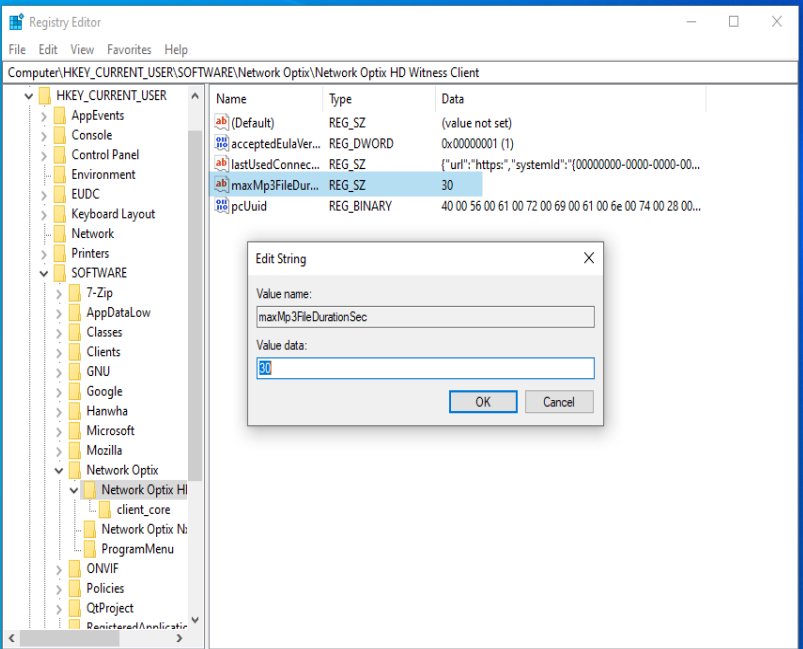
In response to your second question, I am happy to inform you that if you update a client's value and attach an audio file from the customer, with a duration exceeding 30 seconds, the file will be played for other clients during the set time. If you have any further questions or concerns, please do not hesitate to ask.1 -
Sorry but seems like the setting isn't taking affect... it still only maxes out at 10 seconds.
My server is Wisenet WAVE 5.0.0.35745 but my client is on 5.0.0.36634 so it runs in compatibility mode, would this have any affect on it? I did try it on the main server machine (matching versions) but still didn't work. Do I need a newer version?
My path in Regedit is Computer\HKEY_CURRENT_USER\SOFTWARE\Hanwha\Hanwha Wisenet WAVE Client
Then I made the String value just like your screenshots, tried restarting Windows as well but nothing still.
0 -
Hi Tyler Boodman,
Could you provide remote access through TeamViewer?
If so, I'll transfer the topic into a support ticket and one of us will take a look into your client configuration.0 -
Yes please do that and I can provide the TeamViewer Partner ID
0
Post is closed for comments.
Comments
18 comments