Ver4.1.0.32045 Automatic save setting
Answered
Bit rate setting for each camera, 1Mbps, 3Mbps, 6Mbps
When Ver3.2 automatic recording save was set, all cameras recorded almost the same days, but after updating to Ver4.1.0.32045, the recording data retention period is different.
The recorded data of the 4K camera set at 6 Mbps is about 2 weeks, and the camera set at 1 Mbps is 3 or 4 months.
It’s why?
-

Hi jyuuyou tyou,
To answer your question, more information is required, see THIS support article for the preferred information.
In this case most important are a reproduction scenario; which steps were taken to come to these results. Were there any changes in the storage? Are both cameras in the same server?
In general, it is expected that a 6 Mbps can be recorded for a shorter period of time than a 1 Mbps camera.
You cannot convert the retention period of the 1 Mbps camera being 6 times longer than a 6 Mbps camera, since it depends on multiple variables and Mbps is only one of them.Based on your answer about the reproduction scenario, we might be able to offer a suggestion to equalize the storage retention times.
0 -
Hi Norman san
Customer's NxWitness environment:
NxWitness Ver: 4.1.0.32045
Client&Server:Win10Pro
Network Topology:2 MS integrated; 37 camera;3 POEHUB(24Port) .
Reproduction Scenario:
Camera bit rate setting 1.5 Mbps, 2 Mbps, 3 Mbps, 6 Mbps
Camera settings and MS connection are as shown in the picture.
At Ver3.2, all cameras automatically recorded, recording for about 80 days.
After updating to Ver4.1.0.32045, the automatic recording and saving setting remains, but the recording data period of the camera has become terribly different.
The recording data period of all 6Mbps cameras is only 2 to 3 weeks.
Others have cameras with recorded data for 4 months.Recording settings up to Ver3.2 are decided by the number of days,
Is Ver4.1.0.32045 determined by the amount of data?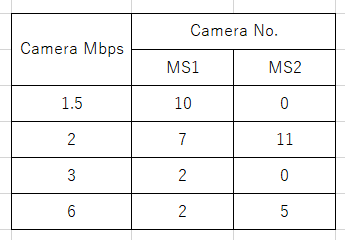 0
0 -
Hi jyuuyou tyou,
Please re-index the archive and after this was done, please allow the system to extend the retention times.
See THIS article about how Nx Witness manages its storage.
0 -
Hi Norman san
All 2 MSs have 12TB HDD x 4 built-in.
No Raid, All four HDDs are recording drives. Usable area 10.9TB x 4.
Each drive has been set free space of 100GB.External storage (such as NAS or DAS or SD) is not used.
0 -
Hi jyuuyou tyou,
We have not heard back from you in a while, so we are going to assume your question has been answered and set this topic to 'Answered'.
0 -
Hi Norman san
I am waiting for your answer.
I need to submit a report to a customer, they want to know the cause.0 -
Hi jyuuyou tyou,
I'm pretty sure the cause won't be revealed.
As mentioned: Please re-index the archive and after this was done, please allow the system to extend the retention times.
Over time, the retention times should be properly displayed again.
0 -
Hi Norman san
I replied to the customer that the cause was unknown, but the customer cannot accept this reason.
Can you give me some advice, even if it's a guess?
0 -
Hi Jyuuyou tyoi,
A guess could be that the cameras were added at a later time. Another guess could be a restart during a write action to the storage database causing a minor data corruption. But these are just guessses and don't mean anything.
As requested before in the support article we linked to: server logs might givea clue if they were set to DEBUG or VERBOSE, but likely they are set to INFO as they should be and won't reveal anything.
0 -
Hi Norman san
Thanks for your advice.
With the camera registered in Ver3.2, I disabled the camera recording setting and then updated to Ver4.1.
No cameras were added later.After that, I did Windows update with the camera recording setting disabled. The NxWitness recorder has restarted several times.
Will there be any impact?0 -
Hi jyuuyou tyou,
You asked:
Will there be any impact?
Not sure, based on:
The NxWitness recorder has restarted several times.
If these restarts were unexpected, then the write process in the storage database might be interrupted and might have cause an error, which should be resolved by re-indexing the archive. But it will remain an assumption and there is no way I can change this assumption into certainty.
0
Please sign in to leave a comment.
Comments
11 comments