Intercom supports in Nx Witness - 2N ? Other brand ?
Answered
Dear Community,
We are distributing Nx in France with pretty good feedback, but on the intercom side we don't really know how to deal with it.
We were thinking about promoting 2N together from Nx, but as I can see from 2N page Audio to intercom is not supported : https://wiki.2n.cz/hip/inte/latest/en/8-vms/nx-witness
From what I undertand :
- Someone press button we get event in Nx (action can be push notification since 4.1)
- We can get audio in Nx
- We can turn on the relay output from Nx
- We can't send sound to Intercom from Nx
As we all agree this last point is absolutely necessary...
You can confirm the last functionnality is not available ?
Do you know any intercom that can support my 4 steps ?
Regards
-

Hi Decoux Guilhem,
As far as we know, the Nx Witness works with AXIS Intercom and it is likely matching your requirements.
Thanks.0 -
Hi Ichiro,
As Axis bought 2N few years ago I thought they stopped their intercom range !
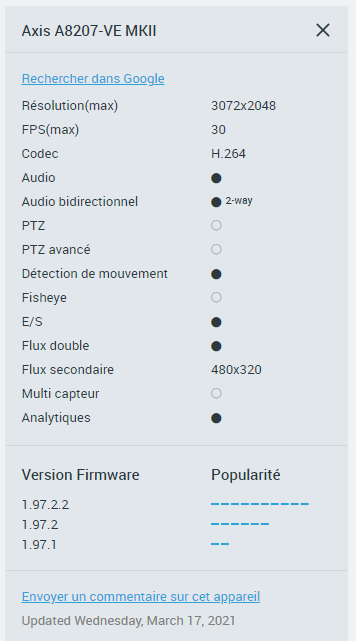
As I can see only the A8207 support bi-directionnal audio, and that model is far too big for our common project... All others listed in your webpage do no support bi-audio.
@... any idea when we might get the audio to HIP working for 2N ? https://wiki.2n.cz/hip/inte/latest/en/8-vms/nx-witness
That brand is famous here, and would help us...
0 -
Hi Decoux,
Thanks for the answer.
We integrate AXIS native API and there are several models. Even though they are not on the list of supported devices, they should be able to work with Nx still based on the API compatibility. It is suggested you can ask AXIS or have the local AXIS distributor lend you one to check.Besides, the 2N products are also listed on the supported device. It looks like you have the experience to the ipvd supported device. I saw the 2N model were all supported 2-way audio, likely it is already in use by some other customers in the global.
So far, we support 2N device via ONVIF 2-way audio. If you are looking for native SIP or other audio integration,that could be a feature request. Nx Witness now uses standard ONVIF integration for most of devices, and likely this would be the option for you.
0 -
Hi,
Axis is not the kind of company to lend item !
As to 2N we like to buy one for test, but agin the cost is pretty high.
And yes, seen it's working in IPVD, just found different information on their website, I will keep you posted here if we can finally test it.
Regards
0 -

IchiroGuilhem Decoux - At the moment 2 way audio does not work properly with the 2N intercom, I have been sent one for testing but they sent me an RMA model by mistake that does not work so I need to get a new one. Then we will be able to test and see what we can do to integrate 2 way audio.
0 -
Hi James,
Thanks for the feedback.Hi Decoux,
We have tested A-8004, A-8105E and A8207. They are all working well as expected.Regarding to 2N intercom, the one on their website is SIP or HIP, but Nx Witness uses ONVIF 2-way audio, likely this is the difference.
As James’s experience and feedback, we might need the device to check and then we will know what was the issue and/or any other investigation might be needed.
Thanks.
0 -
Perfect, let's keep in touch on that topic, I really need to buy one, as it's the last item missing for our demo room...
0 -
Hello,
Do you have any additional details on the AXIS Intercom integrations with A-8004, 8105 & 8207? Is there any documentation on how to set this up with 2-way audio and IO Controls? Thank you.
0 -

Hi @...,
When the device was added to your Nx Witness system, you need to enable audio first. You can do this in the Camera Settings menu, tab General. Here you tick the option Enable Audio.
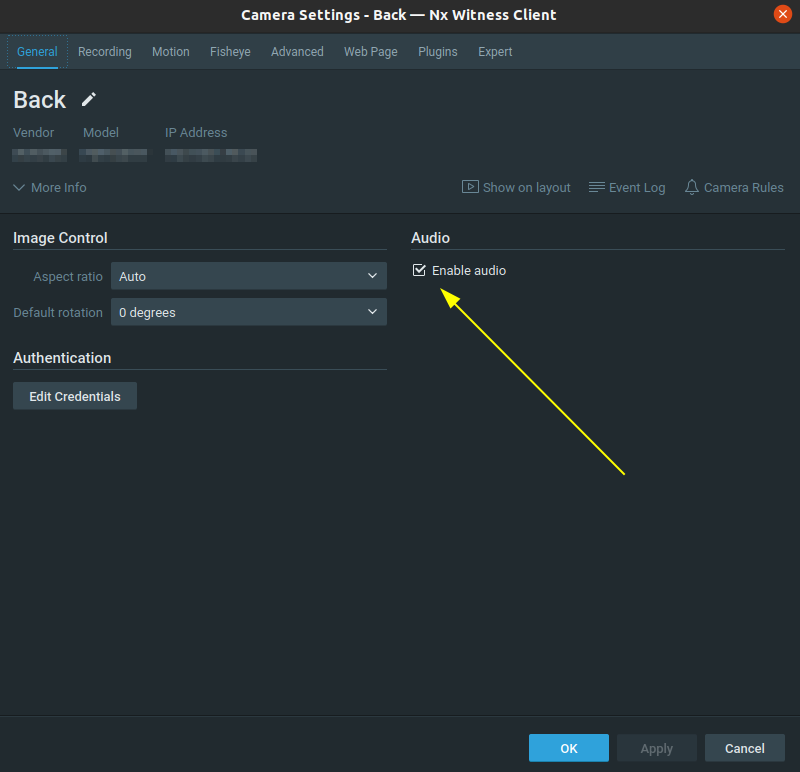
Then you could set up rules and these might vary per brand.
First, if someone hits the push button to ring a bell, this could activate multiple Event, depending on the product. It could be either an Input Signal on Camera or a Generic Event.
In case of an Input Signal on Camera you create the following rule:
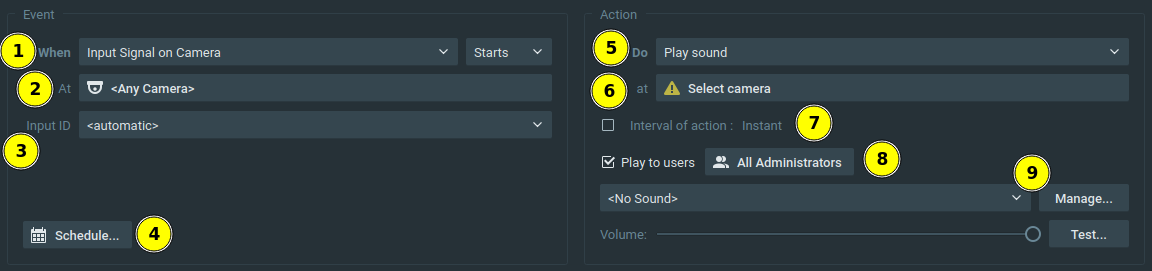
- Select the Input Signal on Camera event.
- Select the applicable device
- Select the appropriate input
- Change the Schedule is you don't want the rule to apply for 24/7.
- The action Play Sound will play the selected sound when someone hits the push button. You also you use the Repeat Sound or any other action.
- Select the applicable device.
- Set the Interval of action to Instant.
- Select the desired user(group)s.
- Select the desired sound.
In case of the Generic Event, it is more or less the same. But it requires some extra set up inside the device to send the HTTP request from the intercom to the Nx Witness server. THIS article describes such a process.
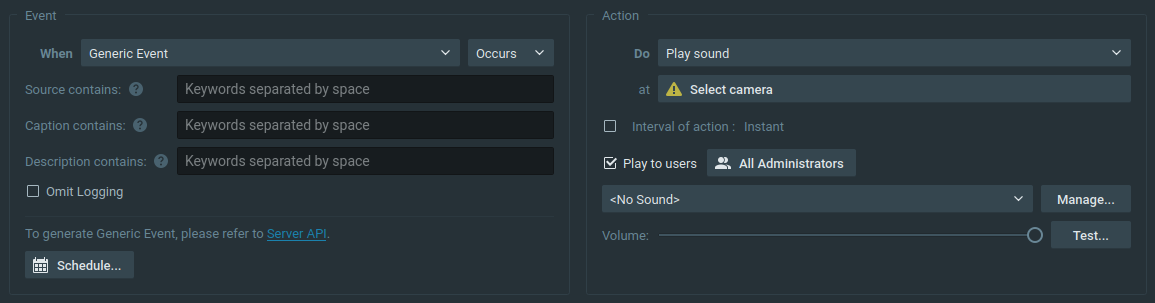
Apply either one of these rules and when someone pushes the button, the intercom will trigger this rule and the sound will play on the client of the applicable users.
Of course, more actions can be created, based on the same event. Just multiply the rules with the same event. For example, you can trigger a Camera Output or a Do HTTP request to open a door lock which is connected to the intercom device.
HERE is a video that shows a bit how it works.
0 -
Hello Norman,
We finally bought a sample of latest 2N Verso system (really nice looking), we also add the ONVIF licence (that is optionnal).
We got 2 issues :
1. The video signal is not stable, often disconnect (similar to this thread https://support.networkoptix.com/hc/en-us/community/posts/4403795807383-2N-IP-Force-Verso-video-issues-in-DW). We solved it by doing some strange settings that I don't really appreciate :
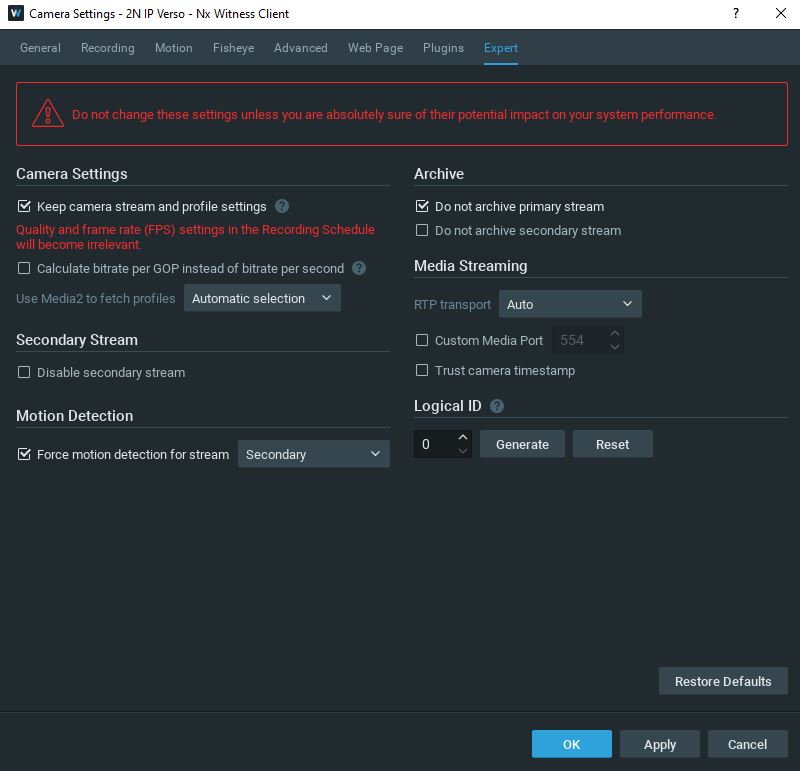
The issue might comes from limited settings we got in the 2N web interface, first stream is only in MJPEG...
2. Impossible to get bi-directionnal audio :
https://nxvms.com/ipvd?search=verso&camera=2N%20IP%20Verso
For a video intercom it's quite an issue ! We can clearly heard, my microphone is well detected by Nx as you can see on this picture :
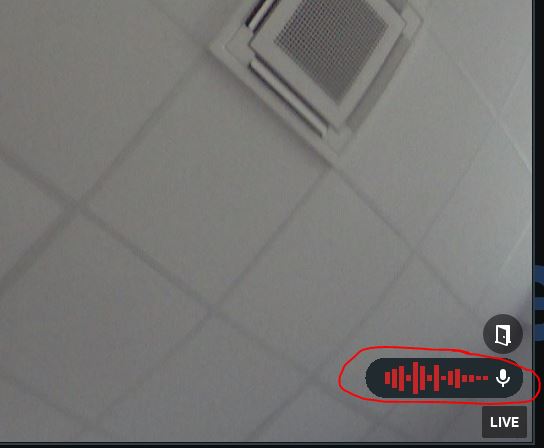
We were able to control relay, push notification and so on using HTTP request. I prefer to use alarm input and output, but the settings in Nx are strange : Input from 1 to 11, output from 50 to 54 (shoud be virtual ones).
We can give you Anydesk acess on local network, or Nx Cloud admin account if needed.
@... you was doing some test to, let me know any useful info.
0 -
Hi Guilhem Decoux,
When connecting to a device, Nx sents requests to the device, Onvif requests in this case, and 2N devices report themselves as 2-way audio, but in reality they don't support it, so the replies are incorrect and therefore they get listed with features they don't support.
See THIS link on the 2N Wiki.
Regarding the codec and I/O, please check them in the Onvif Device Manager (ODM) first.
If the results are similar; please consult 2N, if the results differ between ODM and Nx, please submit a support ticket, so we can investigate it.0
Please sign in to leave a comment.
Comments
11 comments