SUPPORT NEW AXIS CAMERA ACAP
Answered
nxw system does not support AXIS P1455-LE analysis events
can receive acap events in other ways ?
nxw system version:4.1.0.32212
-

Hi @...,
That is a bold statement, that needs some explanation.
- What ACAP are you using?
- Does it show in the rules' engine as an available analytics event?
- Are you using the latest camera firmware?
We should support all ACAP events except a few. To understand which; please check the notes in THIS support article and as shown below:
Note: An event (no matter if it is in the Application or built-in) will be supported if it meets the following two conditions:
- The capability description passed from the camera must contain at least one of the three following options (they are called “topics” in terms of the common event description):
- "tns1:VideoSource" (usually contains built-in basic event such as Camera tampering, Global scene change, Day-night vision etc)
- "tns1:RuleEngine" (usually contains intellectual events such as Cross-line detection, Area entrance etc)
- "tnsaxis:CameraApplicationPlatform" (usually contains events of external applications)
- An event must not be marked as internal (i.e. it must not contain “flag: xinternal_data” in its description).
These conditions are met by most ACAP applications, but it is wise to verify this before deployment with the supplier of the ACAP application.
Note 2: The rules described above can be modified with a special JSON file placed near the Axis plugin directory.
0 -
Thank you for your answer
i have other question 。
AXIS Network Camera joining NX system 。the complete ONVIF stream is like the following
axis model:Q1700
rtsp://192.168.0.140:554/axis-media/media.amp?streamprofile=hdwitness_all_cnPrimary rtsp://192.168.0.140:554/axis-media/media.amp?streamprofile=hdwitness_all_cnSecondary
We use model P1455-LE which can only be used for general streaming because nxwiness auto search cannot find this model
axis model:P1455-LE
rtsp://192.168.0.206/onvif-media/media.ampprofile=profile_1_h264&sessiontimeout=60&streamtype=unicast
rtsp://192.168.0.206/onvif-media/media.amp?profile=profile_1_jpeg&sessiontimeout=60&streamtype=unicast
How to get streaming like axis model:Q1700 ?
0 -
Hi @...,
I requested access to a P1455-LE from the Axis HQ. It is reserved and as soon as it is available I'll check it and share the results.
0 -
Hi @...,
Please compare the firmware version of your camera with the one I connected to:
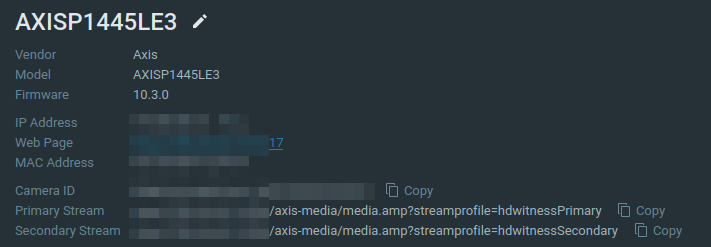
As you can see, in my case the streams were added as expected for an Axis camera.
0 -
HI Norman
I see the picture axis model :P1445LE3 .but my axis model P1455-LE。
Test P1445LE3 is no problem on nxw system。
nxw version:4.1.0.31946
0 -
Hi @...,
Is it possible to get direct access to your camera, so we can add it to our test environment?
If that is the case, I'll move this topic into a support ticket to enable you to share all login details privately.
0 -
HI Norman Graafsma
You can log in axis cctv and add your test system;But how do I provide you with information?
Email to nx support?
0 -
Hi @...,
I created a support ticket for you where you can share all confidential information privately. Please check your email.
0
Please sign in to leave a comment.
Comments
8 comments