Issues installing Nx Meta server on Ubuntu
Answered
Hi
Really struggling to get Nx Meta Server installed on Ubuntu. I have tried with GDebi Package installer and through the terminal.
These are the errors I am getting. I'm new to Linux.

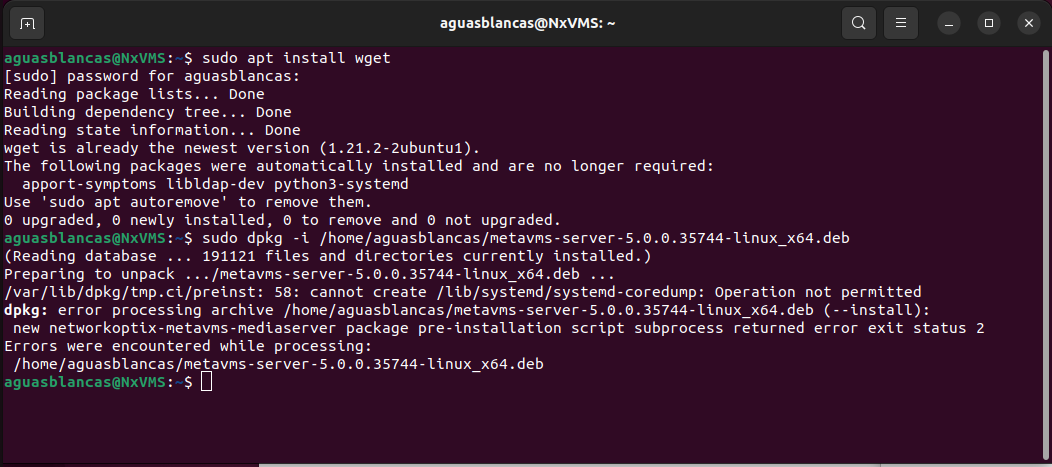

-

Hi @...,
Which version of Ubuntu are you using?
What kind of CPU? Intel/AMD or ARM?Did you run the updates && upgrades before installing anything?
Did you try dist-upgrade? Or apt -f install?My typical process is before installing anything:
$ sudo apt update && upgrade && autoremove
$ sudo dpkg -i <package.deb>
If it fails, I run the following command(s):
$ sudo apt install -f
and/or:
$ sudo apt dist-upgrade
0 -
Hi Norman
Thanks for the quick reply.
I'm on Ubuntu 22.04.01 LTS.
CPU is 8700k from Intel.I tried most of those commands but didn't try:
$ sudo apt dist-upgrade
I ended up formatting and will give it another go later today.
I think the error might be because I already have Nx Witness server installed? Or should that not be an issue.
0 -
Hi @...,
That's what I already assumed a bit.
Ubuntu 22.04 LTS will be supported in version 5.1, and isn't supported yet for version 5.0.
See also, THIS support article
So, if you are going to format, please install Ubuntu 20.04 LTS and you should be fine.Regarding, running two customisations of us on a single system isn't recommended. If you have one server and want to run multiple server daemons, it is best to use virtual machines.
0 -
Hi Norman
I should have read the support article, my bad. Will install Ubuntu 20.04 LTS instead.
Thanks again!0 -
No problem @....
0
Please sign in to leave a comment.
Comments
5 comments