NX Server 5 will not start
Answered
Today I noticed that the NX server is giving me an error that I'm not licensed.
I tried to restart the Windows machine, and it did not help.
I was using NX 4.2 and decided that maybe updating would help.
I downloaded NX 5.0.0.35745 it installed but now I will not load.
I get no error message nor I can see it in the windows services.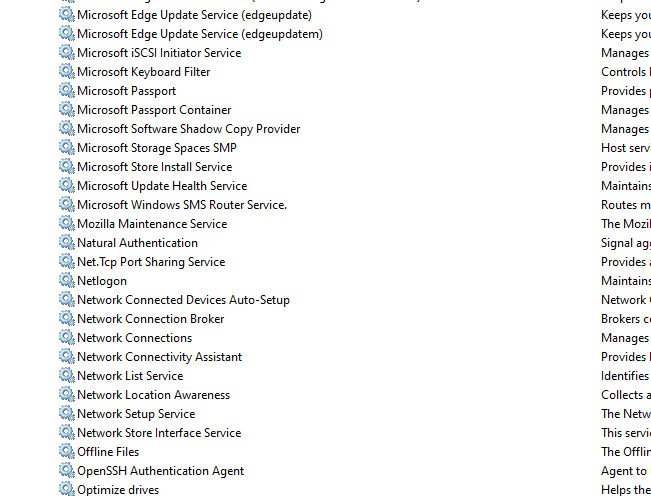
Tried to uninstall and reinstall, yet only the client works.
I'm using windows 10 pro 21H2
Where do I go from here?
-

Hi Itamar Kerbel,
Can you be more specific about the error you're receiving?
Nx Witness can run without any licenses, and also doesn't care if Windows is licensed or not.
The image you show, shows the services in alphabetical order, and you should look at:defaultMediaServer in the Name column:

If the mediaserver isn't running, please check the suggestion in THIS support article. And, in such case, please check if the system complies to the recommended hardware specifications for the mediaserver.
0 -
Thank you for the response.
I have reinstalled the server and now it appears in the services, but will not start.
It will start for a few seconds and then stop.I think I know what the problem is but not sure how to solve it.
I have taken a look at the logs and saw that NX cannot get the machine ID.2022-11-18 20:23:57.451 1af8 ERROR HWID: getHardwareId(): Could not connect. Error code = 0x2048-2147217394
2022-11-18 20:23:58.227 1af8 ERROR HWID: getHardwareId(): requested hwid of invalid version: 1
2022-11-18 20:23:58.227 1af8 ERROR HWID: getHardwareId(): requested hwid of invalid version: 2
2022-11-18 20:23:58.227 1af8 ERROR HWID: getHardwareId(): requested hwid of invalid version: 3
2022-11-18 20:23:58.227 1af8 ERROR HWID: getHardwareId(): requested hwid of invalid version: 4
2022-11-18 20:23:58.227 1af8 ERROR HWID: getHardwareId(): requested hwid of invalid version: 5Then I remembered that I had a power outage and indeed in my system settings the processor ID cannot be found:
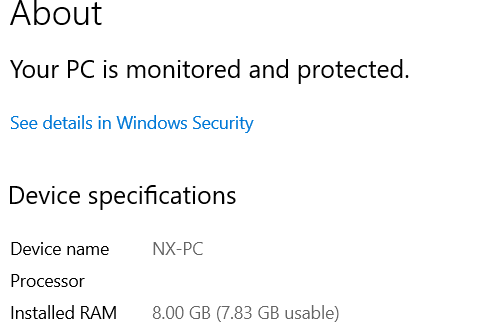
I have tried to update windows, do several things recommended on the internet, but nothing has worked.
Is there anything that can be done here?0 -
Hi Itamar Kerbel,
The easiest thing would be to return to a restore point of before the power outage.
Please note, that any change to the system (settings, data, etc.) after this restore point will be lost.
0 -
Thank you for the tip.
Restoring helped, but I had to delete and reinstall NX.Anyway, seems to working now.
Thanks.
0
Post is closed for comments.
Comments
4 comments