Motion detecting no longer working after switching resolution
Answered
Summary
Yesterday i switched my resolution one one camera (Dahua Generic) from 720p to 1080p after wich motion detection stopped working
Environment
- Nx Witness Version: Nx Witness Client version 4.2.0.34860 (902894683818). Server ZM (192.168.110.87): v4.2.0.34860
- Client OS: Ubuntu 22.04.1 LTS \n \l
- Server OS: Ubuntu 20.04.5 LTS \n \l
- Network Topology: 1 server connected to 1 switch connecting 13 camera`s
- Special features:
Reproduction Scenario
Switch resolution from 720p 5 fps to 1080p 10fps (H264h or H265) and see that there is no longer motion detected. Switching back does not seem to fix it? Which stream is used for the detection? Recording is set to Motion + Lo-Res
Expected Behavior
Higher resolution and still motion detecting
Actual Behavior
No motion detecting
Additional Information
I`m in the process of testing v5 so i created a VM with camera detecting, but with the "allow system to optimize camera settings" disabled
-
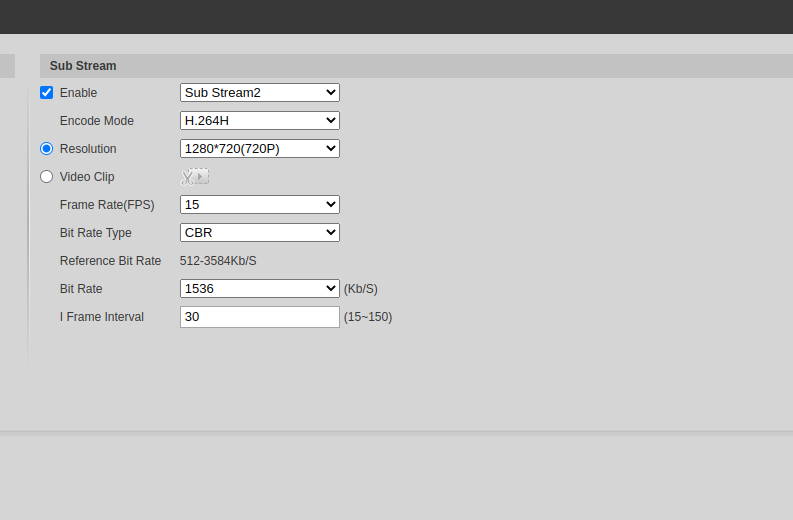
It looks like it is working when i switch the 3rd stream to D1 resolution
 0
0 -
But it is not when i switch it to 720p
 0
0 -

EDIT; I was creating my reply during your last replies, and it confirms what I thought.
704 x 576 = <1024 x 728 > Motion Detection works by default
1280 x 720 = >1024 x 728 > Motion Detection doesn't work by default----
Hi Raymon,
Thank you very much for the clear support request.
I assume you changed the resolution for the secondary stream?
If that is the case, it makes sense that motion detection doesn't work with 1080p and for 720p it depends.
The max. resolution for the secondary stream should be 1024x728, while 720p is typically a larger resolution; 1280x720, which still won't work by default.Typically, it is recommended to keep the default resolution Nx Witness sets for the secondary stream which is ~640x480 @ 7 fps or the closest resolution available without transcoding.
Higher resolutions for the secondary stream are possible, but typically have more disadvantages than advantages like;
- Higher CPU and RAM load
- More false positives for motion detection
- More storage required.
- More load on the device itself, and as a consequence packet loss.
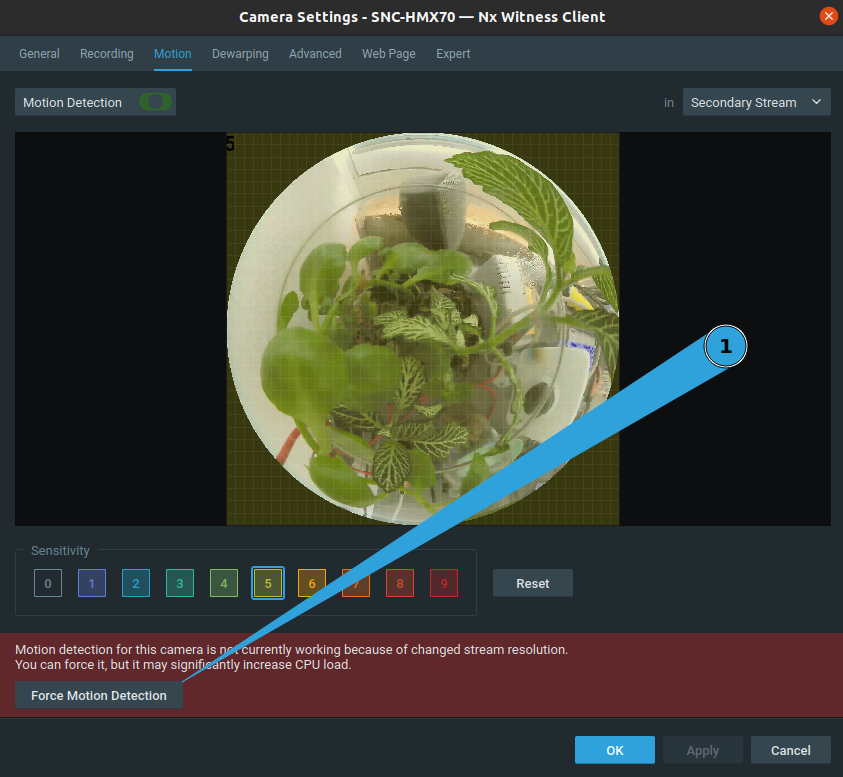
Nevertheless, if you insist in using higher resolutions for the secondary stream, you can force the system to use the secondary stream after you increased the resolution to >1024x728 by clicking on the Force Motion Detection button (1) in the Motion tab of the Camera Settings menu.
 0
0
Please sign in to leave a comment.
Comments
3 comments