Desktop icons switching
Answered
Summary
When running NX Witness on desktop the Desktop icon start switch between styles. I only happen when we open NX witness and has done it on two different PC for the same user. No other user has issue.
Environment
- Nx Witness Version:NX Witness Client 5.0.0.35064.
- Client OS:Window 10 Enterprise 21H2 19044.1889
Reproduction Scenario
Occurs only for one user. Has had his PC replaced and issued started again.
Expected Behavior
NX Witness client to open.
Actual Behavior
Open the NX Witness desktop client and it fails to open but starts all the Desktop icon flashing.
____________________________
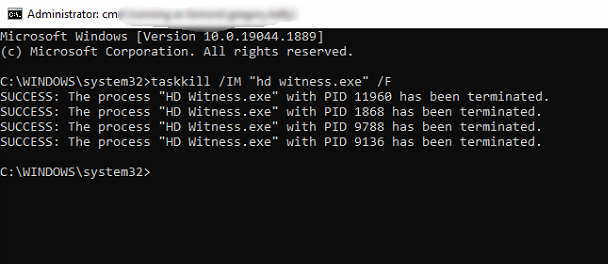
Has started on another PC now same issue. Opening NX Witness client then causing the icons to flash. Can stop with this command.
-

Hi @...,
It isn't entirely clear what you mean. Could you make and share a screen recording of the issue?
0 -
Hi this is what happens
https://www.dropbox.com/s/0b8rdvflzgc5ncg/PC22016.wmv?dl=0
0 -
Hi @...,
You wrote:
When running NX Witness on desktop the Desktop icon start switch between styles. I only happen when we open NX witness
But when I check the video, Nx Witness isn't opened and the shortcuts toggle from icon to thumbnail and vice versa. I tried to find some information online about this, but so far without luck.
I would check the following article about thumbnail issues through this LINK and check if this helps you to resolve the issue.
If this doesn't solve the issue, I would back up the work on the computer, and use a restore point to move back to the situation before this occurred and add the backup, so changes between the restore point and the moment you put back the restore point are restored as well.
0 -
The flashing starts once NX Witness starts and then continues when you close it. To stop it I have to restart or run the Taskkill command. I will try your suggestion and get back to you. Thanks.
0 -
We have not heard back from you in a while, so we are going to assume your question has been answered and set this topic to 'Answered'.
0
Please sign in to leave a comment.
Comments
5 comments