Remove an external HDD storage?
Answered
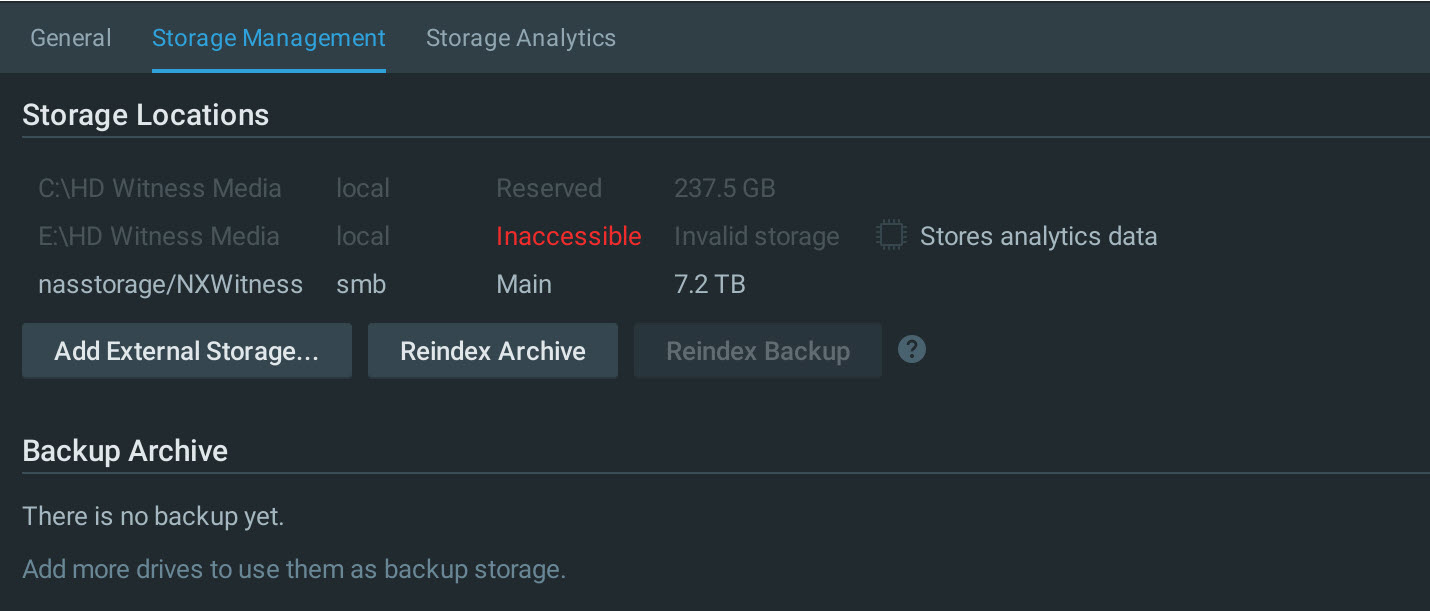
I want to replace and remove an external Storage HD which was giving write errors with a NAS as my main storage. The NAS is successfully installed but I can't find how to remove the external HD E: as listed in Storage Management as below. I also see the HD E: Stores analytic data as well and am not sure what to do about that?
Any help with this would be appreciated!
Peter
-

Hi Peter Arnold,
According to the screenshot, you had set the E: disk for storing the analytics data.
Please set the other local disk for storing the analytics data, then the Remove option of the E: disk should appear.Please let me know if you have any further questions.
Thank you.0 -
Hi Anderson
Thanks for your reply. I have managed to remove the E: drive on the Webadmin page but can't find where you enable the NASS drive to store analytics data. could you please help with this?
Cheers.
Peter
0 -
Hi Peter Arnold,
The Analytics Data can only be stored on the local disk for now.
We use the SQLite standard for storing the Analytics Data currently, which introduces pretty strict requirements for the data media.
SMB protocol does not face those which eventually always result in significant data loss.
We can not allow that, so does not support saving the Analytics Data on the network drive.There is a workaround for this situation is to mount the remote drive with OS means, such as NFS.
In this case, Nx Server will detect it as a "local" drive, then you should be able to save the Analytics Data on your NAS.Thank you.
0
Please sign in to leave a comment.
Comments
3 comments