Cannot update nx witness to version 5
Answered
Hi there,
Trying to update to version 5, but there is no update available.
When using upgrade to specific build this also fails.
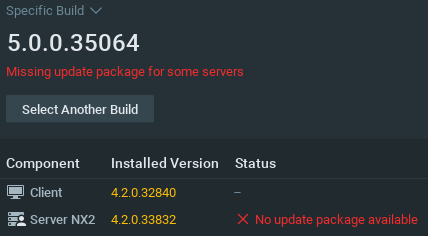
How do I solve this?
-

Hi @...,
Can you tell us more about the hardware and operating system of the Server NX2?
My first guess would be that an older, unsupported operating system is used in the server NX2.0 -
Hi Norman,
Sure.
I'm running DietPi v8.1.2 on a ROCKPro64 (aarch64).
0 -
Hi @...,
That clarifies it. The Nx update mechanism checks for supported operating systems and DietPi isn't a supported operating system. Also, the RockPro64 SBC isn't an official supported SBC, so might cause issues as well.
One thing you could try is a manual update through the OS.
0 -
Allright, how does manual update through OS work? I don't see any info about that in the knowledge base.
0 -
Hi @...,
You can do it by installing the application on the system as mentioned in THIS support article.
It does require some proficiency with Linux based systems, but since you are using DietPi and the RockPro board, I assume you are experienced enough with Linux to resolve this.
Below the applicable download links for ARM:
- 64-Bit: nxwitness-server-5.0.0.35064-linux_arm64.deb
- 32-Bit: nxwitness-server-5.0.0.35064-linux_arm32.deb
I would use the update && upgrade commands prior to the installation and do a cleanup after the installation with the autoremove && autoclean commands.
0 -
Thank you Norman, these instructions will do. I’m experienced enough with Linux.
0
Please sign in to leave a comment.
Comments
6 comments