Server Failure, How to deactivate Licenses or reactivate them?
Answered
I had a server actually get soaked in water on the motherboard. I have taken the boot SSDs and moved them to an exact replica server. I have the system booted now and the software is running using the old configuration. My only issue now is that the software is saying the hardware ID has changed.
What can I do to fix this?
Thanks
-

Hi @...,
Please check THIS support article and submit a request to our licensing team.
Please also share the hw_log.log with the licensing team.
You can find this log on the server at the following location:
For Windows:
C:\Windows\System32\config\systemprofile\AppData\Local\Network Optix\Network Optix Media Server\log\hw_log.log
For Ubuntu:
/opt/networkoptix/mediaserver/var/log/hw_log.log
0 -
Thanks, i'll get this to them ASAP.
How does it work when you have multiple servers? Are the licenses bound to one or both? If one server dies and you add a 2nd server do you need to deactivate / Reactivate the licenses?
Curious if there is a way to prevent this issue in the future, this was a freak issue of a pipe leaking into the rack where it was located and my plan was for this server to run for years before replacing it, but you never really know.
0 -
Hello @...,
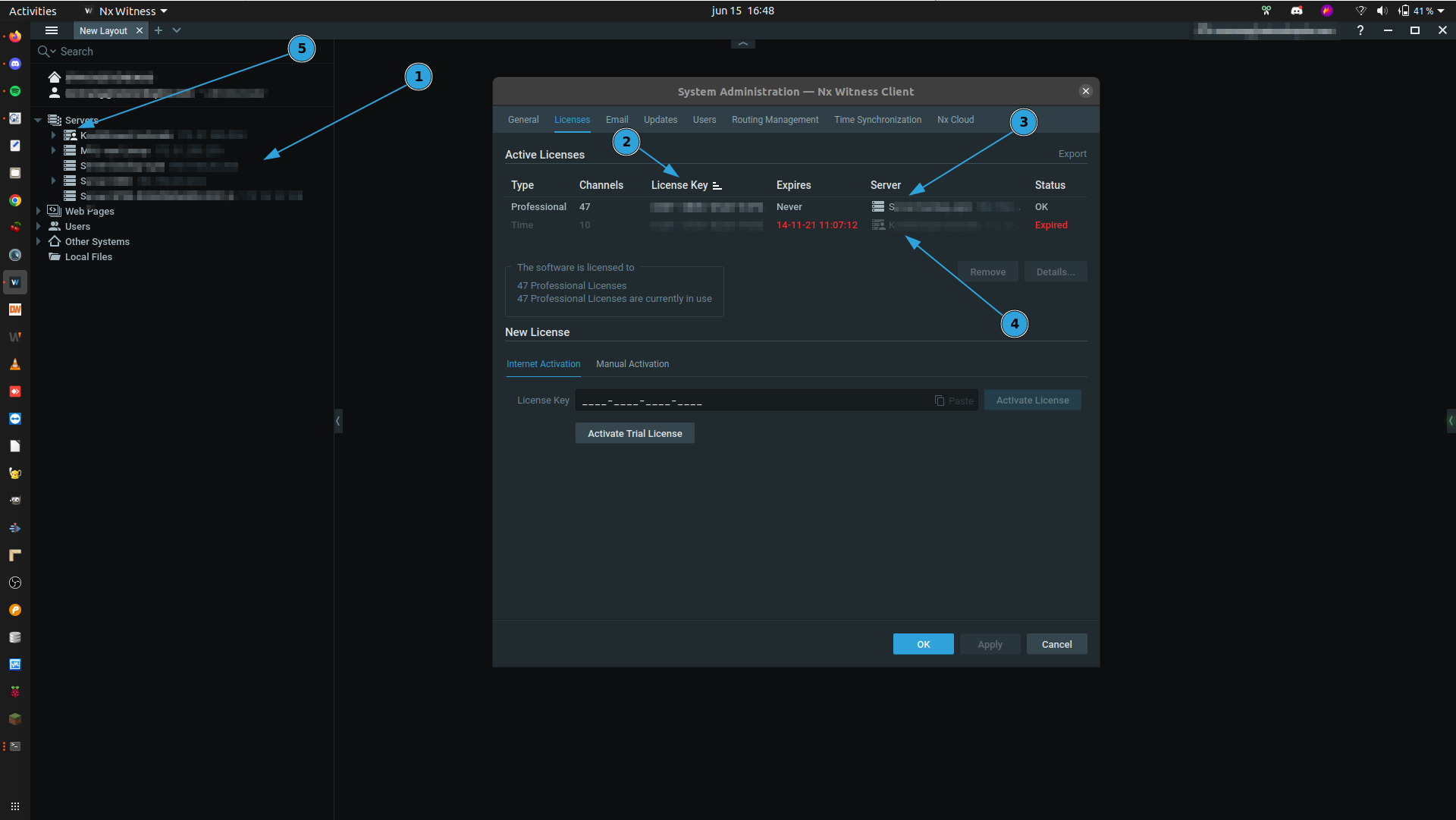
See the example system:
In this system there are 5 servers (1), there are 3 bundles of licenses (2), One bundle is bound to Server 'S...' (3) and the other bundles is (was) bound to server 'K...' (4).
The licenses will be bound to the server you are connected to at the moment of the license activation, and you can recognize this with the 'man-icon' (5).
Regarding preventing the freak accident; there are waterproof server racks for sale. ;-)
Just kidding. We are investigating options for different methods to allocate licenses to a system and which can be moved around systems easier. But so far we haven't found a one-size-fits-all solution. But I assure you, it has our attention.0 -
Great. I think i'll add a second server, but i'll still just activate all the licenses against 1 server.
You can have multiple servers in a group correct? and share non used licenses between the server? I'm guessing the activation is still based off only 1 server though correct?
Once I eventually move over all my cameras from Milestone, i'll have more than the maximum allowed per server.
0 -
Hi @...,
You can merge up to 100 servers in a single system and such large systems can hold up to 100 devices.
All licenses can be activated on a single server or multiple, your choice. In case a server loses the connection to the server that holds the licenses, it continues to work normally for 30 days, so you have enough time to restore the connection / replace the server. After the 30 days, the server will continue to work, only it stops recording and event related to recording, like bookmarking, will stop.
Of course, you'll receive notification in several ways if this happens.
I typically recommend at least 2 servers in a system with up to 64 devices per server, with failover enabled. In such case, if one server dies, all devices can be handles by a single server, until the connection with the other server restores.
0
Please sign in to leave a comment.
Comments
5 comments