Dahua XVR7416-4kl-i2 License issue - NX Looking for Pro License instead of Encoder one
Answered
Hi Support,
I have a Dahua XVR which NX is looking for Professional Licenses rather than Encoder ones which I have already installed. I applied the patch from the article below but it has not solved it.
Regards,
Mark
-

Hi Mark Costello,
Please share a screenshot similar to the one in the topic you linked to, and most likely we can make a patch for your system as well.
0 -
Hi Norman,
Please see below. I may need to do this for another recorder also. I didnt know the patch was specfic to the device.
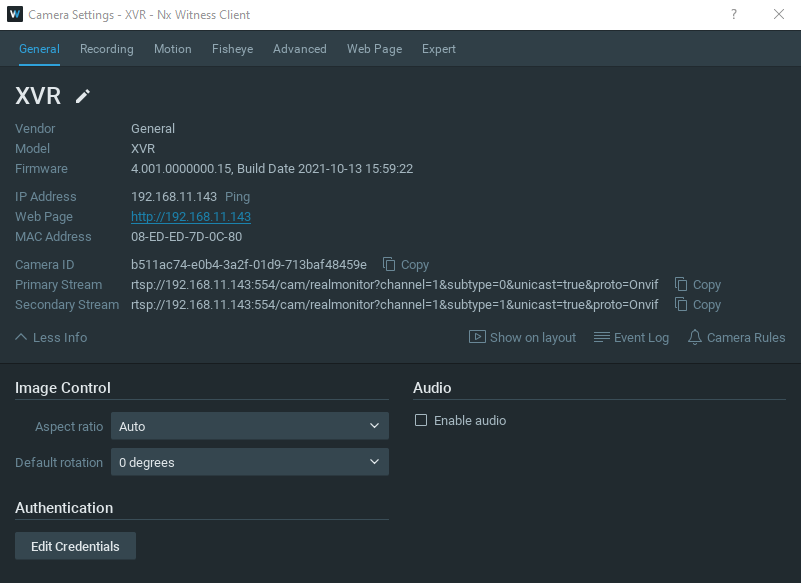 0
0 -
Hi Mark Costello,
Please follow the steps as described below:
-
Remove the device from the system
-
Stop the mediaserver application and paste the resource_data.json file in THIS LINK at the following location:
For Windows: C:\Program Files\Network Optix\Nx Witness\MediaServer
For Linux: /opt/networkoptix/mediaserver/bin/ -
Now start the mediaserver application again.
-
Add the device again
To stop and start the media server, please do it as follows:
For Windows: Open the task manager, select tab ‘Services’ find the mediaserver application, right-click and select; Stop or Start
For Linux: Open the terminal (Ctrl+Alt+T) and enter the following command; sudo service networkoptix-mediaserver stop or sudo service networkoptix-mediaserver start.
After this, the request should be fulfilled.
Please confirm, and we will add it to a future patch.0 -
-
Hi Norman,
Many thanks for the quick actions here. However this has not solved my problem. It is still asking me for a Pro license
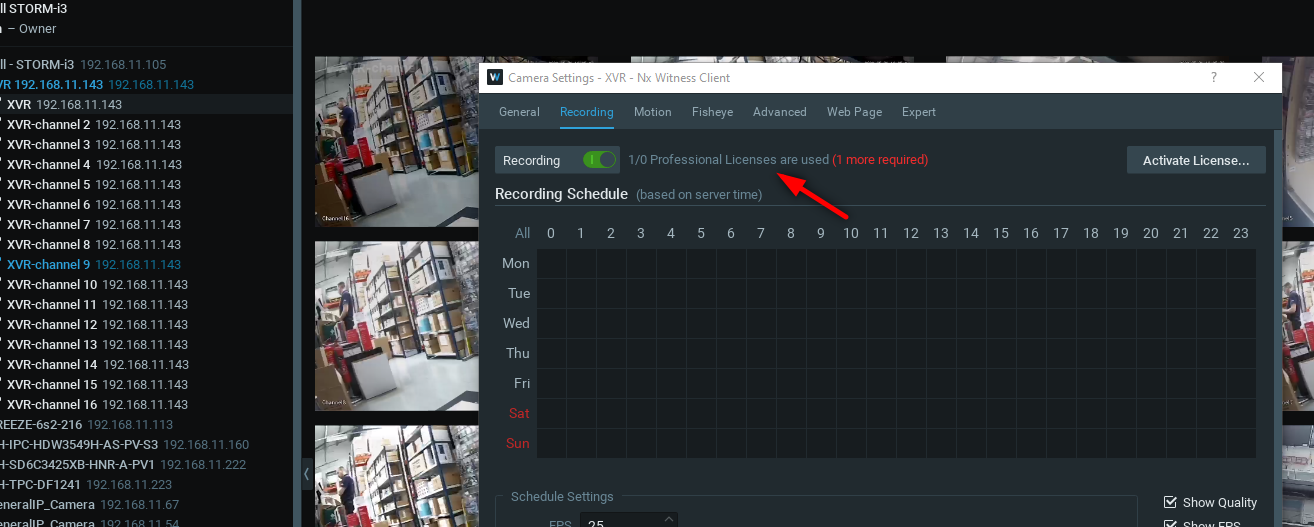
Regards,
Mark
0 -
Hi Mark Costello,
Can you execute the following API request:
https://<serverIp>:7001/ec2/getFullInfo
Please save the output as a .json file and share the file with us.
If this doesn't reveal the required information, would it be possible to provide remote access to the device via port forwarding, so we can add it to our test environment for further investigation?
If the latter is possible, I'll convert this topic into a support ticket, so you can share the login credentials privatly.
0 -
Hi Norman,
Thank you. I can set up port forwarding if you need access. What ports do you need access to? HTTP and RTSP or TCP also?
Please see below link for the .json file.
Regards,
Mark
0 -
Hi Mark Costello,
I noticed from the json file you provide that something went wrong while adding the resource_data.json file to your mediaserver application.
Can you execute the steps I mentioned above once more? It is mandatory that the name and the extension of the file remains resource_data.json.
0 -
Hi Norman,
Please see below video on myself following your steps. Can you see an error in what I am doing?
Regards,
Mark
0 -
Hi Mark Costello,
My neck hurts when looking at the video. ;-)
It is correct that the system asks/shows for the professional license (UX error), but for each encoder license it should use 1 encoder license (displayed as 1 professional license) per 4 DVR channels.
Would it be possible to provide TeamViewer access to the client? If so, I'll convert this topic, into a ticket, so you can share the TeamViewer credentials privately?
0 -
Hi Norman,
Apologies, bad habit of mine.
Yes please fire ahead.
Mark
0 -
Temporary fix was provided, unfortunately we couldn't process it in the source code, since the Vendor/Model name are too generic and conflict with other vendors which might affect the system as a whole.
0
Please sign in to leave a comment.
Comments
11 comments