It doesn't start on Ubuntu
Answered
I am trying to install the software, but it won't start on an Ubuntu 18. The error log shows the following:
===================================================================
 Info
===================================================================
           PID: 21406 (nxwitness_clien)
           UID: 1000 (tormund)
           GID: 1000 (tormund)
        Signal: 4 (ILL)
     Timestamp: Tue 2022-04-19 08:39:35 CEST (50min ago)
  Command Line: /opt/networkoptix/client/4.2.0.32840/bin/nxwitness_client /opt/networkoptix/client/4.2.0.32840/bin/applauncher-bin
    Executable: /opt/networkoptix/client/4.2.0.32840/bin/nxwitness_client
 Control Group: /user.slice/user-1000.slice/session-c2.scope
          Unit: session-c2.scope
         Slice: user-1000.slice
       Session: c2
     Owner UID: 1000 (tormund)
       Boot ID: e2a4b709fab84ca2906e638c5e6ad264
    Machine ID: aaa642a1efb049fba8d6ca0c8d22ff0a
      Hostname: tormund-EMBY
       Storage: /var/lib/systemd/coredump/core.nxwitness_clien.1000.e2a4b709fab84ca2906e638c5e6ad264.21406.1650350375000000.lz4
       Message: Process 21406 (nxwitness_clien) of user 1000 dumped core.

                Stack trace of thread 21406:
                #0  0x00007f3d431789a2 function<<lambda(mfxSession, mfxVideoParam*, mfxVideoParam*)> > (libmfxhw64.so.1)
                #1  0x00007f3d609b28d3 call_init (ld-linux-x86-64.so.2)
                #2  0x00007f3d609a30ca _dl_start_user (ld-linux-x86-64.so.2)
===================================================================
 GDB Log
===================================================================

warning: core file may not match specified executable file.
[New LWP 21406]
[Thread debugging using libthread_db enabled]
Using host libthread_db library "/lib/x86_64-linux-gnu/libthread_db.so.1".
Core was generated by `/opt/networkoptix/client/4.2.0.32840/bin/nxwitness_client /opt/networkoptix/cli'.
Program terminated with signal SIGILL, Illegal instruction.
#0  0x00007f3d431789a2 in std::function<mfxStatus(_mfxSession*, mfxVideoParam*, mfxVideoParam*)>::function<<lambda(mfxSession, mfxVideoParam*, mfxVideoParam*)> > (this=0x7fff896dfcb0, __f=...) at /home/lbusygin/.conan/data/gcc-toolchain/8.3/_/_/package/32716a9d6e86acb3da57e877d059e10e39f714d9/x86_64-linux-gnu/include/c++/8.3.0/new:169
169	/home/lbusygin/.conan/data/gcc-toolchain/8.3/_/_/package/32716a9d6e86acb3da57e877d059e10e39f714d9/x86_64-linux-gnu/include/c++/8.3.0/new: No such file or directory.

===================================================================
 GDB Backtrace
===================================================================

warning: core file may not match specified executable file.
[New LWP 21406]
[Thread debugging using libthread_db enabled]
Using host libthread_db library "/lib/x86_64-linux-gnu/libthread_db.so.1".
Core was generated by `/opt/networkoptix/client/4.2.0.32840/bin/nxwitness_client /opt/networkoptix/cli'.
Program terminated with signal SIGILL, Illegal instruction.
#0  0x00007f3d431789a2 in std::function<mfxStatus(_mfxSession*, mfxVideoParam*, mfxVideoParam*)>::function<<lambda(mfxSession, mfxVideoParam*, mfxVideoParam*)> > (this=0x7fff896dfcb0, __f=...) at /home/lbusygin/.conan/data/gcc-toolchain/8.3/_/_/package/32716a9d6e86acb3da57e877d059e10e39f714d9/x86_64-linux-gnu/include/c++/8.3.0/new:169
169	/home/lbusygin/.conan/data/gcc-toolchain/8.3/_/_/package/32716a9d6e86acb3da57e877d059e10e39f714d9/x86_64-linux-gnu/include/c++/8.3.0/new: No such file or directory.
#0  0x00007f3d431789a2 in std::function<mfxStatus(_mfxSession*, mfxVideoParam*, mfxVideoParam*)>::function<<lambda(mfxSession, mfxVideoParam*, mfxVideoParam*)> > (this=0x7fff896dfcb0, __f=...) at /home/lbusygin/.conan/data/gcc-toolchain/8.3/_/_/package/32716a9d6e86acb3da57e877d059e10e39f714d9/x86_64-linux-gnu/include/c++/8.3.0/new:169
#1  __static_initialization_and_destruction_0(int, int) [clone .constprop.277] () at /home/lbusygin/.conan/data/intel_media_sdk/19.4.0/_/_/build/2d5685a99e2ff5a0d2b054bb1fbfa46781f8a46a/sources/_studio/mfx_lib/shared/src/libmfxsw_encode.cpp:104
#2  0x00007f3d609b28d3 in call_init (env=0x7fff896e0380, argv=0x7fff896e0368, argc=2, l=<optimized out>) at dl-init.c:72
#3  _dl_init (main_map=0x7f3d60bcd170, argc=2, argv=0x7fff896e0368, env=0x7fff896e0380) at dl-init.c:119
#4  0x00007f3d609a30ca in _dl_start_user () from /lib64/ld-linux-x86-64.so.2
#5  0x0000000000000002 in ?? ()
#6  0x00007fff896e08e3 in ?? ()
#7  0x00007fff896e091d in ?? ()
#8  0x0000000000000000 in ?? ()

===================================================================
 GDB Backtrace (all threads)
===================================================================

warning: core file may not match specified executable file.
[New LWP 21406]
[Thread debugging using libthread_db enabled]
Using host libthread_db library "/lib/x86_64-linux-gnu/libthread_db.so.1".
Core was generated by `/opt/networkoptix/client/4.2.0.32840/bin/nxwitness_client /opt/networkoptix/cli'.
Program terminated with signal SIGILL, Illegal instruction.
#0  0x00007f3d431789a2 in std::function<mfxStatus(_mfxSession*, mfxVideoParam*, mfxVideoParam*)>::function<<lambda(mfxSession, mfxVideoParam*, mfxVideoParam*)> > (this=0x7fff896dfcb0, __f=...) at /home/lbusygin/.conan/data/gcc-toolchain/8.3/_/_/package/32716a9d6e86acb3da57e877d059e10e39f714d9/x86_64-linux-gnu/include/c++/8.3.0/new:169
169	/home/lbusygin/.conan/data/gcc-toolchain/8.3/_/_/package/32716a9d6e86acb3da57e877d059e10e39f714d9/x86_64-linux-gnu/include/c++/8.3.0/new: No such file or directory.

Thread 1 (Thread 0x7f3d60b7a580 (LWP 21406)):
#0  0x00007f3d431789a2 in std::function<mfxStatus(_mfxSession*, mfxVideoParam*, mfxVideoParam*)>::function<<lambda(mfxSession, mfxVideoParam*, mfxVideoParam*)> > (this=0x7fff896dfcb0, __f=...) at /home/lbusygin/.conan/data/gcc-toolchain/8.3/_/_/package/32716a9d6e86acb3da57e877d059e10e39f714d9/x86_64-linux-gnu/include/c++/8.3.0/new:169
No locals.
#1  __static_initialization_and_destruction_0(int, int) [clone .constprop.277] () at /home/lbusygin/.conan/data/intel_media_sdk/19.4.0/_/_/build/2d5685a99e2ff5a0d2b054bb1fbfa46781f8a46a/sources/_studio/mfx_lib/shared/src/libmfxsw_encode.cpp:104
No locals.
#2  0x00007f3d609b28d3 in call_init (env=0x7fff896e0380, argv=0x7fff896e0368, argc=2, l=<optimized out>) at dl-init.c:72
        j = <optimized out>
        jm = <optimized out>
        addrs = <optimized out>
        init_array = <optimized out>
        env = 0x7fff896e0380
        argv = 0x7fff896e0368
        init_array = <optimized out>
        argc = 2
        l = <optimized out>
        j = <optimized out>
        jm = <optimized out>
        addrs = <optimized out>
        init_array = <optimized out>
        init_array = <optimized out>
        j = <optimized out>
        jm = <optimized out>
        addrs = <optimized out>
#3  _dl_init (main_map=0x7f3d60bcd170, argc=2, argv=0x7fff896e0368, env=0x7fff896e0380) at dl-init.c:119
        preinit_array = <optimized out>
        preinit_array_size = <optimized out>
        i = 55
#4  0x00007f3d609a30ca in _dl_start_user () from /lib64/ld-linux-x86-64.so.2
        library_path = 0x7fff896e0966 "/opt/networkoptix/client/4.2.0.32840/bin/../lib/stdcpp:"
        version_info = 0
        any_debug = 0
        _dl_rtld_libname = {name = 0x5614db090238 "/lib64/ld-linux-x86-64.so.2", next = 0x7f3d60bccfe0 <newname>, dont_free = 0}
        relocate_time = 1380650190
        _dl_rtld_libname2 = {name = 0x0, next = 0x0, dont_free = 0}
        start_time = 1278014106213890
        tls_init_tp_called = true
        load_time = 292901932
        audit_list = 0x0
        preloadlist = 0x0
        __GI__dl_argv = 0x7fff896e0368
        _dl_argc = 2
        audit_list_string = 0x0
        _rtld_global = {_dl_ns = {{_ns_loaded = 0x7f3d60bcd170, _ns_nloaded = 122, _ns_main_searchlist = 0x7f3d60bcd428, _ns_global_scope_alloc = 0, _ns_unique_sym_table = {lock = {mutex = pthread_mutex_t = {Type = Recursive, Status = Not acquired, Robust = No, Shared = No, Protocol = None}}, entries = 0x7f3d60a72000, size = 16381, n_elements = 12088, free = 0x7f3d609bd800 <free>}, _ns_debug = {r_version = 0, r_map = 0x0, r_brk = 0, r_state = RT_CONSISTENT, r_ldbase = 0}}, {_ns_loaded = 0x0, _ns_nloaded = 0, _ns_main_searchlist = 0x0, _ns_global_scope_alloc = 0, _ns_unique_sym_table = {lock = {mutex = pthread_mutex_t = {Type = Normal, Status = Not acquired, Robust = No, Shared = No, Protocol = None}}, entries = 0x0, size = 0, n_elements = 0, free = 0x0}, _ns_debug = {r_version = 0, r_map = 0x0, r_brk = 0, r_state = RT_CONSISTENT, r_ldbase = 0}} <repeats 15 times>}, _dl_nns = 1, _dl_load_lock = {mutex = pthread_mutex_t = {Type = Recursive, Status = Not acquired, Robust = No, Shared = No, Protocol = None}}, _dl_load_write_lock = {mutex = pthread_mutex_t = {Type = Recursive, Status = Not acquired, Robust = No, Shared = No, Protocol = None}}, _dl_load_adds = 122, _dl_initfirst = 0x0, _dl_cpuclock_offset = 1278014106251498, _dl_profile_map = 0x0, _dl_num_relocations = 84677, _dl_num_cache_relocations = 97643, _dl_all_dirs = 0x7f3d60b8b920, _dl_rtld_map = {l_addr = 139901590446080, l_name = 0x5614db090238 "/lib64/ld-linux-x86-64.so.2", l_ld = 0x7f3d60bcbe68, l_next = 0x7f3d60ba37f0, l_prev = 0x7f3d60ba3000, l_real = 0x7f3d60bcc9f0 <_rtld_global+2448>, l_ns = 0, l_libname = 0x7f3d60bcd030 <_dl_rtld_libname>, l_info = {0x0, 0x0, 0x7f3d60bcbee8, 0x7f3d60bcbed8, 0x7f3d60bcbe78, 0x7f3d60bcbe98, 0x7f3d60bcbea8, 0x7f3d60bcbf18, 0x7f3d60bcbf28, 0x7f3d60bcbf38, 0x7f3d60bcbeb8, 0x7f3d60bcbec8, 0x0, 0x0, 0x7f3d60bcbe68, 0x0, 0x0, 0x0, 0x0, 0x0, 0x7f3d60bcbef8, 0x0, 0x0, 0x7f3d60bcbf08, 0x0 <repeats 12 times>, 0x7f3d60bcbf58, 0x7f3d60bcbf48, 0x0, 0x0, 0x7f3d60bcbf78, 0x0, 0x0, 0x0, 0x0, 0x0, 0x0, 0x0, 0x0, 0x7f3d60bcbf68, 0x0 <repeats 25 times>, 0x7f3d60bcbe88}, l_phdr = 0x7f3d609a2040, l_entry = 0, l_phnum = 7, l_ldnum = 0, l_searchlist = {r_list = 0x0, r_nlist = 0}, l_symbolic_searchlist = {r_list = 0x0, r_nlist = 0}, l_loader = 0x0, l_versions = 0x7f3d60b7fc20, l_nversions = 6, l_nbuckets = 17, l_gnu_bitmask_idxbits = 3, l_gnu_shift = 8, l_gnu_bitmask = 0x7f3d609a22d8, {l_gnu_buckets = 0x7f3d609a22f8, l_chain = 0x7f3d609a22f8}, {l_gnu_chain_zero = 0x7f3d609a2338, l_buckets = 0x7f3d609a2338}, l_direct_opencount = 0, l_type = lt_library, l_relocated = 1, l_init_called = 1, l_global = 1, l_reserved = 0, l_phdr_allocated = 0, l_soname_added = 0, l_faked = 0, l_need_tls_init = 0, l_auditing = 0, l_audit_any_plt = 0, l_removed = 0, l_contiguous = 0, l_symbolic_in_local_scope = 0, l_free_initfini = 0, l_rpath_dirs = {dirs = 0x0, malloced = 0}, l_reloc_result = 0x0, l_versyms = 0x7f3d609a2914, l_origin = 0x0, l_map_start = 139901590446080, l_map_end = 139901592719728, l_text_end = 139901590582608, l_scope_mem = {0x0, 0x0, 0x0, 0x0}, l_scope_max = 0, l_scope = 0x0, l_local_scope = {0x0, 0x0}, l_file_id = {dev = 0, ino = 0}, l_runpath_dirs = {dirs = 0x0, malloced = 0}, l_initfini = 0x0, l_reldeps = 0x0, l_reldepsmax = 0, l_used = 1, l_feature_1 = 0, l_flags_1 = 0, l_flags = 0, l_idx = 0, l_mach = {plt = 0, gotplt = 0, tlsdesc_table = 0x0}, l_lookup_cache = {sym = 0x7f3d609a2480, type_class = 1, value = 0x7f3d60bcaa80, ret = 0x7f3d5cfa1110}, l_tls_initimage = 0x0, l_tls_initimage_size = 0, l_tls_blocksize = 0, l_tls_align = 0, l_tls_firstbyte_offset = 0, l_tls_offset = 0, l_tls_modid = 0, l_tls_dtor_count = 0, l_relro_addr = 2266752, l_relro_size = 2432, l_serial = 0, l_audit = 0x7f3d60bcce60 <_rtld_global+3584>}, audit_data = {{cookie = 0, bindflags = 0} <repeats 16 times>}, _dl_rtld_lock_recursive = 0x7f3d4f0edfd0 <__GI___pthread_mutex_lock>, _dl_rtld_unlock_recursive = 0x7f3d4f0ef810 <__GI___pthread_mutex_unlock>, _dl_make_stack_executable_hook = 0x7f3d4f0ea740 <__make_stacks_executable>, _dl_stack_flags = 7, _dl_tls_dtv_gaps = false, _dl_tls_max_dtv_idx = 7, _dl_tls_dtv_slotinfo_list = 0x7f3d60b79860, _dl_tls_static_nelem = 7, _dl_tls_static_size = 4480, _dl_tls_static_used = 496, _dl_tls_static_align = 64, _dl_initial_dtv = 0x7f3d60b77010, _dl_tls_generation = 1, _dl_init_static_tls = 0x7f3d4f0eb020 <__pthread_init_static_tls>, _dl_wait_lookup_done = 0x7f3d4f0eb140 <__wait_lookup_done>, _dl_scope_free_list = 0x0}
        _rtld_global_ro = {_dl_debug_mask = 0, _dl_osversion = 328878, _dl_platform = 0x7fff896e0649 "x86_64", _dl_platformlen = 6, _dl_pagesize = 4096, _dl_inhibit_cache = 0, _dl_initial_searchlist = {r_list = 0x7f3d60b85568, r_nlist = 118}, _dl_clktck = 100, _dl_verbose = 0, _dl_debug_fd = 2, _dl_lazy = 1, _dl_bind_not = 0, _dl_dynamic_weak = 0, _dl_fpu_control = 895, _dl_correct_cache_id = 771, _dl_hwcap = 2, _dl_auxv = 0x7fff896e04f0, _dl_x86_cpu_features = {kind = arch_kind_amd, max_cpuid = 5, cpuid = {{eax = 1052499, ebx = 33818624, ecx = 8396809, edx = 395049983}, {eax = 0, ebx = 0, ecx = 0, edx = 0}, {eax = 1052499, ebx = 268456582, ecx = 538623, edx = 4023647231}}, family = 16, model = 5, xsave_state_size = 0, xsave_state_full_size = 0, feature = {49152}, data_cache_size = 0, shared_cache_size = 0, non_temporal_threshold = 0}, _dl_x86_hwcap_flags = {"sse2\000\000\000\000", "x86_64\000\000", "avx512_1"}, _dl_x86_platforms = {"i586\000\000\000\000", "i686\000\000\000\000", "haswell\000", "xeon_phi"}, _dl_inhibit_rpath = 0x0, _dl_origin_path = 0x0, _dl_use_load_bias = 0, _dl_profile = 0x0, _dl_profile_output = 0x7f3d609c35dc "/var/tmp", _dl_trace_prelink = 0x0, _dl_trace_prelink_map = 0x0, _dl_init_all_dirs = 0x7f3d60b8b920, _dl_sysinfo_dso = 0x7fff897d4000, _dl_sysinfo_map = 0x7f3d60bcd710, _dl_hwcap2 = 0, _dl_debug_printf = 0x7f3d609b36a0 <_dl_debug_printf>, _dl_mcount = 0x7f3d609b4a70 <__GI__dl_mcount>, _dl_lookup_symbol_x = 0x7f3d609ad260 <_dl_lookup_symbol_x>, _dl_check_caller = 0x7f3d609b5f30 <_dl_check_caller>, _dl_open = 0x7f3d609b68b0 <_dl_open>, _dl_close = 0x7f3d609b8bc0 <_dl_close>, _dl_tls_get_addr_soft = 0x7f3d609b5a90 <_dl_tls_get_addr_soft>, _dl_discover_osversion = 0x7f3d609bd3f0 <_dl_discover_osversion>, _dl_audit = 0x0, _dl_naudit = 0}
        _dl_skip_args = 0
        __pointer_chk_guard_local = 7353851245560882530
#5  0x0000000000000002 in ?? ()
No symbol table info available.
#6  0x00007fff896e08e3 in ?? ()
No symbol table info available.
#7  0x00007fff896e091d in ?? ()
No symbol table info available.
#8  0x0000000000000000 in ?? ()
No symbol table info available.
#0  0x00007f3d431789a2 in std::function<mfxStatus(_mfxSession*, mfxVideoParam*, mfxVideoParam*)>::function<<lambda(mfxSession, mfxVideoParam*, mfxVideoParam*)> > (this=0x7fff896dfcb0, __f=...) at /home/lbusygin/.conan/data/gcc-toolchain/8.3/_/_/package/32716a9d6e86acb3da57e877d059e10e39f714d9/x86_64-linux-gnu/include/c++/8.3.0/new:169
#1  __static_initialization_and_destruction_0(int, int) [clone .constprop.277] () at /home/lbusygin/.conan/data/intel_media_sdk/19.4.0/_/_/build/2d5685a99e2ff5a0d2b054bb1fbfa46781f8a46a/sources/_studio/mfx_lib/shared/src/libmfxsw_encode.cpp:104
#2  0x00007f3d609b28d3 in call_init (env=0x7fff896e0380, argv=0x7fff896e0368, argc=2, l=<optimized out>) at dl-init.c:72
#3  _dl_init (main_map=0x7f3d60bcd170, argc=2, argv=0x7fff896e0368, env=0x7fff896e0380) at dl-init.c:119
#4  0x00007f3d609a30ca in _dl_start_user () from /lib64/ld-linux-x86-64.so.2
#5  0x0000000000000002 in ?? ()
#6  0x00007fff896e08e3 in ?? ()
#7  0x00007fff896e091d in ?? ()
#8  0x0000000000000000 in ?? ()
Webserver on port 7001 display in browser.
Thanks
-

Hello @...,
Please check THIS support article and provide the information accordingly.
If I understand it correctly, the Nx Mediaserver is running, otherwise, you wouldn't be able to access the WebAdmin through port 7001?
Based on the information you shared, I assume the Nx Witness client won't start? Can you be more specific?
As in nothing happens when you start the client? Or the client starts and shows an error and terminates? Can you start the client through the commandline? A screenrecording could be really helpful in this case.
What kind of hardware are you using?
Are you using a virtual machine or bare metal? In case of the first; which one?
Which version of Ubuntu are you using? 18.04 LTS or 18.10?
Did you run all updates/upgrades?
Etc. etc.0 -
Yes the problem I think is only the client becouse server in running on port 7001. I try to start the client but nothing happen. How can I start the client by terminal? If you tell me which service should be run, I could launch a journalctl -u xxx in order to know the message error.
I am using Linux Mint based on Ubuntu 18.04 LTS.
I am try to read all the information that you send me.
Many thanks.
0 -
Hi @...,
Please install the original Ubuntu 18.04 LTS (or better 20.04 LTS) and check again.
Although Mint is a derivate of Ubuntu, dependencies and packages may vary, and I'm sure you should be able to make it work on most Debian/Ubuntu derivates, unfortunately we can't support or troubleshoot them all.
With the command below, you can check if the daemon is running.
$ sudo systemctl status networkoptix-mediaserver.service
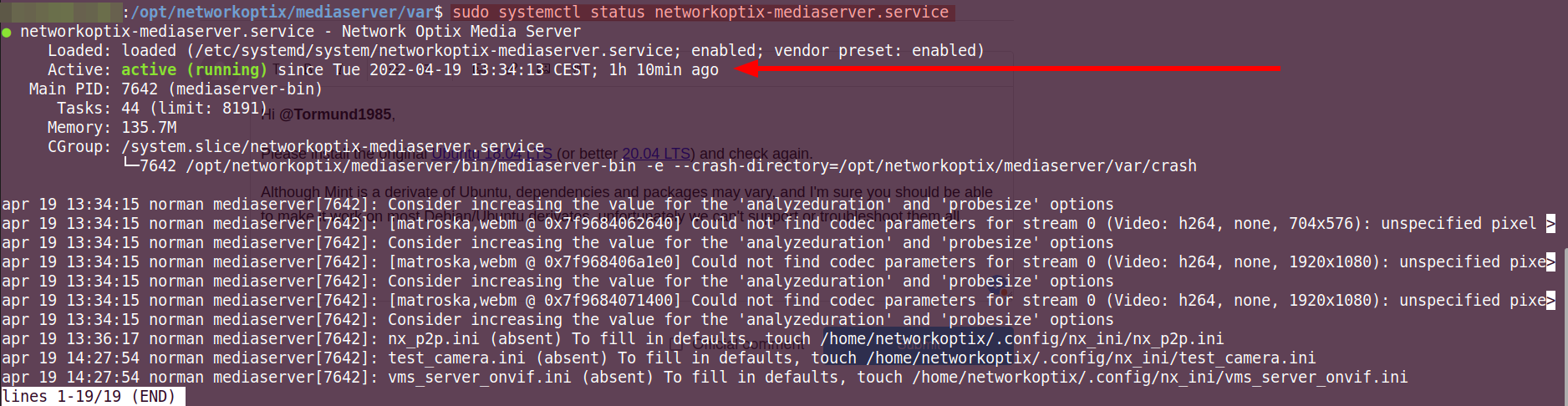
If you want to use the journalctl command, the following command applies:
$ journalctl -u networkoptix-mediaserver.service
0
Please sign in to leave a comment.
Comments
3 comments