Motion Detecting false positive due overlay
Answered
I have a test system setup at home and work, I added some cameras at work and noticed a lot of issues with motion detection. Thought maybe it was picking up something in the background like AC vibrating etc. Well I setup new cameras at home and noticed it was picking up motion where there is no motion.
Its detecting the time changing in the information overlay of the camera. Every time the timestamp changes to a new second, this is flagging the motion detecting.
Is this normal operation and should I disable the time stamp / overlay in the camera? I don't think i have ever had this issue with <another_VMS>.
These are Honeywell series 60 and 30 cameras FYI.
Thanks
-

Hi @...,
These false positives are expected behavior, since the OnScreen Display (OSD) is part of the stream, it isn't a separate overlay.
Typically, people disable the OSD inside the camera, since the time is displayed in the Nx Witness client, and can be added when exporting footage.
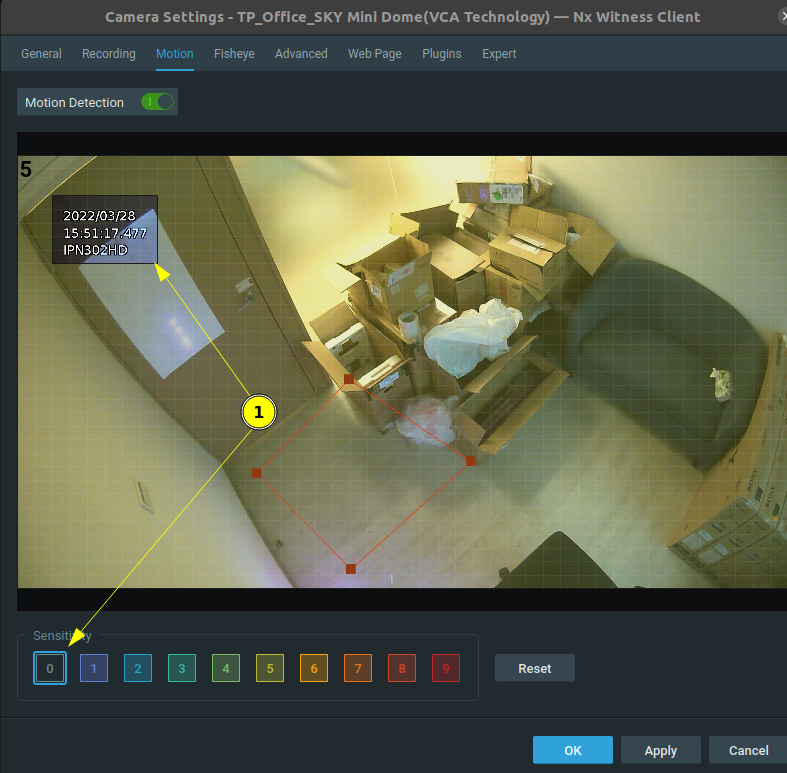
If you want to keep the OSD, it is recommended to exclude this section for Motion Detection by setting them area to zero (0) sensitivity, in the Camera Settings menu, tab Motion. Than the false positives, caused by the OSD, will stop.
 1
1 -
That's what I thought on the issue. My only real annoyance with the camera is you can't add the time / camera name independently. Only one option for OSD and it adds time and name.
Thanks for the information!
0 -
Hi @...,
Please take notice how the time is represented:
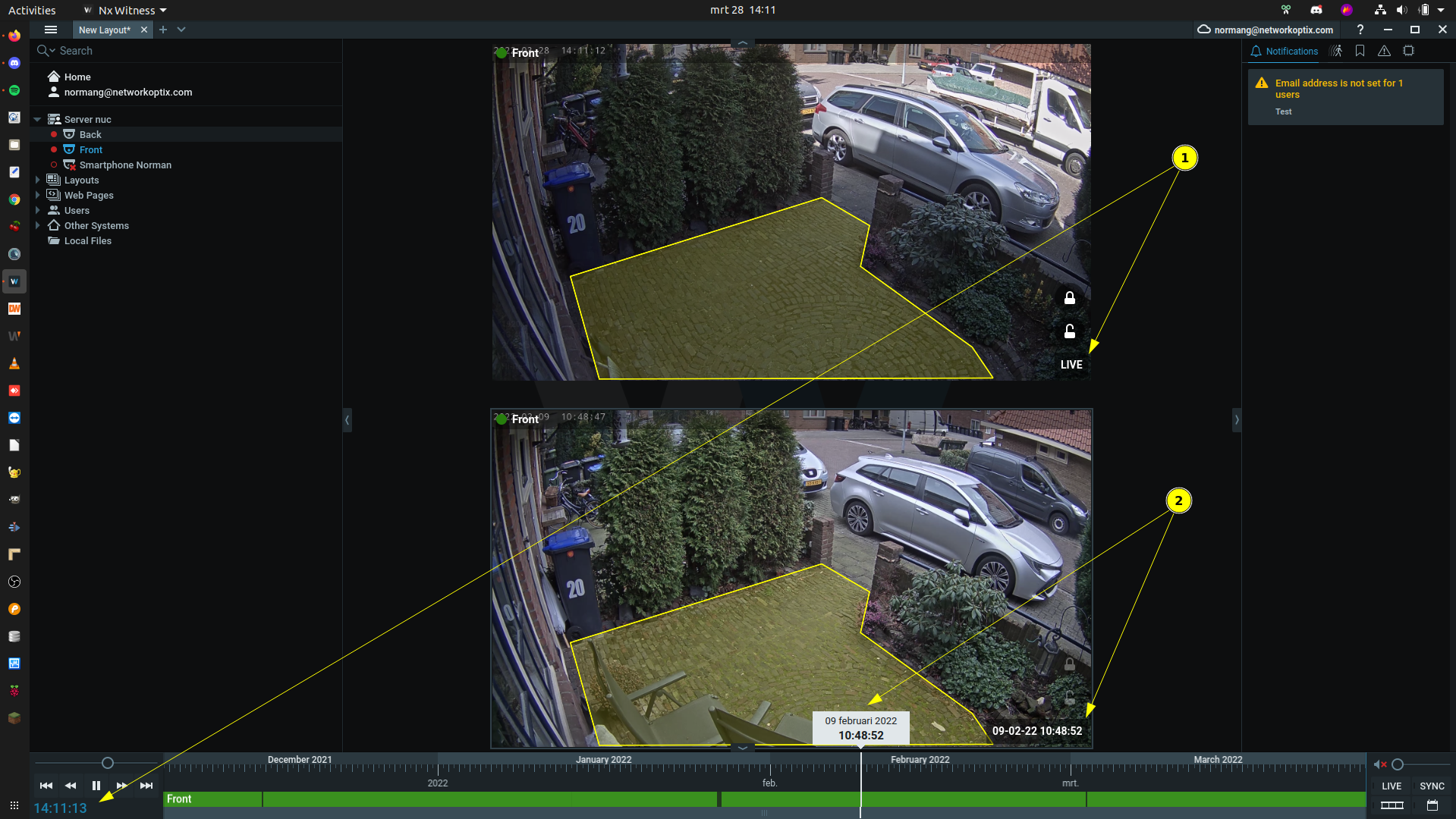
- Represents the Live time.
- Represents the Playback time
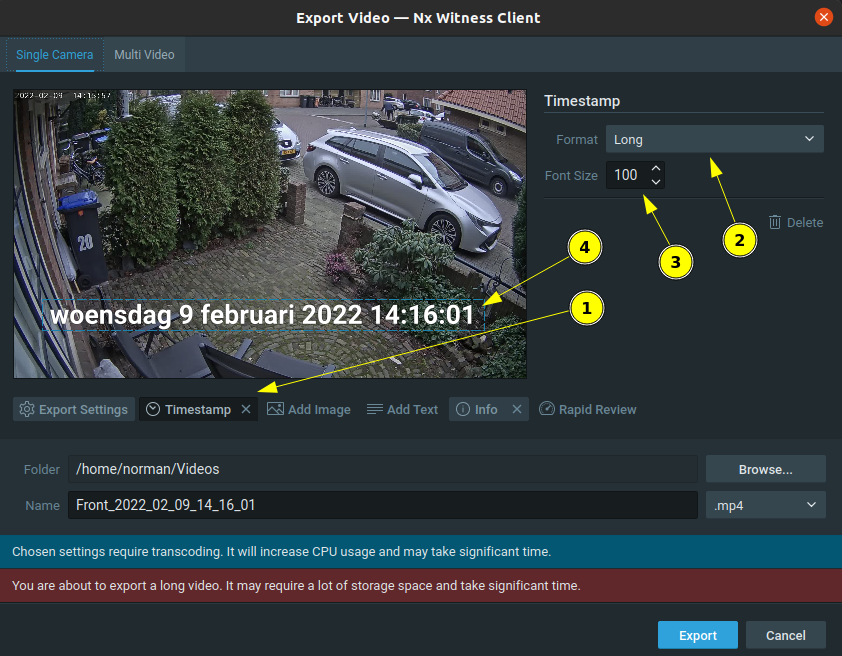
If you export footage, you can add the timestamp (1) in the preferred format (2) and size (3) at any position of the footage (4) with click-and-drag:
 0
0 -
Thanks. I was hoping I could keep the name at the top but in my camera OSD settings, you need to enable the camera name and timestamp. I have about 50 nVidia Shields scattered throughout looking at the 2nd or third stream in my facility watching cameras for industrial presses and having the camera name on them at the top is useful for the press operators.
Maybe I can reach out to Honeywell and they can separate this information in a future firmware. Even my jankity Chinese cameras allowed multiple different OSD options. We had to switch to Honeywell due to NDAA requirements though.
0 -
Hi @...,
That is possible as well. See below. All names are shown.
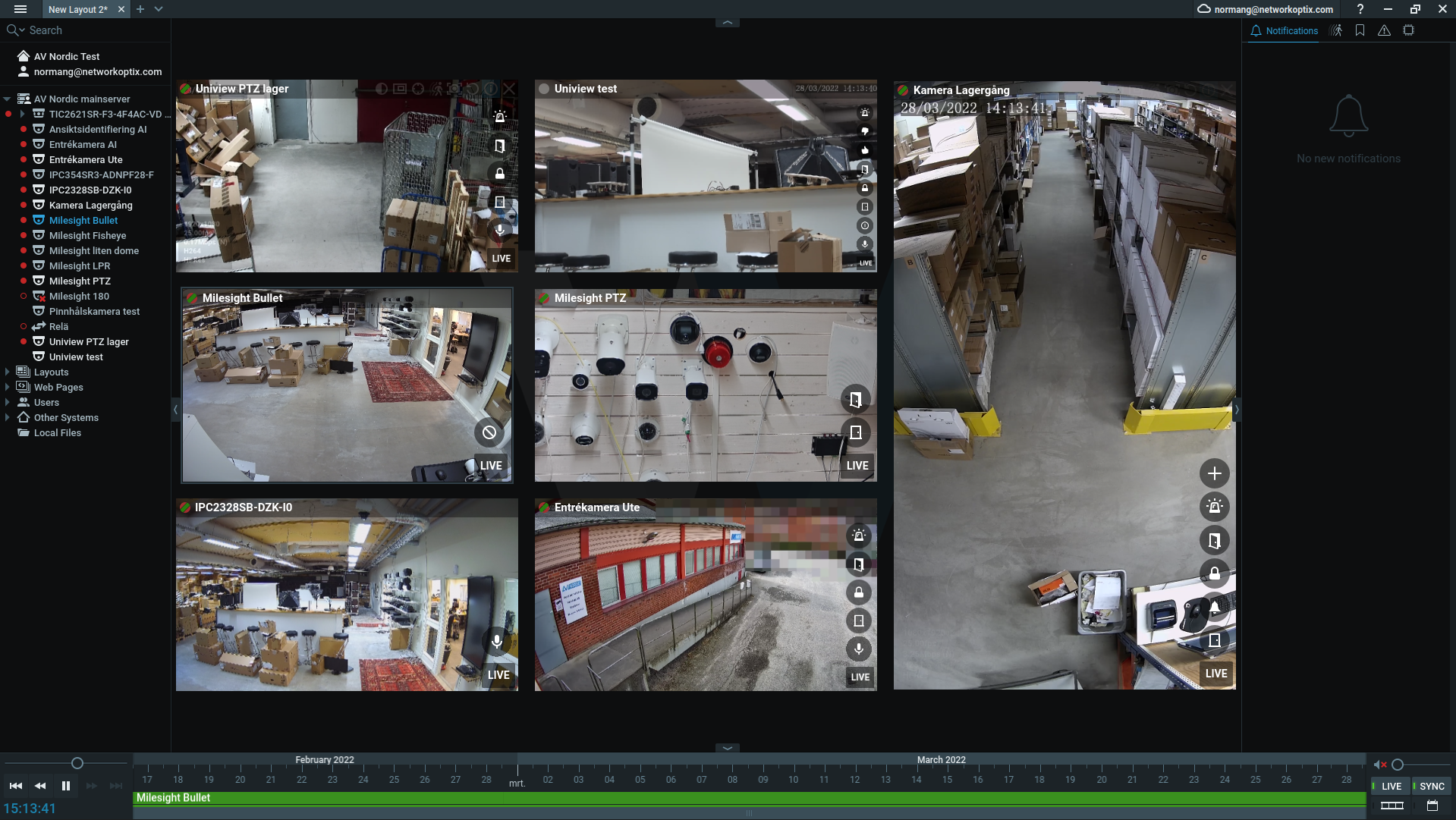
To achieve this, the following options are possible:
- Select all camera by selecting them all, and press 'i'.
Selecting can be done by pulling a rectangle around them.
Or one-by-one, holding Ctrl and clicking on each device.
Or by pressing Ctrl+A.
When this is done, you can save the layout, and each time the layout is opened, the camera information is shown. -
Opening the desktop client through the commandline with the --show-full-info parameter.
This way is more useful if people don't use fixed layouts.
0 - Select all camera by selecting them all, and press 'i'.
-
I'm needing the display on a third party media streamer. I would need to install computers and run the client at over 50 screens in my facility, this is why I use $200 nVidia shields. Unless the nxwitness client can run on a nVidia Shield.
0 -
Hi @...,
Interesting. I have never used the Nvidia shields. I assume you use the Pro version, can you confirm?
Allow me some time to check the possibilities, and I'll get back at you as soon as possible.I have used the Intel Compute sticks in the past, and these worked just fine for a few cameras at once, except that have a quite annoying fan.
0 -
Hello, Norman
We are using nVidia Shield Pro's with TinyCamPro Android app thats available in the AndroidTV store. We use it in a few different ways, mainly for safety.
Some displays have 2 cameras, a 360 Camera mounted in the center of the room to verify the room is empty and 1 directly pointed at a press thats pressing explosives. We can't have people in the room due to the dangerous situation.
It works perfectly using it in this situation. You should test it out. We usually stream the 2nd or 3rd stream from the Cameras we use as they don't need to be 1080p etc when just looking at a camera for this type of use.
We also have some TVs with Shields in other areas to watch entry point Cameras so secretarys can unlock the gates when visitors come through when they call to the front desk they can also see the visitor.
0 -
Hi @...,
Thank you. I noticed it was an Android device, while I initially assumed that you could use Linux applications on the devices, as you could with the 'common' Nvidia Jetson boards.
I have used such Android boxes in the past, and could run the Nx Witness Mobile application on it, but that being said, the Nx Mobile app isn't designed for 24/7 operations, so I'm not sure how it performs over time.
So if you have a working application that suits your needs, I would stick to it. And in case you need the OSD, the most sensible option seems to be to exclude the OSD in the motion field.
If you didn't have the Nvidia Shields already, I would have advised you to use a barebone PC. They would cost you approx. the same amount, but would offer you more functionality, and it gives you more control over the operating system and in general a longer lifespan.
0
Please sign in to leave a comment.
Comments
9 comments